Product How-To: Using the Wizard for Creating Ad Hoc Reports
InetSoft's intuitive reporting tools allow you to rapidly and easily design your reports yourself. Read on to learn more about the Style Intelligence solution.
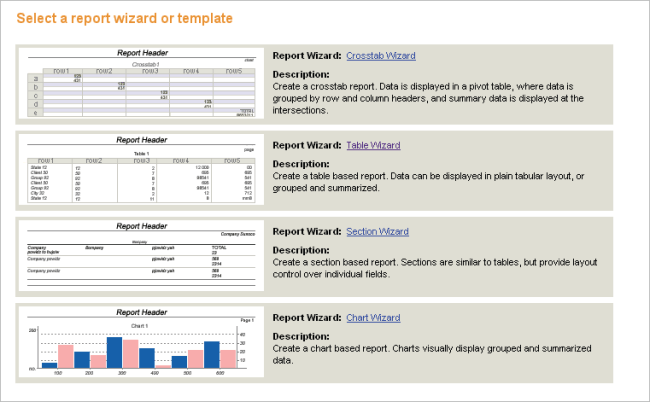
The ad hoc tool allows you to create new reports from scratch by using a step-by-step wizard. This section explains how to use the different wizards.
To create a new report, follow these steps:
1. Click on the Design tab in the Portal.
2. Select the ‘Report’ option. This displays a list of the available wizards.
3. Click on one of the Wizards. The Wizard will lead you through a series of steps to design the report.
What Kinds of Users Can Create Reports with the Wizard Tool?
The goal of report wizard tools is to democratize the reporting process, making it accessible to a broader range of users. These tools often abstract technical complexities, enabling users with varying levels of technical expertise to harness the power of data and generate meaningful reports for decision-making purposes.
- Non-Technical Users:
- A report wizard is often designed to be user-friendly and intuitive, allowing individuals without extensive technical or programming skills to generate reports. This empowers business users to create reports tailored to their specific needs.
- Business Analysts:
- Professionals with a deeper understanding of business processes and data analysis may use report wizard tools to quickly generate reports without relying on IT or technical support. This enhances their agility in extracting insights from data.
- Managers and Executives:
- Decision-makers at various levels within an organization may use report wizards to create ad-hoc reports for quick decision-making. This allows them to have timely access to relevant information without depending on dedicated reporting teams.
- Data Analysts:
- While more technically inclined, data analysts may still find report wizards useful for rapidly creating basic reports or prototypes. This allows them to focus on more complex analysis tasks rather than spending time on routine reporting.
- Small Business Owners:
- In smaller organizations with limited IT resources, business owners or managers may leverage report wizards to independently create reports without the need for specialized technical skills.
- Departmental Users:
- Users within specific departments, such as marketing, finance, or human resources, may use report wizards tailored to their domain expertise. This allows them to generate reports relevant to their functional areas.
- End Users:
- In some cases, applications provide report wizards directly to end users, allowing individuals to create personalized reports to meet their specific needs. This promotes self-service and reduces the reliance on dedicated reporting teams.
- Freelancers and Consultants:
- Individuals who work on a project basis or provide consulting services may use report wizards to quickly generate reports for their clients without extensive setup or development efforts.
| Previous: Ad Hoc Reporting Software |
Next: Ad Hoc Reporting Charts
|