Business Mapping Software
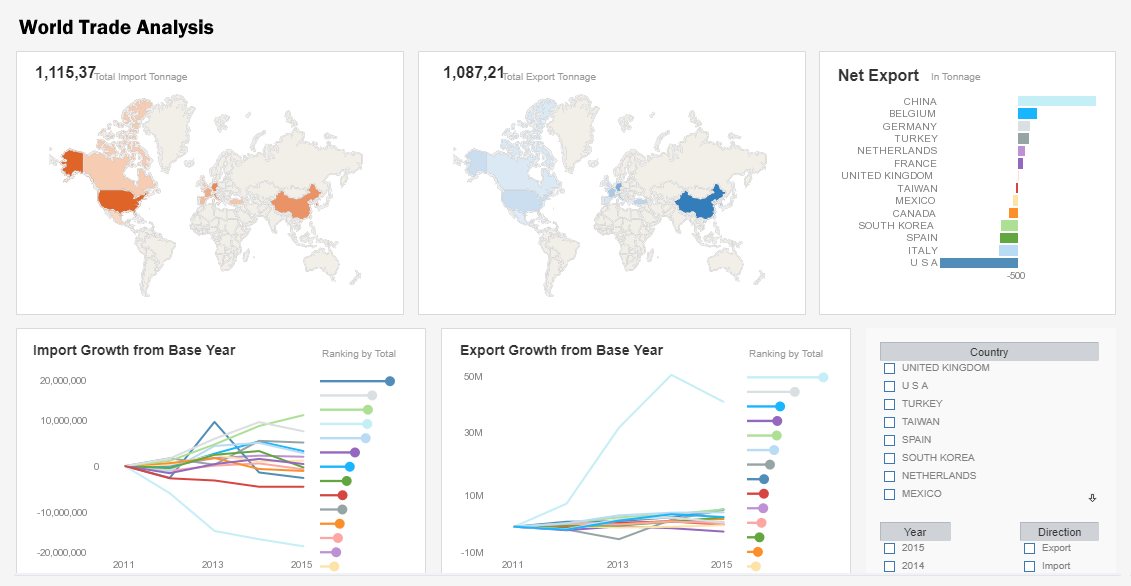
InetSoft's business mapping software combines multi-dimensional charting with geographic charting. This allows interactive dashboards to display continuous measures such as population or sales volume by using color ranges across any geographically defined boundary on the local, state and national levels, and even custom-defined areas such as sales regions or political districts.
The integration of mapping and chart engines also allows for the use of multi-charts that compare multiple maps side-by-side, and also permits the combination of data tables alongside visual maps of data so that drilling-down into a region displays custom metrics and detailed data.
The end result is a data-rich application of geospatial mapping that makes finding answers and drawing conclusions from large data sets a much more efficient task for a business user.


| #1 Ranking: Read how InetSoft was rated #1 for user adoption in G2's user survey-based index | Read More |
Additonal visualization and analysis features include
Rich multi-dimensional charting
Multi-dimensional charting is the ability to depict more than two dimensions on a graph by simultaneously representing points through various shapes, sizes, or colors. This enables users to create 3d, 4d, or even 5d charts.
Brushing for data exploration
Brushing is a technique that allows users to highlight data points within one chart and immediately isolate corresponding data points in accompanying charts leading to quick comparative analysis and recognition of aberrations and outlier.
Co-located multi-charts
The ability to position multiple charts of various types in a shared location and quickly sort through them by clicking on the corresponding tab thereby reducing dashboard complexity and enhancing the propensity for accurate interpretation.
Custom geographic data binding
The ability to bind data to built-in geographic points on world, state, or city levels, as well as custom defined areas on a map like sales territories or political districts that can be easily added with minimal scripting.
Drag-and-drop dashboard designer
The ability to drag desired elements like charts, tables, filter, or objects onto a design grid and then drop Data Blocks™ onto them. From the design grid, users can manipulate the size, color, font, text, layout, or display of any element they chose.
Multi-source data mashup and visualization
The ability to analyze data with visualizations created from combinations of various data sources including: Relational databases via JDBC, multidimensional databases, OLAP cubes, XML, SOAP, Java beans (POJO), EJB beans, CSV, Microsoft Excel spreadsheets, and Web services.
 |
“Flexible product with great training and support. The product has been very useful for quickly creating dashboards and data views. Support and training has always been available to us and quick to respond.
- George R, Information Technology Specialist at Sonepar USA |
What Industries Heavily Rely on Business Mapping Software?
-
Retail and E-commerce: Retailers use mapping software to analyze customer demographics and behaviors. This helps them make informed decisions about store locations, inventory management, and targeted marketing campaigns. In my view, the retail industry benefits greatly from business mapping software as it allows for data-driven strategies that enhance customer experience and drive sales.
-
Real Estate and Property Management: Real estate professionals use mapping software to identify suitable locations for development, assess property values, and analyze market trends. This enables them to make well-informed investment decisions. Business mapping software has transformed the real estate industry, providing a competitive edge by enabling precise location analysis.
-
Logistics and Supply Chain Management: Mapping software is vital for optimizing routes, tracking shipments, and managing inventory across vast networks. It helps businesses reduce transportation costs, improve delivery times, and enhance overall operational efficiency. In my opinion, the logistics industry would struggle to operate effectively without business mapping software, given the complexity of modern supply chains.
-
Utilities and Energy: Energy companies use mapping software for asset management, maintenance planning, and to ensure compliance with regulations. It helps them visualize infrastructure and plan for expansions or upgrades. Business mapping software is instrumental in ensuring the reliable and efficient delivery of utilities, which is critical for both businesses and households.
-
Healthcare and Public Health: Healthcare providers use mapping software to analyze patient data, identify areas with specific health needs, and plan for the allocation of resources. It's particularly crucial in disaster response and epidemiological studies. Business mapping software has been a game-changer in public health, enabling more targeted and effective interventions in both routine and crisis situations.
-
Marketing and Advertising: Marketers use mapping software to target specific demographics, plan advertising campaigns, and evaluate the effectiveness of marketing efforts in various regions. It helps them allocate resources efficiently. The precision and granularity that business mapping software provides have revolutionized marketing, allowing for highly targeted campaigns that yield better ROI.
-
Environmental and Natural Resource Management: Organizations involved in environmental conservation and resource management use mapping software to monitor ecosystems, plan conservation efforts, and manage natural resources sustainably. Business mapping software is instrumental in preserving our environment and natural resources by providing powerful tools for data-driven decision-making.
-
Government and Public Services: Government agencies use mapping software for urban planning, emergency response, census data analysis, and various other applications. It enhances the efficiency and effectiveness of public services. The integration of business mapping software into public sector operations has greatly improved the delivery of services to citizens, making government more responsive and accountable.
 |
View live interactive examples in InetSoft's dashboard and visualization gallery. |
What Analytics Does a Natural Resource Management Organization Use?
Natural resource management organizations utilize a range of analytics to make informed decisions about the sustainable use and conservation of natural resources. Here are some key types of analytics commonly employed in this field:
-
Geospatial Analytics: This involves the use of geographic information systems (GIS) and remote sensing technologies to analyze and interpret spatial data related to natural resources. It helps in mapping and monitoring ecosystems, land use, and resource distribution.
-
Spatial Modeling: This involves the creation of models that simulate the behavior and interactions of natural systems. For instance, it might simulate the flow of water in a watershed or predict the impact of land-use changes on biodiversity.
-
Ecosystem Services Valuation: This involves quantifying the economic value of the benefits provided by ecosystems, such as clean water, pollination services, and carbon sequestration. It helps in making the case for conservation efforts.
-
Statistical Analysis: Statistical methods are used to analyze data related to natural resources, such as population trends of wildlife, water quality measurements, and vegetation surveys. This helps in identifying trends and making evidence-based decisions.
-
Environmental Impact Assessment (EIA): This involves evaluating the potential environmental impacts of proposed projects or policies. It considers factors like air and water quality, biodiversity, and social impacts.
-
Risk Assessment: This involves evaluating the likelihood and potential consequences of specific environmental risks, such as oil spills, habitat destruction, or climate change impacts. It helps in planning for and mitigating potential disasters.
-
Scenario Analysis: This involves creating hypothetical scenarios to explore potential outcomes of different management strategies or policy decisions. It helps in understanding the range of possible futures and making adaptive management plans.
-
Carbon Footprint Analysis: This involves calculating the amount of greenhouse gases emitted as a result of organizational activities. It helps in identifying opportunities for emission reductions and carbon offset projects.
-
Stakeholder Engagement Analytics: This involves analyzing feedback and input from various stakeholders, including local communities, indigenous groups, and other interested parties. It helps in ensuring that management decisions are inclusive and take into account diverse perspectives.
-
Resource Inventory and Monitoring: This involves systematically collecting and analyzing data on the quantity and quality of natural resources, such as forest inventories, wildlife population counts, and water quality monitoring.
-
Cost-Benefit Analysis: This involves comparing the costs of a proposed action or policy with the benefits it is expected to provide. It helps in prioritizing actions based on their potential impact.
 |
Read how InetSoft was rated as a top BI vendor in G2 Crowd's user survey-based index. |
More Articles Related to Analytics
Couple of Examples of Data Mashups - I am going to just pick a couple of examples of data mashups and then go little bit deeper. The first one is an example of classic reporting, a daily sales report across multiple drugs for a biotechnology company. Part of that information comes from a Oracle database that has the North American sales and also the budget, but the problem is there are a lot of other inputs to the system coming from external...
Customized Dashboards for QuickBooks - Custom dashboards using rich QuickBooks data lets executives focus on what's important and scale up right now. The Bison System quickly and accurately consolidates QuickBooks data. CFO's can not only create dashboards and reports, but also filter, sort, format, and organize them, bringing previously unreachable levels of analytics and interactivity to QuickBooks data...
Embedded Dashboard Options for Cloud Application Providers - InetSoft specializes in embeddable dashboard technology and has many application provider clients who have embedded dashboards based on InetSoft technology. This article discusses some of the integration methods for embedding reports and dashboards into other Web-based applications or portals...
 |
View the gallery of examples of dashboards and visualizations. |
Example of a Regional Map - This map of European countries colored by population can provide valuable insights into the distribution and density of population across the continent. By using different colors or shades to represent different levels of population, this map quickly highlights areas of high and low population density, and can aid in the identifying of patterns and trends in population distribution...
Exploring Spatial BI or Location Intelligence - Now GIS Systems or Geographic Information Systems add one more important dimension, and that's where. It's not just a descriptive where, but a where defined by x and y coordinates. Many people say that as many as 80 percent of all transactions are location based. For instance, a phone call happens between people in two locations. Transactions or sales happen...
 |
Read how InetSoft saves money and resources with deployment flexibility. |
More Options When Using Google Maps - When choosing the kind of map image to use in your data visualization, you have all of the options made available from the Google API. Google's documentation page details the options and URL fetching syntax, and highlights are mentioned here. Map size - the image file can be as large as 1280x1280 pixels under the free usage license, and 2048x2048 pixels under the commercial license...
Field Report Options for the User - InetSoft sets itself apart from competitors by putting you, the user, first. We offer several different setup and deployment options to meet any business needs you may have. With a shallow learning curve, non-technical users can create dashboards in the cloud and deploy InetSoft's online reporting software using a simple point-and-click interface. With DataBlock technology, users can drag and drop blocks...
More Focus And Alignment Via Dashboards - As the managers can get a complete view of the data from their organization, it allows them to focus on key performance indicators that are more important to the organizations and align their processes with the business goals. The use of dashboards can drive certain behaviors in its users, which will invariably improve their work habits. It makes it easy to connect and...
Tool to Make Gauge Charts Online for Free - To easily and quickly create Gauge Charts online for free, create a Free Individual Account on the InetSoft website. You will then be able to upload a spreadsheet data set, as shown below. Once you have done that, you will be able to proceed to the Visualization Recommender, which will get you started creating a dashboard. To start with a Gauge Chart, select a measure that you want to display, and choose the desired gauge from the top bar of the Recommender...
 |
Learn about the top 10 features of embedded business intelligence. |
Tracking Problem Areas in HR - Last but not least, a comprehensive HR executive dashboard will help you track all the problem areas of your business. It's not just about locating errors and issues in your company, it's also about how you treat them once you have discovered them. Because you have all the important metrics and reports right in front of you organized on the dashboard, you will be able to...
Troubleshooting Report Configuration - None of my settings have taken effect. If your configuration files are in a folder other than the classes folder of the web application, a sree.home initialization parameter must be set for both the administrator and the repository servlets. I cannot see my reports after I deploy them. This could be a problem with the location of the registry directory or the CLASSPATH in the application server...