Interactive Executive Dashboard Examples with KPIs
Below is the continuation of the transcript of a Webinar hosted by InetSoft on the topic of New Features in Version 11 of InetSoft's StyleBI BI Software. The presenters are Mark Flaherty, CMO at InetSoft, and Amanda Pleasant, Product Manager at InetSoft.
Amanda Pleasant (BI): Currently I am showing date and total in this line graph. Notice because of the ups and downs in the data, how it’s hard to see some trends or patterns over time, the general up or down trend. One of the new features we have added here is ability to do common calculations on measures in charts. So for instance, you can change this to be the percentage of a grand total, change in values from previous periods, and also a moving average.
Let me apply this moving average, and this smoothes out the curve basically incorporating some of the prior months and subsequent months in the current value. So it makes a little bit easier to see some of the general trends or seasonal effects over time.
I am also going to go here to the Design tab and open up my Visual Composer to remind you this is the design interface for creating both data mashups and interactive visualization dashboards. So in here, I am going to create a new dashboard. Now dashboards in version 11 can either be used on top of a data mashup, or we have also added the ability to use it directly on top of a query or model.
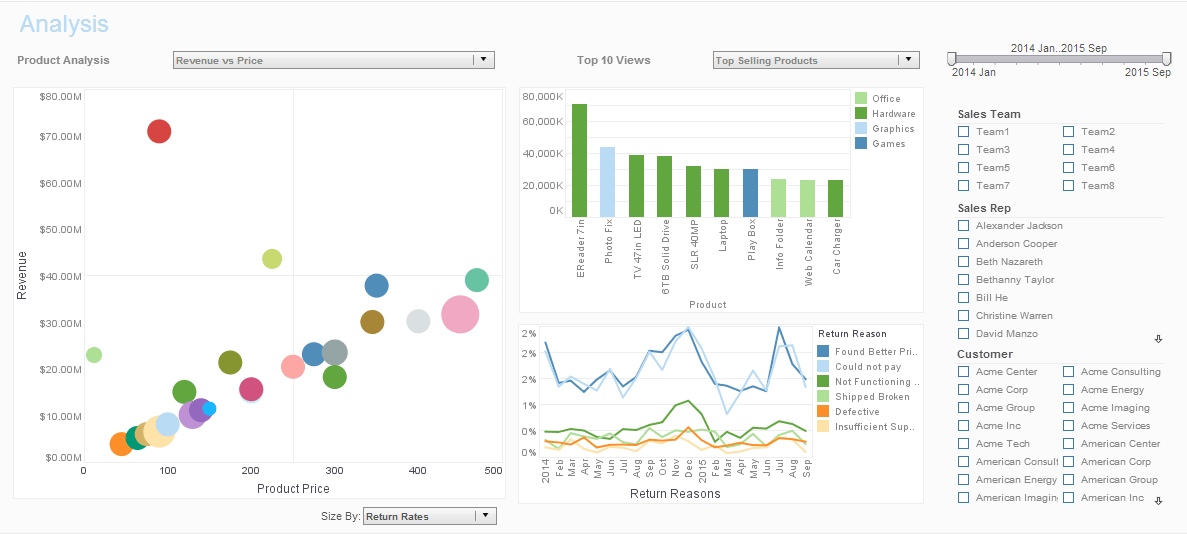

Creating this dashboard directly on top of the model, I have all of the entities and attributes available to me on the left hand side from this data model. I am just going to add a couple of components from my toolbox like a gauge over here, maybe a thermometer over here. Then I anticipate people wanting some selection lists, which I will add over here, and maybe I will add a chart as well.
Now to display some information in these components, all I have to do is drag and drop. So that simply displays the count of all companies in thermometer. Let’s say, we want the total quantity purchased in the gauge. Notice it detected that this choice could be resulting in double-counting. I am going to choose to continue. There it inflates the value of the count of companies. I can also come in here and override the aggregation option instead of count to a distinct count, so that handles that double-counting for me.
Similarly, I will add states over here, that’s also filtered by companies over here. And then in the charts, let’s show the Customer States on the X axis and we can show the Products Total on the Y axis, so it defaults to a nice bar graph for me and I can continue. And again, I can do special operations in the chart binding, so for instance doing a change or running totals. I can also define custom calculations choosing from any of the values here, sliding like a moving average, running totals, deltas, or percentages.
There, I’ve completed an interactive executive dashboard with some very useful KPIs.
Mark Flaherty (CMO): Amanda, one of the things executives always ask about is trust in the numbers. They love interactivity, but they want confidence that a number on a gauge is governed the same way across every dashboard they open. Can you explain how teams can standardize KPI logic while still giving users freedom to explore?
Amanda Pleasant (BI): That is a great point. A practical approach is to define KPI metrics in the semantic model first, not in each individual chart. When the model contains clear definitions for metrics like recurring revenue, order velocity, or customer retention, every dashboard component can inherit the same business logic. Then users can filter and drill without breaking consistency. We also recommend naming conventions that are readable by non-technical users, adding short descriptions for each measure, and setting default aggregation behavior up front. Those simple standards reduce confusion and eliminate the back-and-forth where teams debate whether two reports are truly showing the same thing.
Amanda Pleasant (BI): Another best practice is designing KPIs as a story, not a pile of widgets. Start with a top row that answers high-level questions in ten seconds: Are we on target, where are we trending, and what changed since the last period? Then place diagnostic components underneath so executives can click into cause and effect. For example, if margin drops in the headline KPI, the next visual should immediately break it down by region, product line, or channel. That progression turns a dashboard into a decision workflow. It also shortens meeting time because people spend less energy interpreting charts and more time discussing actions.
Mark Flaherty (CMO): I also hear concerns about performance when organizations scale these dashboards across departments. People worry that more filters and more concurrent users will slow everything down.
Amanda Pleasant (BI): Performance is absolutely manageable with the right setup. We usually start by identifying the highest-value interactions and optimizing those first. Caching frequently used query paths, reducing unnecessary high-cardinality dimensions in default views, and using pre-aggregations for heavy historical analysis can dramatically improve responsiveness. It helps to separate exploratory views from operational monitoring views too. Monitoring dashboards should open instantly with opinionated defaults, while exploratory dashboards can expose more controls for analysts. With that architecture, executives get speed, analysts keep flexibility, and IT avoids constant firefighting around load spikes.
Amanda Pleasant (BI): Finally, do not underestimate governance and adoption. A technically perfect dashboard fails if users do not trust it or do not know how to use it in daily decisions. We suggest adding lightweight annotations directly in the dashboard: metric definitions, refresh timestamps, and visual indicators for data quality exceptions. Then pair that with a monthly KPI review where business and data teams validate relevance, retire stale metrics, and add new leading indicators as strategy changes. When teams treat dashboard design as an ongoing program instead of a one-time launch, KPIs stay aligned to real business goals and executives keep relying on the platform as their primary decision system.