Designing Effective Ad Hoc Reporting Columns: How to Balance Flexibility, Governance, and Usability
Ad hoc reporting promises freedom: business users can answer their own questions without waiting for IT or data teams. But that promise only holds if the columns they see are clear, trustworthy, and usable. When users are confronted with hundreds of cryptic fields, duplicate names, and technical jargon, ad hoc reporting quickly becomes frustrating instead of empowering.
Designing effective ad hoc reporting columns is not just a modeling exercise; it is a product design decision. You are shaping the vocabulary your organization will use to talk about data. The goal is to balance three competing forces: flexibility for users, governance for the business, and usability for everyday reporting.
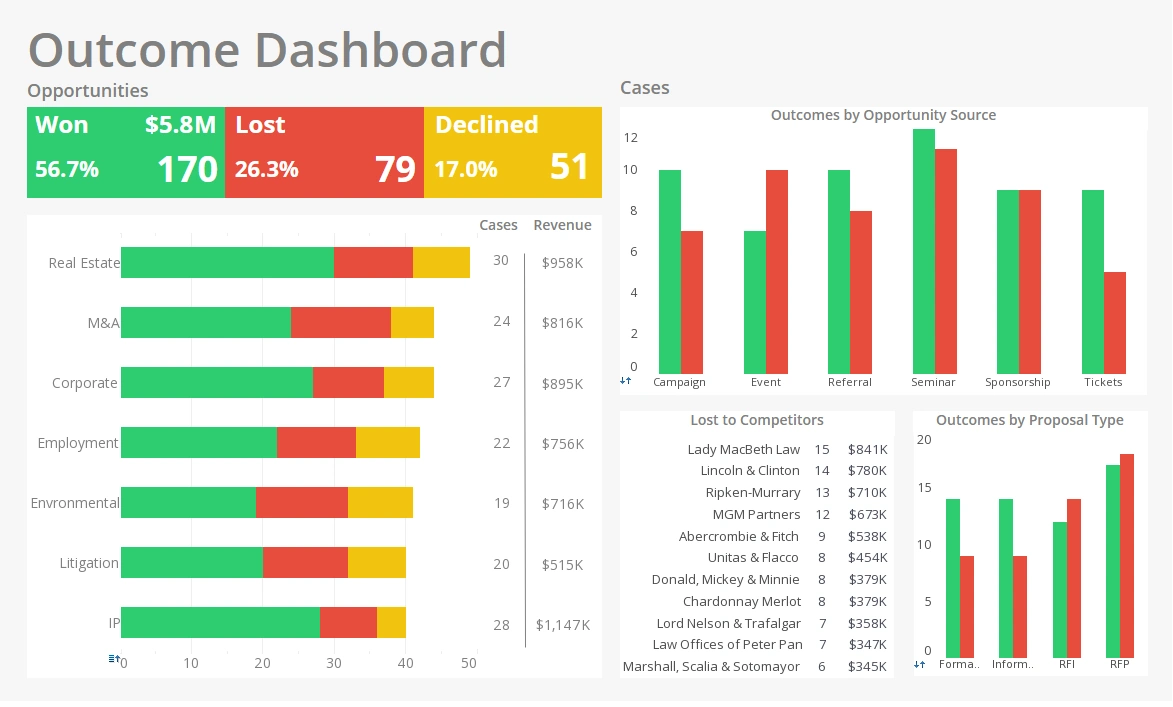

What are ad hoc reporting columns?
Ad hoc reporting columns are the fields that users can select, drag, and drop when building their own reports. They represent the exposed surface of your data model: dimensions, measures, dates, flags, and calculated fields that users can combine to answer their questions.
These columns are different from the raw fields in your database. They are curated, named, and structured
for business use. A single database column might be hidden, renamed, or combined with others to form a
business-friendly field. For example, a raw field like cust_id might never appear, while
“Customer Name” and “Customer Segment” are exposed instead.
Good ad hoc reporting columns act as a contract between data teams and business users. They encode agreed definitions, such as what counts as “Active Customer” or “Net Revenue,” and they shield users from the complexity of joins, keys, and low-level technical details.
The three pillars of effective column design
Strong ad hoc reporting experiences are built on three pillars: clarity, governance, and performance. If any one of these is neglected, the reporting environment becomes confusing, risky, or slow.
Clarity
Clarity means that users can understand what a column represents without needing a data dictionary open on a second screen. Column names should be written in business language, not database shorthand. “Order Date” is better than “ord_dt,” and “Customer Lifetime Value” is better than “CLV_calc.”
Clarity also extends to descriptions and tooltips. When possible, provide short explanations for important fields, especially metrics that drive decisions. A user should be able to hover over “Churn Rate” and see a concise definition of how it is calculated and over what time period.

Governance
Governance ensures that the columns users see are consistent, accurate, and aligned with official business definitions. Without governance, different teams may create their own versions of “Revenue” or “Active Users,” leading to conflicting reports and endless debates.
Governance does not mean locking everything down. Instead, it means establishing a curated set of authoritative columns and controlling who can create or publish new shared fields. Ad hoc environments can still allow personal or team-level calculations, but the core column library should be managed with care.
Performance
Performance is often overlooked until dashboards and reports start timing out. Some columns are inherently heavy: high-cardinality fields, complex calculations, or fields that require expensive joins. Exposing too many of these can slow down the entire environment.
Effective column design includes performance considerations from the start. That might mean pre-aggregating certain metrics, limiting access to extremely granular fields, or providing summarized alternatives such as “Daily Revenue” instead of raw transaction-level amounts for most users.

How to choose which columns to expose
The starting point for column selection should always be business questions, not database schemas. Talk to stakeholders and ask what they need to know: “Which customers are at risk?”, “Which products are driving growth?”, “Where are we missing our targets?” From these questions, you can derive the dimensions and measures that matter most.
Begin with a minimal, high-value set of columns. Include core dimensions such as customer, product, region, and time, along with key measures like revenue, margin, quantity, and counts of important entities. Avoid exposing every possible field just because it exists in the source system.
Remove duplicates and technical fields. If two columns represent the same concept with slightly different names, pick one and deprecate the other. Hide keys, IDs, and low-level flags unless they are truly needed for analysis. When in doubt, favor fewer, clearer columns over a sprawling list that overwhelms users.
Naming and organizing columns for non-technical users
Naming is one of the most powerful tools you have. Use full words, consistent capitalization, and predictable patterns. If you use “Customer” in one place, avoid “Client” or “Acct” elsewhere for the same concept. Consistency reduces cognitive load and makes it easier for users to find what they need.
Organize columns into logical groups or folders. For example, you might group fields under “Customer,” “Product,” “Order,” “Finance,” and “Support.” Within each group, place the most commonly used fields at the top. This structure helps new users orient themselves and reduces the feeling of being lost in a long list.
Where appropriate, use synonyms and aliases in descriptions or documentation, but keep the primary column name clean and consistent. Avoid internal jargon, system codes, and acronyms that only a few people understand. The goal is to make the column library feel like a natural extension of how the business talks about itself.
Column types that drive strong ad hoc reports
Not all columns are equally valuable in an ad hoc context. Some types of fields consistently deliver more insight and flexibility than others.
- Dimensions: Categorical fields such as customer, product, region, and channel are the backbone of slicing and dicing data.
- Measures: Aggregatable fields like revenue, cost, quantity, and counts provide the numeric backbone of analysis.
- Date and time fields: Well-modeled dates with hierarchies (year, quarter, month, day) enable trend and period-over-period analysis.
- Status and flag fields: Fields like “Is Active,” “Is New Customer,” or “Is High Priority” make it easy to filter and segment.
- Pre-calculated business metrics: Metrics such as conversion rate, churn rate, or average order value encapsulate complex logic into reusable columns.
By focusing on these types, you give users building blocks that are both powerful and safe to combine.
Common mistakes in ad hoc reporting columns
Several recurring mistakes can undermine even the best-intentioned ad hoc environment. One of the most common is exposing raw transactional fields without context. Users may drag in low-level IDs or timestamps that explode row counts or create confusing results.
Another mistake is overwhelming users with too many options. When every field from every table is visible, users spend more time searching than analyzing. This also increases the risk of misinterpretation, as similar-sounding fields may have different meanings.
Inconsistent naming is another source of confusion. If “Net Revenue” appears in one subject area and “Net Sales” appears in another, users may not realize they are different or may assume they are the same when they are not. Over time, this erodes trust in the data.

Best practices for governance and maintenance
Designing ad hoc reporting columns is not a one-time project; it is an ongoing practice. As the business evolves, new metrics and dimensions will be needed, and old ones will become obsolete. A simple governance process helps keep the column library healthy.
Establish clear ownership for the semantic layer or data model that powers ad hoc reporting. Changes to shared columns should follow a lightweight review process to ensure they align with business definitions and do not break existing reports. When a column needs to be retired, mark it as deprecated before removing it, and communicate the change to users.
Monitor column usage to understand which fields are heavily used and which are rarely touched. Low-usage fields may be candidates for removal or consolidation, while high-usage fields deserve extra attention for performance and clarity. Encourage feedback from users and treat the column library as a living product that can be improved over time.
When you design ad hoc reporting columns with clarity, governance, and usability in mind, you create an environment where users feel confident exploring data. Instead of wrestling with cryptic fields, they can focus on asking better questions and making better decisions—and that is where the real value of ad hoc reporting is realized.