Live Event Ticket Dashboards
Live event ticket dashboards provide organizers, promoters, venues, and ticketing platforms with real-time visibility into ticket sales, payment processing, customer transactions, refunds, disputes, and revenue performance. Instead of relying on spreadsheets and disconnected reports, teams can monitor every stage of the ticket lifecycle from the moment a fan attempts to purchase a ticket until event revenue reaches the promoter's bank account.
Modern ticketing operations generate large volumes of transaction data from credit card processors, digital wallets, ticketing systems, fraud prevention tools, and financial platforms. Interactive dashboards consolidate these data sources into a single analytical environment, helping teams identify revenue leakage, sales trends, payment issues, cancellation impacts, and operational bottlenecks before they affect profitability.

Why Live Event Organizations Use Ticket Dashboards
Concert promoters, music festivals, sports organizations, theaters, and event production companies depend on ticket sales as their primary source of revenue. Even small declines in payment authorization rates, increases in refunds, or rising dispute activity can significantly impact margins. Ticket dashboards allow decision makers to track performance continuously and respond quickly when problems emerge.
- Monitor ticket sales performance in real time.
- Track payment authorization success rates.
- Analyze customer payment methods.
- Identify fraud and card-testing activity.
- Manage refunds and cancellations.
- Track chargebacks and dispute outcomes.
- Measure promoter payouts and settlement timing.
- Evaluate profitability by show, venue, artist, or promoter.
Event Ticket Sales Dashboard
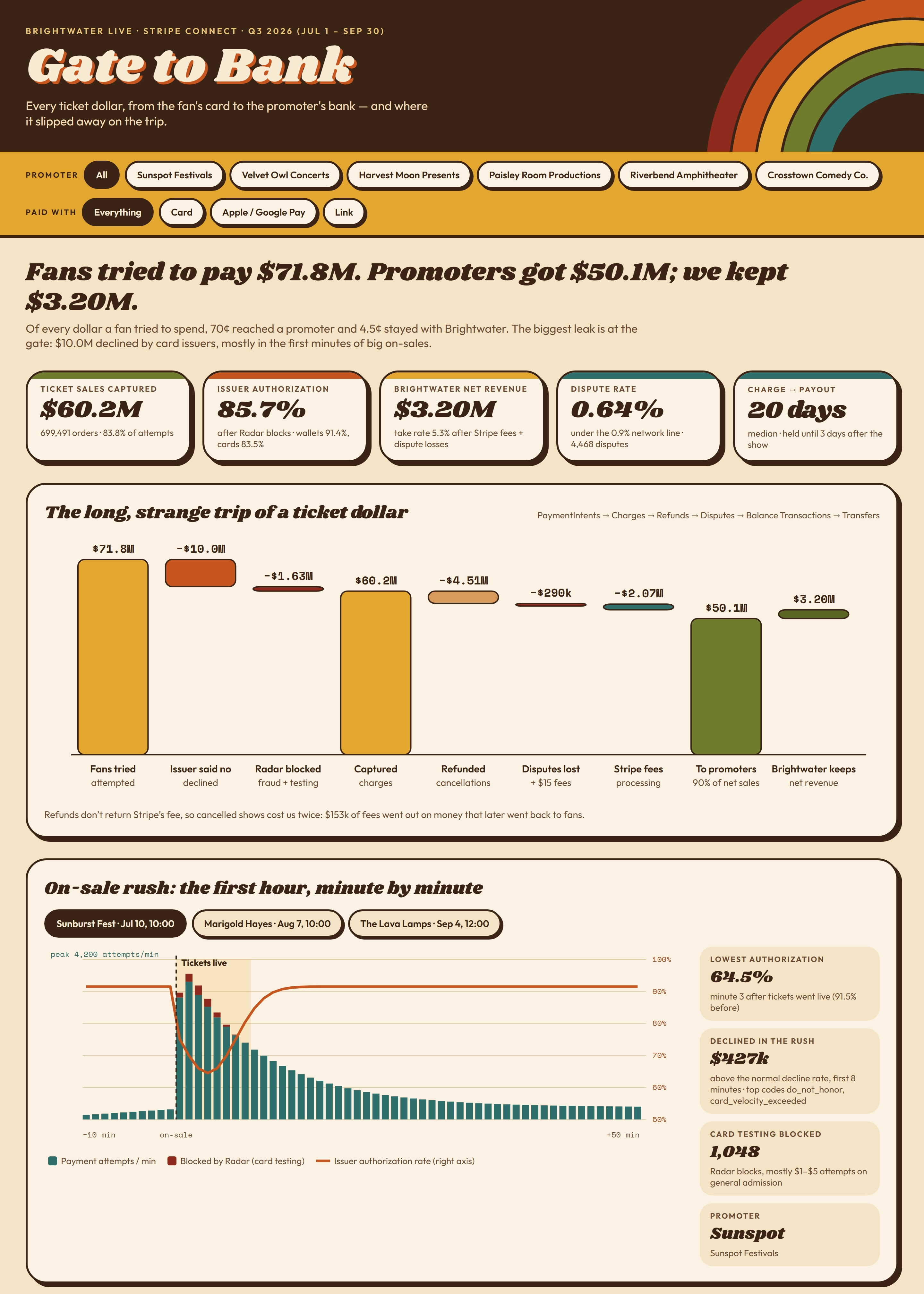
The first dashboard image presents a comprehensive ticket revenue analysis often referred to as a "Gate to Bank" dashboard. Its purpose is to explain how every attempted ticket purchase progresses through the payment ecosystem and how much revenue ultimately reaches promoters.
Key performance indicators displayed include captured ticket sales, authorization rates, dispute rates, promoter payouts, and platform revenue. The dashboard uses summary scorecards to immediately communicate overall business health while allowing users to drill into individual promoters and payment methods.
One of the most valuable visualizations is a revenue flow chart that tracks money throughout the entire transaction journey. The analysis starts with the total value of purchase attempts, then subtracts declines, fraud blocks, refunds, disputes, and payment processing fees before showing the amount ultimately paid to promoters and retained by the platform.
The dashboard also contains a first-hour on-sale analysis showing minute-by-minute purchasing activity during a major ticket launch. Ticketing teams use this view to understand peak transaction volume, authorization performance, and customer purchasing behavior during critical sales windows. Such visibility helps organizations improve infrastructure capacity, optimize payment processing, and reduce lost revenue during high-demand on-sales.
Ticket Payment Operations Dashboard
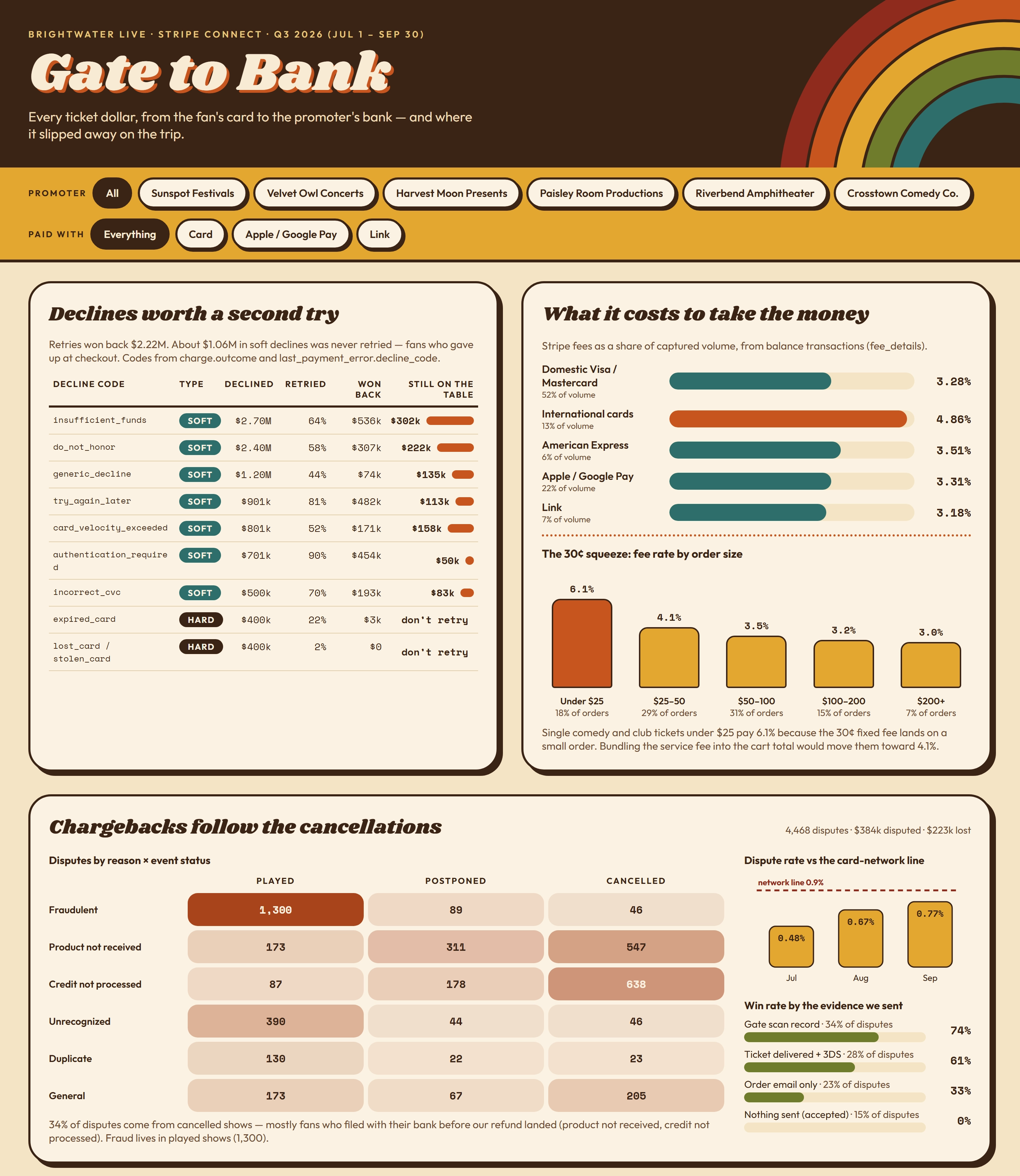
The second dashboard focuses on payment operations and revenue leakage. It highlights common reasons for transaction declines and measures the financial impact associated with each decline category.
A decline management section categorizes failed transactions such as insufficient funds, do-not-honor responses, authentication failures, expired cards, and other authorization issues. The dashboard measures how frequently customers retry purchases and how much otherwise lost revenue is recovered through successful retries.
Another section analyzes payment processing costs by payment type. Credit cards, digital wallets, and payment links often carry different fee structures, making it important for organizations to understand the true cost of accepting each payment method. This visibility helps ticketing companies optimize payment routing strategies while maintaining customer convenience.
The dashboard also contains extensive chargeback analytics. Heat maps and dispute trend visualizations show how fraud claims, product-not-received complaints, duplicate charges, and refund-related disputes vary according to event status. By examining dispute causes and evidence win rates, organizations can improve documentation processes and reduce financial losses resulting from chargebacks.
Refund and Promoter Payout Dashboard
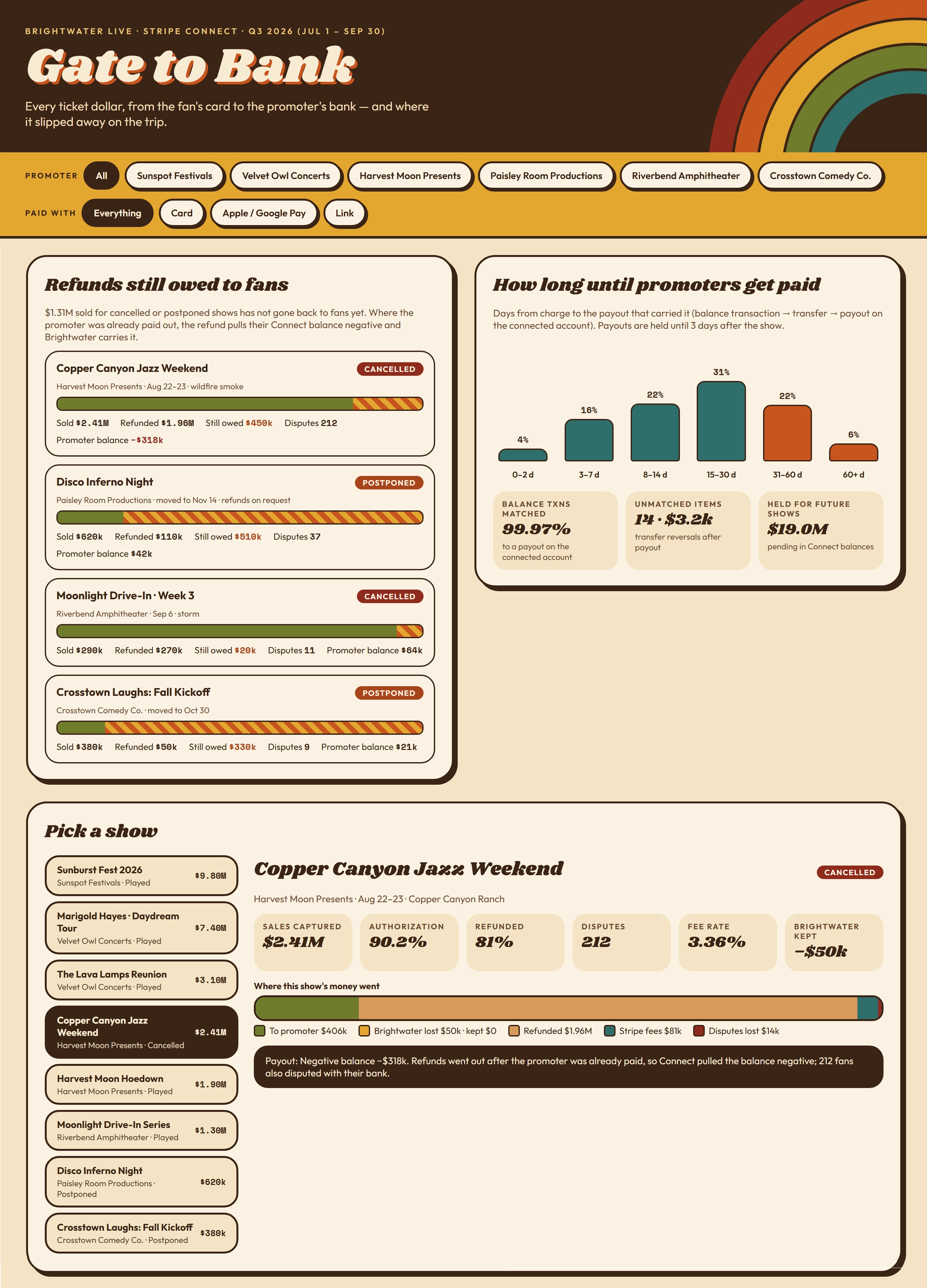
The third dashboard examines refunds, postponed events, cancelled events, and promoter settlement timing. These metrics become especially important when events are impacted by weather, venue issues, artist cancellations, or operational disruptions.
A refund obligations section tracks events with outstanding customer refunds and compares refund liabilities against promoter balances. This allows finance teams to identify situations where payouts have already been distributed while refund requests are still pending.
The payout analysis measures how long it takes funds collected from ticket buyers to reach promoters. Distribution charts reveal settlement timing patterns and help finance teams understand where delays occur during the payment and transfer process.
A show-level profitability analysis provides detailed visibility into individual events. Decision makers can evaluate captured sales, authorization performance, refund percentages, dispute activity, processing fees, and retained revenue for each show. This perspective helps organizations determine which events generate the strongest financial outcomes and which require corrective action.
Common Metrics Found in Live Event Ticket Dashboards
- Total Ticket Sales
- Gross Revenue
- Tickets Sold
- Average Ticket Price
- Authorization Rate
- Payment Approval Rate
- Decline Rate
- Refund Volume
- Refund Percentage
- Chargeback Rate
- Dispute Losses
- Fraud Detection Activity
- Payment Processing Fees
- Platform Revenue
- Promoter Payout Amount
- Settlement Cycle Time
- Revenue by Event
- Revenue by Venue
- Revenue by Promoter
- Revenue by Payment Method

Business Benefits of Ticket Dashboards
Organizations that implement ticket dashboards gain a more complete understanding of revenue generation and revenue leakage across the entire customer transaction lifecycle. Finance teams can improve forecasting, operational teams can identify processing bottlenecks, and event executives can make faster decisions using current information instead of waiting for end-of-month reports.
By bringing together ticketing, payment, settlement, refund, and dispute data, these dashboards enable event organizations to maximize sales conversion, reduce financial losses, improve customer experiences, and increase overall profitability.
End-to-End View of Event Commerce Operations
Live event ticket dashboards provide an end-to-end view of event commerce operations. From analyzing ticket demand during an on-sale rush to monitoring payment approvals, refunds, chargebacks, and promoter settlements, these dashboards help organizations understand where money is earned, where it is lost, and where opportunities for improvement exist. As live entertainment organizations continue to rely on data-driven operations, ticket dashboards have become an essential tool for maximizing event performance and financial success.