How a Nacre Producer Evaluated StyleBI vs Tableau
In the niche industry of nacre (mother‑of‑pearl) production—a highly specialized sector where shell‑cultured mollusks produce the iridescent inner layer used in luxury inlays—the data demands are unique. A nacre producer might track shell stock, growth rates, quality grading, supply‑chain logistics, export compliance, and wholesale pricing across global artisan markets.
When the analytics stack becomes cumbersome, performance lags, or embedding into partner portals becomes necessary, the reporting team must evaluate alternatives. In this case a nacre‑inlay producer compared two BI platforms: StyleBI (by InetSoft Technology Corp.) and Tableau. The developer audience will appreciate examining why the producer ultimately selected StyleBI.

Assessment of Tableau’s Strengths and Limitations
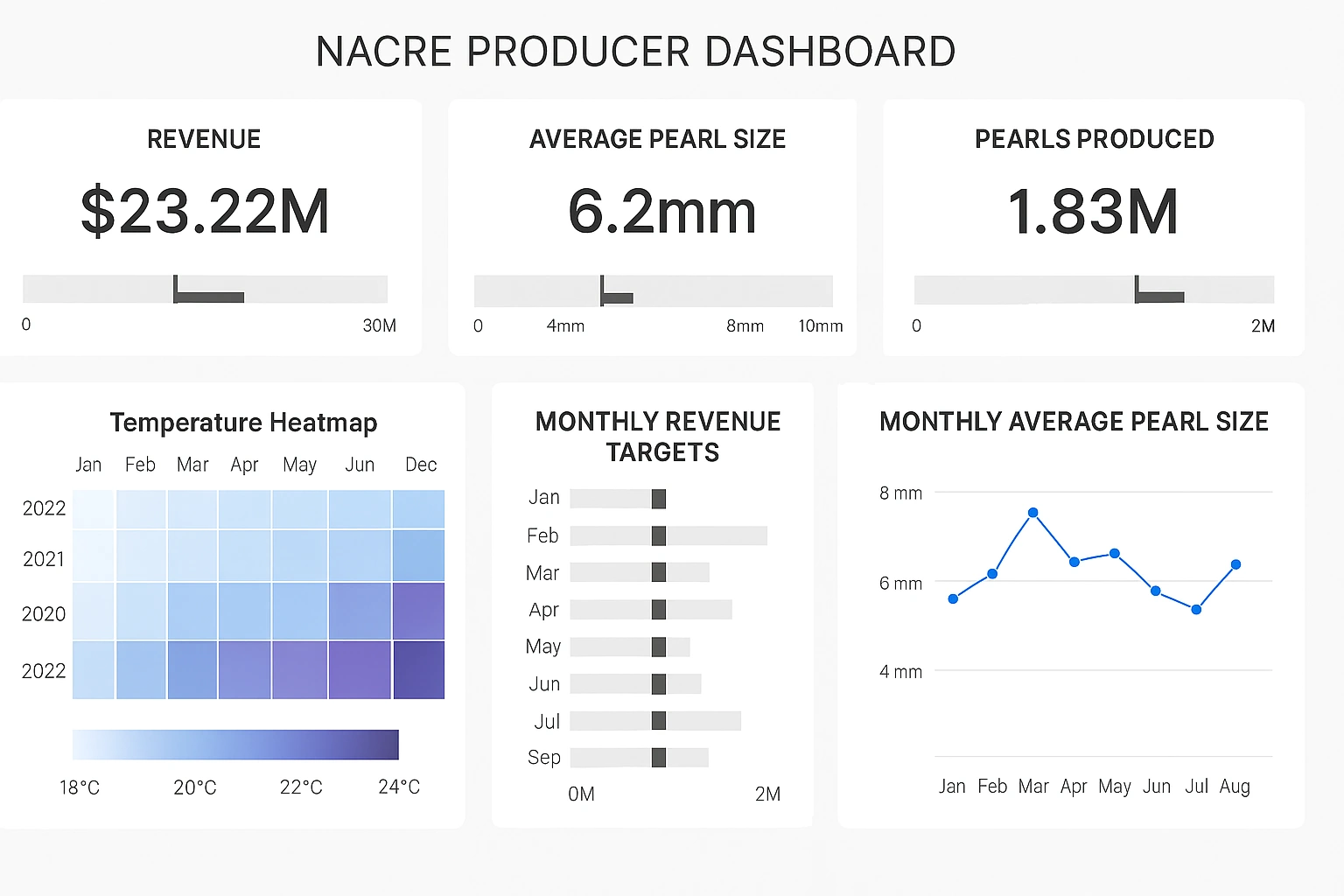
The evaluation began with Tableau, which is widely recognized for its sophisticated visual analytics, drag‑and‑drop dashboard design and large ecosystem of pre‑built connectors. For the nacre producer, the ability to produce visually compelling dashboards of shell‑growth vs environmental parameters, grade distributions and export summaries was a clear plus. However, developers noted several limitations. First, Tableau’s architecture is heavily desktop‑centric for design: designers work on a Windows desktop and then publish to the server—this creates deployment bottlenecks for large collaborator teams or external partner portals. Additionally, embedding Tableau analytics into partner‑facing web portals carried licensing and customization overhead. The nacre‑producer’s analytics team found that marrying data from disparate sources—e.g., oyster farm sensors, export ledger (Excel/spreadsheet), shell‑quality photographic metadata, and partner portals—would stretch Tableau’s blending model. They observed that when unpredictable new data sources emerged (for example, third‑party quality grading APIs or IoT sensor feeds in remote farms), the ETL/mash‑up pipeline would need heavy adjustment. Finally, licensing costs were flagged: as the number of users (internal and external) grew, Tableau’s per‑seat model threatened to escalate rapidly.
Why the Nacre Producer Considered an Alternative
Given the specialized workflows of a nacre producer—shell growth tracking, quality‑grading metadata, partner portal dashboards, export compliance, and embedding analytics into artisan‑partner web apps—the evaluation team sought more than just beautiful visualizations. They needed a platform that could: (1) mash up and blend data from spreadsheets, CSV, cloud APIs and databases in an agile way; (2) embed dashboards seamlessly into their partner portal and artisan dashboards with zero‑client web access; (3) scale cost‑effectively to internal users, partners, and suppliers without a dramatic licensing escalation; (4) support both interactive dashboards and paginated production reports (for export submission and compliance documentation); and (5) be developer‑friendly, open‑standards, deployable on their Linux/cloud stack. These criteria suggested that a more development‑centric or embed‑centric BI platform might better serve their long‑term goals.
Why StyleBI Emerged as the Preferred Choice
StyleBI addressed many of the nacre producer’s requirements. Its architecture is zero‑client and web‑native: developers and dashboard authors work via browser, and dashboards are accessible on any device. This simplified deployment for internal users and external artisan partners alike. The data‑mashup engine—referred to by InetSoft as Data Block™ technology—allowed blending of data from multiple sources (sensor feeds, sub‑supplier spreadsheets, export logs) into virtual datasets dynamically, reducing dependency on dedicated ETL pipelines. Embedding was a key differentiator: StyleBI offers JavaScript SDK, REST APIs, multi‑tenant support, theming and seamless integration into existing portals with full branding—exactly what the producer needed to expose dashboards to artisan networks and export partners without requiring separate licensing for every viewer. From a cost perspective the producer found StyleBI’s licensing model more predictable and scalable—broad consumption users could be added without per‑seat explosion. Also critical: StyleBI supports paginated reports and scheduling, enabling export‑ready production reports (for export compliance and trade documentation) within the same environment.
Developer‑centric Advantages Realized
From a developer’s standpoint the nacre producer’s technical team valued that StyleBI is Java‑based, OS‑agnostic (Windows/Linux/Mac), and embeddable. They could deploy in containerised form on their cloud infrastructure, integrate SSO, apply custom CSS/JS theming, and expose dashboards into partner portals with linkage to their authentication system. The mashup and worksheet tools enabled continuous agile iteration: when a new supplier feed or shell‑quality analyser data arrived, the developers could join it directly without waiting for a full warehouse update. Embedding dashboards into both internal operations and partner‑facing artisan portals meant that analytics became part of the application UX rather than a separate BI silo. The reduced need for heavy desktop installations meant the team could quickly onboard users and partners without training or install‑footprint issues—or requiring expensive external consultancy. Developer productivity improved, time‑to‑insight shortened, and the team gained more control over the entire analytics stack—data‑prep through publishing—within one unified system.
Real‑World Alignment To The Nacre Production Workflow
Consider a specific workflow of the nacre producer: an oyster farm in Malaysia collects sensor data on water quality and shell growth daily; a hatchery outputs Excel reports of spat survival rates; artisan inlay partners upload quality‑grading photos with metadata; export compliance requires monthly paginated reports of inventory, distribution, pricing and partner certifications. With Tableau, the team would likely have separate pipelines: building the dashboards with visual data, building a separate pipeline for paginated export compliance, managing embedding/licensing for partner access. With StyleBI, the producer built a virtual dataset combining sensor feed (via JDBC or API), Excel spreadsheets, and photo‑metadata database. They deployed dashboards embedded into their partner portal for artisan partners to view performance metrics and inventory availability. At month‑end, they triggered scheduled paginated reports (PDF) for export regulators. All this occurred in one platform: one metadata layer, one governance model, one deployment. The result was simplified architecture, fewer silos, and faster adaptability when new data sources emerged (for example when they added a new supplier or introduced IoT feed from the lab). Embedding dashboards into partner portals increased partner adoption and visibility into inventory—helping reduce idle shell inventory and accelerate inlay production cycles.
Trade‑Offs and Considerations
Of course, the decision to choose StyleBI did not entail that Tableau’s strengths were irrelevant. The team recognized that Tableau still offers a broader ecosystem of visualisation types, extensions, communities and a more polished out‑of‑box visual narrative experience. For a team that exclusively focuses on exploratory analytics within a central organisation and has fewer external partners or embedding requirements, Tableau remains a strong choice. The nacre producer accepted that some advanced visualisation templates might require more development in StyleBI and that they would invest slightly more in creating reusable components. However, given their embedding-heavy use case, multi‑source mashups, partner‑portal extension, and cost‑sensitivity, StyleBI’s trade‑offs were acceptable and manageable. They also planned incremental adoption: core production dashboards and reports rolled out first, then partner‑embedded portals followed, taking advantage of the agile mashup layer to add new sources and data fast.

Implementation Lessons For Developers
Developers working on such a migration or new implementation should follow a few best practices: First, prototype the mashup layer early—connect the shell growth sensor feed, the Excel hatchery report, and a small sample of partner upload data to validate the Data Block layering and virtual dataset concept. Secondly, plan the embedding early—determine authentication flows (SSO, tokens), theming, and how dashboards will appear in the partner portal context. Thirdly, treat paginated reports and dashboards as part of the same platform—don’t separate analytics from compliance reporting. Fourth, govern data sources, reuse of virtual datasets and set up role‑based permissions so that internal operations, hatchery staff, artisan partners and export regulators all access only the relevant views. Finally, measure total cost of ownership: licensing, infrastructure, embedding, training and support—StyleBI’s lower consumption licensing helped the project stay within budget.