What KPIs and Analytics Are Used on Data Pipeline Monitoring Dashboards?
Data pipelines are the backbone of modern analytics systems, moving and transforming raw data into actionable insights for business intelligence, reporting, and machine learning workflows. Monitoring these pipelines is crucial for ensuring reliability, performance, and accuracy.
A data pipeline monitoring dashboard provides developers, data engineers, and analysts with real-time visibility into pipeline health, operational performance, and data quality. Understanding the key metrics tracked on these dashboards, what they mean, and how to influence them is essential for optimizing pipeline operations and preventing costly disruptions.
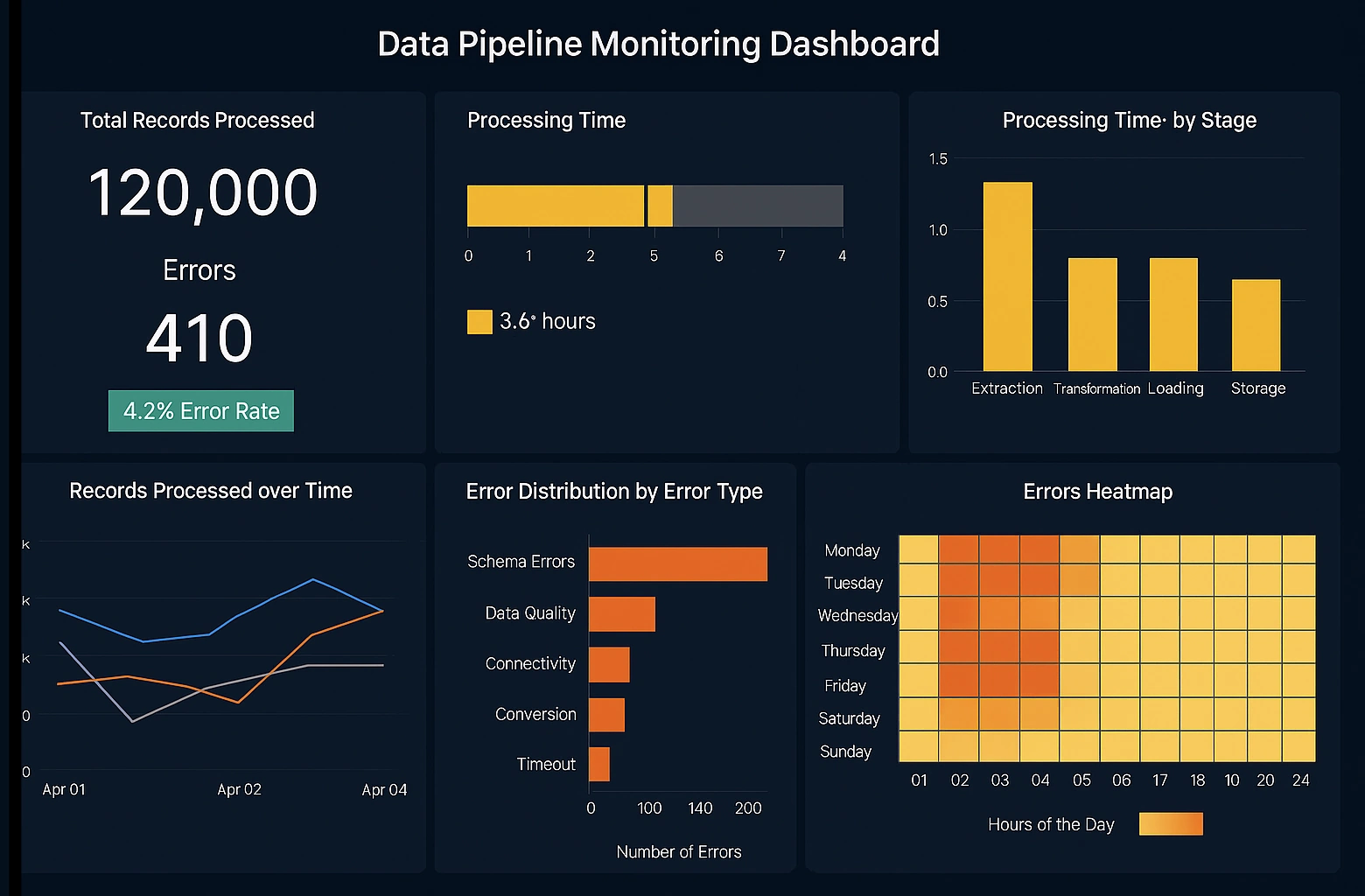

1. Pipeline Throughput
Pipeline throughput measures the volume of data processed by a pipeline over a given period, typically expressed in records per second, megabytes per second, or events per minute. High throughput indicates that the pipeline is efficiently handling data volumes, while low throughput may signal bottlenecks or resource constraints. Throughput can be influenced by optimizing data transformations, increasing parallelism in processing tasks, and tuning the underlying infrastructure, such as allocating more CPU or memory resources to compute nodes. Monitoring throughput allows teams to detect performance degradation before it affects downstream analytics or dashboards.
2. Latency
Latency refers to the time it takes for data to travel from the source system through the pipeline and become available at the destination. This metric is critical for real-time or near-real-time analytics, where delays can impact decision-making. High latency can result from inefficient transformations, slow data sources, network congestion, or queuing delays in message brokers. Developers can reduce latency by implementing stream processing, optimizing SQL queries, batching data intelligently, or increasing resource allocation for intensive tasks. Monitoring latency ensures that the pipeline meets service-level objectives for timeliness.
3. Error Rate
Error rate tracks the number or percentage of records that fail to process correctly at any stage of the pipeline. Errors may include failed transformations, schema mismatches, missing data, or connectivity issues. A high error rate can compromise data quality, produce inaccurate analytics, and disrupt downstream applications. Teams can lower error rates by implementing robust validation rules, automated retries, schema evolution strategies, and alerting for early detection. A monitored error rate provides immediate feedback on pipeline reliability and highlights areas requiring intervention.

4. Data Freshness / Lag
Data freshness, often represented as data lag, measures the delay between the time data is generated in the source system and the time it is available in the destination or analytics system. For example, a 10-minute lag indicates that the data displayed on dashboards is ten minutes behind the actual source events. Lag is influenced by pipeline scheduling, processing speed, and data volume. Reducing lag may involve moving from batch processing to streaming, optimizing transformation logic, or increasing infrastructure throughput. Monitoring data freshness helps ensure that decision-makers have timely and relevant insights.
5. Pipeline Uptime / Availability
Uptime measures the percentage of time a pipeline is operational and processing data as expected. Downtime may result from server outages, application crashes, failed jobs, or network issues. High availability is critical for enterprise applications where delayed or missing data can affect reporting and business operations. Developers can improve uptime by designing pipelines with redundancy, using resilient frameworks, implementing failover mechanisms, and monitoring system health proactively. Tracking uptime ensures pipeline reliability and maintains stakeholder confidence in data quality.
6. Resource Utilization
Resource utilization metrics indicate how efficiently the pipeline is using CPU, memory, disk, and network bandwidth. Overutilized resources can slow processing, increase latency, and even cause failures, while underutilized resources represent wasted capacity. Optimization strategies include scaling compute resources elastically, parallelizing workloads, batching tasks efficiently, and selecting cost-effective cloud infrastructure. Monitoring resource utilization allows teams to balance performance, cost, and environmental efficiency in pipeline operations.

7. Job Duration / Execution Time
Job duration tracks the time taken for individual tasks or pipeline jobs to complete. Long-running jobs may indicate complex transformations, large data volumes, or resource contention. By analyzing job duration, teams can identify bottlenecks, optimize transformations, split tasks into smaller units, or tune configuration parameters. Maintaining predictable execution times ensures reliable scheduling and improves overall pipeline throughput and efficiency.
8. Data Quality Metrics
Data quality metrics encompass completeness, consistency, validity, and uniqueness of the data flowing through the pipeline. Common metrics include null counts, duplicate records, invalid formats, and reference integrity errors. Poor data quality can undermine analytics, lead to inaccurate dashboards, and erode stakeholder trust. Teams can enhance data quality by implementing automated validation checks, enrichment processes, anomaly detection, and corrective workflows. Monitoring data quality provides early detection of issues and safeguards the integrity of downstream insights.
9. Alert Count and Severity
Alerting metrics track the number of warnings or critical alerts triggered by the pipeline monitoring system. Alerts can relate to failures, performance thresholds, or anomalies in data patterns. High alert counts or frequent critical alerts may indicate systemic issues, misconfigured monitoring, or operational instability. Reducing unnecessary alerts involves fine-tuning thresholds, applying intelligent alerting rules, and grouping related events. Developers benefit from actionable alerts that pinpoint problems without overwhelming teams with noise.

10. Backpressure Indicators
Backpressure metrics indicate congestion in streaming or message-driven pipelines. Backpressure occurs when downstream tasks cannot process data as quickly as it is produced, causing upstream buffers to fill and pipeline throughput to drop. This can lead to increased latency, failed jobs, or dropped events. Managing backpressure involves scaling downstream consumers, optimizing transformation logic, increasing buffer sizes, or employing rate-limiting strategies. Monitoring backpressure helps developers maintain smooth data flow and consistent pipeline performance.
11. Data Lineage and Provenance Metrics
Data lineage metrics track the origin, movement, and transformation of data within the pipeline. Understanding lineage is critical for debugging, auditing, compliance, and impact analysis. Metrics may include the number of upstream sources, transformation steps, and dependencies for a given dataset. Developers can influence lineage clarity by documenting transformations, standardizing naming conventions, and using tools that visualize data flow. Monitoring lineage ensures transparency and facilitates maintenance and governance of the data pipeline.
12. SLA Compliance
Service-level agreement (SLA) compliance measures whether pipeline jobs or processes meet predefined operational targets, such as processing times, latency thresholds, or availability percentages. Non-compliance can indicate workflow inefficiencies, resource constraints, or unexpected failures. Developers can improve SLA compliance by tuning pipeline scheduling, optimizing resource allocation, and monitoring for early signs of disruption. Tracking SLA compliance ensures that data pipelines reliably meet business and operational expectations.
13. Change Detection Metrics
Change detection metrics track variations in data volume, schema, or behavior over time. Sudden changes may indicate upstream issues, anomalies, or unexpected events. Monitoring these metrics allows developers to detect and respond to potential pipeline disruptions, validate assumptions, and trigger automated corrective actions. Techniques for influencing these metrics include implementing schema versioning, incremental processing, and anomaly detection algorithms to maintain stable operations.
14. Reprocessing and Retry Metrics
Reprocessing and retry metrics track the number of records or jobs that need to be reprocessed due to failures, errors, or data quality issues. High reprocessing rates indicate inefficiencies or instability in the pipeline. Developers can reduce reprocessing by implementing robust error handling, transactional processing, idempotent operations, and data validation at source. Monitoring retry metrics ensures operational resilience and highlights areas that require pipeline optimization.
15. User-Defined Metrics
Many modern pipeline monitoring dashboards allow developers to track custom metrics specific to their workflows, such as business-specific KPIs or operational counts. These metrics can provide insights into domain-specific bottlenecks, business rules validation, or critical performance indicators. By defining and monitoring these metrics, developers gain actionable visibility into how pipelines support broader organizational objectives and can proactively optimize operations.

How to Act on Metrics Effectively
Understanding what the metrics mean is only the first step; developers must also know how to act on them to maintain healthy pipelines. This involves regular monitoring, alerting on thresholds, analyzing trends, and iteratively tuning infrastructure and workflow configurations. Metrics should be contextualized with workload patterns, historical baselines, and business requirements. Continuous feedback loops, automated remediation, and collaboration across engineering and analytics teams ensure that metrics drive meaningful improvements. Finally, adopting a proactive monitoring culture allows teams to prevent failures, optimize resource usage, and maintain data reliability for downstream systems.