Mail Handling Dashboard
This Mail Handling Dashboard is designed as a full-screen operational command center for a modern mail or parcel sorting facility. Its primary purpose is to translate high-volume, high-velocity operational data into clear, actionable signals that supervisors, floor managers, and executives can understand at a glance.
The dashboard emphasizes real-time visibility, trend awareness, and performance accountability across people, processes, and throughput. By combining high-level KPIs with supporting trend charts and breakdowns, it avoids the common trap of showing “interesting numbers” without operational meaning.
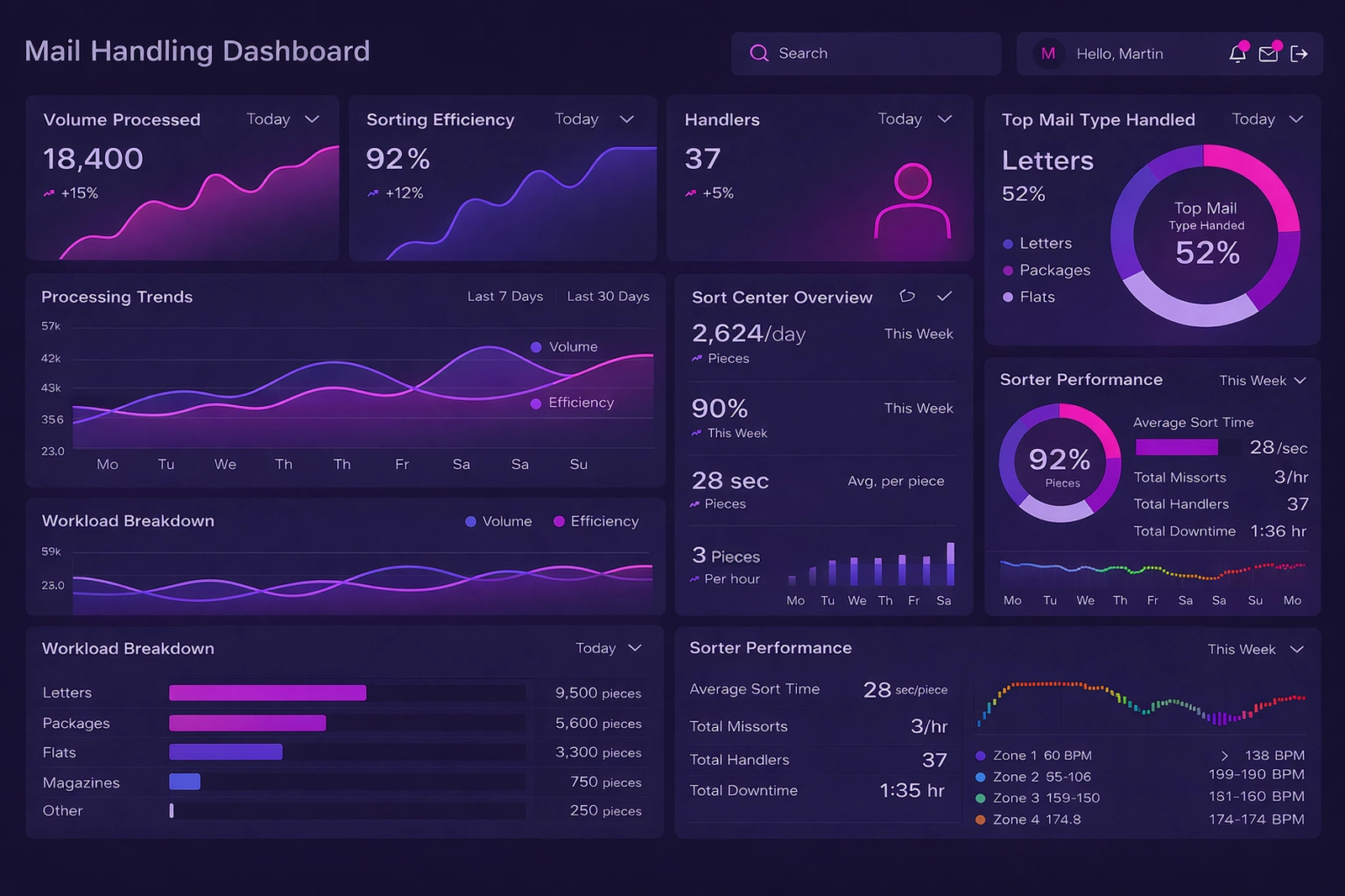

Volume Processed
The Volume Processed KPI represents the total number of mail pieces handled within the selected time frame. This includes letters, flats, packages, and other defined mail classes.
Why it matters: Volume is the baseline metric for all operational analysis. Without understanding throughput, efficiency metrics lose context.
How to affect it: Adjust staffing levels to match demand, improve inbound scheduling, and optimize induction points to prevent bottlenecks.
Sorting Efficiency
Sorting Efficiency expresses how effectively the system converts incoming mail into correctly sorted output.
Why it matters: Small efficiency drops can translate into thousands of misrouted pieces per day.
How to affect it: Maintain equipment calibration, improve handler training, and reduce manual intervention.
Handlers on Duty
The Handlers KPI shows the number of active workers assigned to sorting operations.
Why it matters: Labor is the largest controllable operational cost.
How to affect it: Align schedules with volume patterns, cross-train staff, and redeploy labor dynamically.

Top Mail Type Handled
This indicator highlights the dominant mail category in the current workload.
Why it matters: Different mail types require different handling strategies.
How to affect it: Forecast mix changes, pre-stage equipment, and adjust sorter configurations.
Processing Trends
The Processing Trends chart shows volume and efficiency over time.
Why it matters: Trends reveal whether performance issues are isolated or systemic.
How to affect it: Investigate inflection points and correlate trends with operational changes.
Sort Center Overview
The Sort Center Overview consolidates multiple KPIs into a single executive snapshot.
Why it matters: It enables leadership to assess operational health quickly.
How to affect it: Use it as a daily reference and align improvement goals with headline metrics.

Average Sort Time
Average Sort Time measures how long a piece takes to move through the system.
Why it matters: Increased time indicates congestion or process friction.
How to affect it: Reduce manual touchpoints and balance system loads.
Pieces per Hour
Pieces per Hour converts volume into a normalized performance rate.
Why it matters: Rates allow fair comparison across shifts and facilities.
How to affect it: Optimize handoffs and align upstream flow with downstream capacity.
Sorter Performance
The Sorter Performance panel combines efficiency, mis-sorts, downtime, and staffing.
Why it matters: It reveals the interaction between machine and human performance.
How to affect it: Apply preventive maintenance and standardize operator response procedures.

Total Mis-sorts
Total Mis-sorts measures accuracy failures requiring rework.
Why it matters: Mis-sorts increase labor costs and delay delivery.
How to affect it: Improve barcode readability and standardize mail presentation.
Total Downtime
Total Downtime captures how long equipment is unavailable.
Why it matters: Downtime directly reduces throughput capacity.
How to affect it: Track downtime causes and schedule maintenance strategically.
Workload Breakdown
The Workload Breakdown chart shows volume by mail type.
Why it matters: It enables precise labor and equipment planning.
How to affect it: Forecast by category and align staffing skills accordingly.
Why This Dashboard Works
This dashboard prioritizes clarity, supports evidence-based decisions, and encourages continuous improvement across operations.
Further Reading and References
- USPS Mail Processing Overview
- MIT Center for Transportation & Logistics
- McKinsey – Lean Operations
- Pitney Bowes – Postal Automation
- Gartner – Operations KPI Design
More Articles About InetSoft Dashboards
Industry dashboard examples for multiple business sectors
This page showcases a gallery of interactive, industry-specific dashboards built with InetSoft’s Style Scope platform. It emphasizes how users can explore data by interacting with sliders, filters, and mouseover details. Several verticals are represented, including marketing management and other operational domains. The examples highlight how dashboards support both monitoring and analytical use cases. The page positions these dashboards as a way to quickly gain insight without needing deep technical skills.
Industry dashboard solutions for diverse analytics needs
This page describes InetSoft’s approach to delivering dashboard solutions tailored to different industries and roles. It calls out application developers as a key audience, focusing on metrics like active users, ARPU, churn, downloads, and conversion rates. The content stresses rapid deployment, lightweight architecture, and flexibility in designing monitoring and analytical dashboards. It also links to a gallery of examples and supporting articles about capabilities. Overall, the page frames InetSoft as a platform that can adapt to virtually any industry’s KPI requirements.
Daily dashboard examples for time‑sensitive operations
This page focuses on dashboards that refresh daily or on load to keep information continuously up to date. It explains how data can be pulled from multiple sources so business users always see current metrics. The narrative contrasts manual reporting processes with automated, always-fresh dashboards. Both paginated reports and interactive visualizations are supported, depending on user preference. The page positions daily dashboards as essential for organizations that rely on timely decisions and frequent performance checks.
Intranet dashboard examples for internal company insights
This page defines what an intranet dashboard is and how it serves employees across roles. It describes how executives might see revenue, major sales, staffing levels, and project timelines in one consolidated view. Engineers and other staff can instead see project status, hours worked, progress toward targets, and personal information like expenses or vacation days. The content stresses tailoring the dashboard to the specific user accessing it. It presents intranet dashboards as always-available, device-agnostic hubs for critical internal data.
Healthcare management dashboard examples for hospitals
This page presents interactive dashboards designed for healthcare organizations, particularly hospitals. One example shows patient-level details such as ID, gender, age, and filterable age ranges. Another focuses on staff-to-patient ratios by department, including counts of doctors. The text emphasizes that, despite their simplicity of use, these dashboards expose detailed fields and rich results. It concludes that healthcare providers can use InetSoft’s drag‑and‑drop tools to support daily operations and long‑term strategic goals.
Business dashboard examples across analytic use cases
This page aggregates business dashboard examples, including both InetSoft-built and competitor samples. It highlights an informatics dashboard that uses monochromatic color scaling to show daily case counts. Another example is an analytic medical dashboard that uses shades of red to represent varying case and death numbers. The discussion explains how color choices and shading can make complex measures easier to interpret. Overall, the page illustrates design techniques that improve clarity and insight in business dashboards.
Good management dashboard examples for executives
This page defines management dashboards as executive tools that make information easier to read and act upon. It notes that these dashboards can integrate many data types into a single, coherent visual experience. The examples show how users can move between graphs without losing important context. The content stresses continuous tracking of expenses, inventory, and earnings to maintain a competitive edge. It portrays management dashboards as central to controlling and understanding all aspects of a business.
Top management dashboard examples for performance tracking
This page highlights several standout management dashboards, including a marketing project management example. It describes how Gantt charts are used to visualize project stages, start dates, and end dates. Another example is a sales‑by‑state performance dashboard that breaks down revenue, prices, and profits by product line. Color and mouseover interactions are used to add extra dimensions of information without consuming more space. The page underscores how these dashboards help managers track initiatives and performance at a glance.