Modernizing PeopleSoft Dashboards: Unlocking Real-Time Insights and Cross-Module Analytics
PeopleSoft has long been a reliable enterprise resource planning (ERP) solution for organizations managing human capital, finance, and campus operations. Its built-in reporting tools, such as Query Manager and nVision, have allowed administrators to generate lists, summaries, and basic dashboards for decades.
However, as organizations increasingly demand real-time insights, cross-module analysis, and self-service capabilities, the limitations of PeopleSoft’s native dashboards become more apparent. For many, the question is no longer whether they need dashboards, but how to modernize them without replacing the entire ERP system.
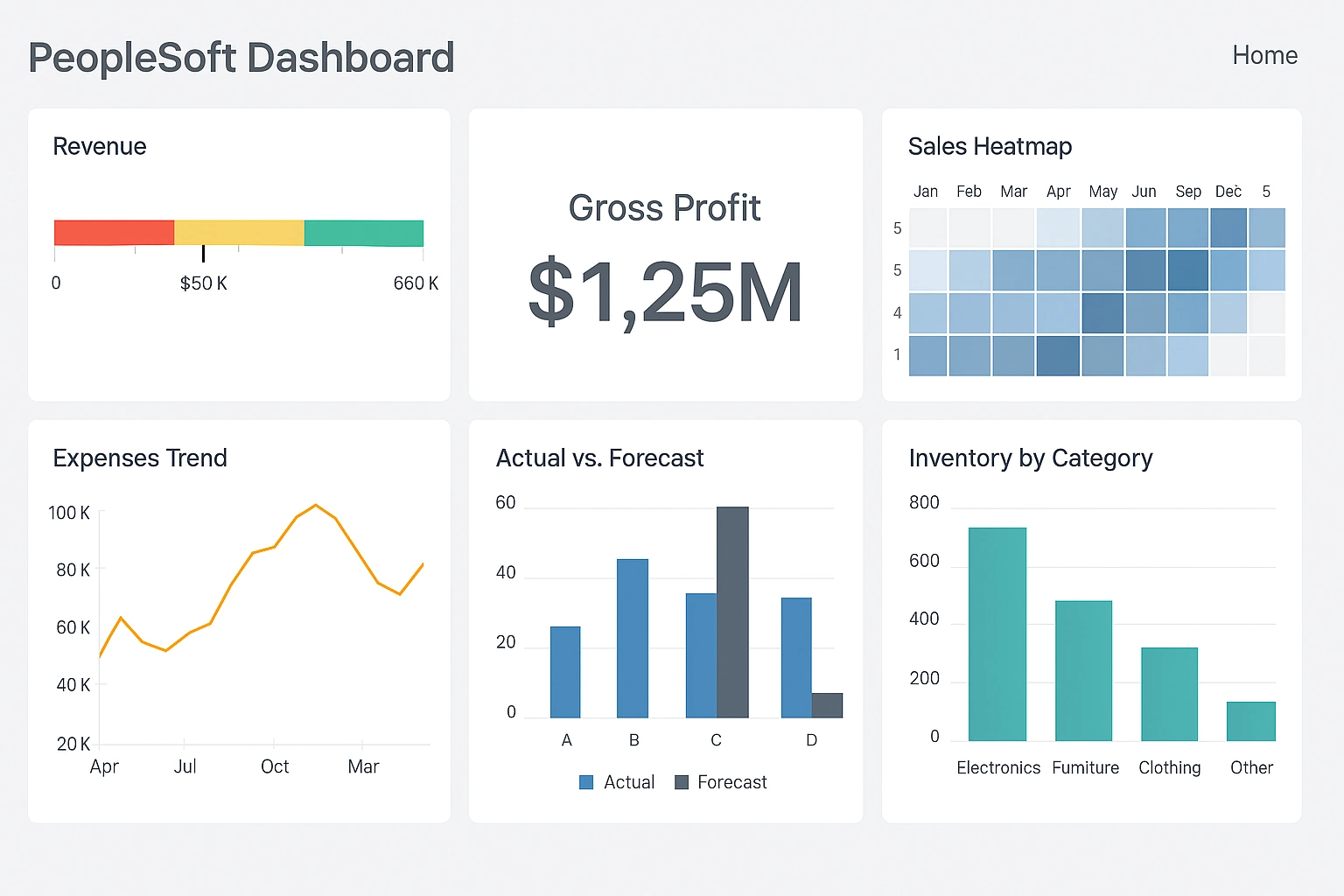

The Limitations of Native PeopleSoft Dashboards
PeopleSoft’s delivered dashboards provide out-of-the-box visibility into key metrics, but they come with several constraints. For one, they are often static and inflexible. Query Manager reports require a predefined structure, and nVision dashboards, while powerful for financial reporting, are heavily grid-based and can be difficult to adapt for other operational needs. Customizations are possible, but they often require technical expertise and complex scripting, creating a bottleneck for business users who need timely insights.
Another limitation is cross-module reporting. PeopleSoft HCM, FSCM, and Campus Solutions are built to serve specific functional areas, and while data resides in a shared database, combining these sources in a meaningful way often requires additional scripting, SQL joins, or complex data extracts. This makes it cumbersome to create dashboards that provide a holistic view of organizational performance, such as correlating workforce trends with financial outcomes or student engagement metrics.
Performance and scalability are additional challenges. Many PeopleSoft dashboards rely on batch processing or pre-aggregated data, which can introduce delays in reporting. Users frequently encounter slow refresh times when trying to access larger datasets or generate reports across multiple modules. The lack of real-time or near-real-time updates limits the ability of leaders and managers to make informed decisions quickly.
The Growing Need for Modern Dashboard Capabilities
Organizations today expect more from their dashboards than static charts or tables. Modern dashboard capabilities should include:
- Real-time insights: The ability to visualize up-to-date data as events occur.
- Cross-source mashups: Combining PeopleSoft data with other enterprise systems or cloud applications to create a comprehensive view.
- Interactive visualizations: Filters, drill-downs, and self-service exploration for end users without relying on IT.
- Embedded analytics: Seamless integration of dashboards into the ERP interface to avoid switching between multiple systems.
- Role-based security: Ensuring that users see only the data relevant to their roles and responsibilities.
Many organizations that rely solely on PeopleSoft dashboards struggle to meet these modern requirements. Even when custom reports are created, the maintenance overhead and technical complexity often outweigh the benefits. This has led many IT and business leaders to explore complementary solutions that can sit on top of PeopleSoft data, providing advanced visualization, real-time analytics, and mashup capabilities without replacing the ERP.
Why Real-Time Data Mashups Matter
One of the key trends in analytics is the move from siloed reporting to real-time, cross-source mashups. While PeopleSoft stores valuable operational and financial data, most organizations also maintain other cloud applications, such as Salesforce, Workday, learning management systems, and marketing platforms. Leaders increasingly want dashboards that integrate all of these sources, allowing them to correlate trends and make decisions based on a complete picture.
Real-time mashups enable several advantages:
- Faster decision-making: Executives and managers can act on current trends rather than waiting for overnight batch reports.
- Improved operational efficiency: Departments can detect issues or anomalies as they occur, reducing reaction time.
- Data consolidation: Analysts can combine multiple sources into a single dataset without complex ETL or manual exports.
Without a tool capable of real-time mashups, organizations often resort to static exports, cumbersome spreadsheets, or delayed reports, which reduces responsiveness and increases risk.
Embedding Dashboards Within PeopleSoft
Another challenge is user experience. Business users prefer accessing analytics within the systems they use daily rather than navigating separate BI platforms. Embedding dashboards directly into PeopleSoft pages improves adoption and reduces friction. Ideally, embedded dashboards should maintain role-based security, update dynamically with underlying data, and offer interactive exploration features such as drill-downs, filters, and context-sensitive views.
Embedding analytics can also align reporting with operational workflows. For example, HR managers reviewing workforce trends can view real-time insights alongside employee records, or financial controllers can monitor budgets while entering journal entries. This integration enhances context, reduces errors, and supports faster action.
Self-Service Analytics and End-User Empowerment
Native PeopleSoft dashboards often limit the ability of non-technical users to create new views or manipulate data. Many requests still require IT intervention, SQL knowledge, or custom development. A modern BI solution that sits on top of PeopleSoft should provide self-service capabilities, enabling business users to:
- Create ad-hoc reports and dashboards without writing SQL
- Combine multiple PeopleSoft modules or external sources easily
- Save reusable dashboards for themselves or their teams
- Adjust filters, time ranges, or dimensions on demand
Empowering end users not only accelerates insights but also reduces the backlog of reporting requests handled by IT. This frees up technical teams to focus on governance, advanced analytics, and more strategic projects.
Security and Governance Considerations
When extending PeopleSoft dashboards or integrating external tools, maintaining security and governance is critical. A modern BI platform should integrate with existing PeopleSoft security roles, ensuring that users see only the data they are authorized to access. Auditing, logging, and change-tracking capabilities are also important for compliance with internal policies and regulatory requirements.
Having a governance framework built into the analytics layer ensures that dashboards remain accurate, reliable, and compliant as datasets evolve. Without it, organizations risk data inconsistencies, unauthorized access, and reduced trust in reporting outputs.
Key Benefits of Modernizing PeopleSoft Dashboards
By modernizing PeopleSoft dashboards with a complementary analytics platform, organizations can achieve several key benefits:
- Enhanced visibility: Real-time insights across multiple modules and external sources provide a holistic view of operations.
- Improved decision-making: Interactive and embedded dashboards allow managers to act quickly based on current data.
- Reduced IT overhead: Self-service capabilities and reusable data mashups reduce the need for custom development and manual reporting.
- Greater adoption: Integrated dashboards within PeopleSoft increase engagement and ensure analytics are used as part of daily workflows.
- Scalability: A flexible platform can handle growing data volumes, new data sources, and evolving business requirements without constant redevelopment.
Choosing the Right Approach
Organizations exploring PeopleSoft dashboard modernization should carefully evaluate their needs across several dimensions:
- Data integration: Does the solution allow mashups of multiple PeopleSoft modules and external sources?
- Real-time analytics: Can dashboards update dynamically with current data?
- Embedding: Is it possible to place dashboards inside PeopleSoft pages while maintaining security?
- User empowerment: Can non-technical users create, modify, and interact with dashboards independently?
- Governance: Does the platform support secure, auditable, and compliant reporting?
By evaluating these factors, organizations can select a solution that complements PeopleSoft without replacing it, maximizing both return on investment and user adoption.