What Metrics Are Tracked on a Retrieval-Augmented Generation (RAG) System Dashboard?
A Retrieval-Augmented Generation (RAG) system dashboard exists to answer one core question: “Is the system reliably finding the right information and using it to generate trustworthy answers at an acceptable cost and speed?” To do that, it tracks metrics across three layers: retrieval, generation, and system/business performance.
By monitoring retrieval metrics, you ensure the system pulls relevant information from your knowledge base. Through generation metrics, you validate that answers are accurate and faithful to the retrieved content.
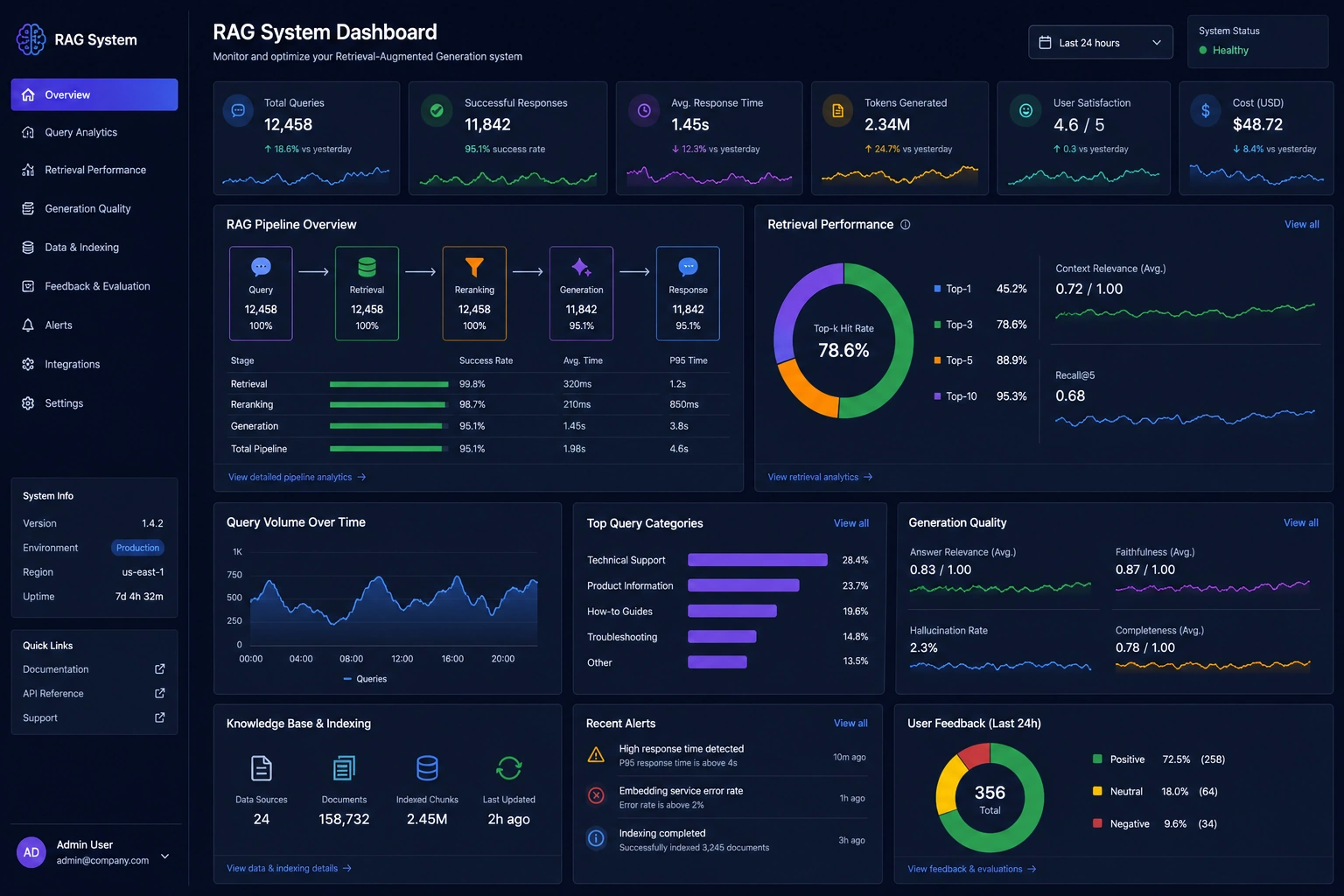

1. Retrieval metrics
Metrics Tracked on a Retrieval-Augmented Generation (RAG) System Dashboard
A Retrieval-Augmented Generation (RAG) system dashboard exists to answer one core question: “Is the system reliably finding the right information and using it to generate trustworthy answers at an acceptable cost and speed?” To do that, it tracks metrics across three layers: retrieval, generation, and system/business performance.
1. Retrieval metrics
Retrieval metrics measure how well the system finds relevant documents or chunks from the knowledge base before the language model generates an answer. Understanding what is RAG in AI requires recognizing this crucial interplay between retrieving external facts and generating reliable responses. If retrieval is weak, even the best model will hallucinate or miss key facts.
1.1 Precision@K
What it means: Precision@K is the fraction of the top K retrieved items that are actually relevant to the query. High precision means most of what you retrieve is useful; low precision means you are pulling in a lot of noise.
How to affect it:
- Improve embeddings: Use higher-quality or domain-specific embedding models so similar concepts are closer in vector space.
- Tune similarity thresholds: Increase similarity cutoffs or reduce K to avoid including marginally relevant chunks.
- Better chunking: Chunk documents semantically (by sections, headings, or paragraphs) instead of fixed token windows, so each chunk is coherent and focused.
- Reranking: Add a reranker model that scores candidate chunks for relevance to the query and reorders the top results.

1.2 Recall@K
What it means: Recall@K is the proportion of all relevant documents that appear in the top K results. High recall means you are capturing most of the information needed to answer the question; low recall means important evidence is missing.
How to affect it:
- Increase K: Retrieve more candidates per query so the system has a better chance of including all relevant chunks.
- Expand queries: Use query rewriting or expansion (synonyms, related terms) to match more ways the same concept appears in the corpus.
- Improve coverage: Ensure the knowledge base actually contains the needed information and that ingestion pipelines are complete and up to date.
- Hybrid search: Combine vector search with keyword or BM25 search to catch both semantic and exact-match cases.
1.3 F1, MRR, and nDCG
F1 score: The harmonic mean of precision and recall, giving a single number that balances both. It’s useful when you want a general retrieval quality indicator rather than optimizing only precision or recall.
MRR (Mean Reciprocal Rank): Measures how high the first relevant document appears in the ranking. If relevant chunks are usually in the top 1–2 positions, MRR will be high; if they are buried lower, MRR drops.
nDCG (Normalized Discounted Cumulative Gain): Evaluates the quality of the entire ranking, giving more weight to relevant items near the top. It’s helpful when multiple documents can be relevant with different degrees of usefulness.
How to affect them: All three respond to better ranking and retrieval strategies:
- Train or fine-tune rerankers: Use supervised data (query, relevant chunk) to train a reranker that pushes the best chunks to the top.
- Optimize index structure: Experiment with different vector database configurations, distance metrics, and indexing parameters.
- Refine chunking and metadata: Add rich metadata (titles, tags, document types) and use it in retrieval filters and ranking features.

1.4 Hit rate / Top-K hit
What it means: Hit rate measures how often at least one relevant document appears in the top K results. It’s a simple “did we get anything useful?” metric and is often used in early-stage RAG experiments.
How to affect it: Similar levers as recall—larger K, better embeddings, hybrid search, and improved coverage of the knowledge base.
2. Generation metrics
Once retrieval provides context, the language model must generate an answer that is accurate, grounded in that context, and useful to the user. Generation metrics focus on answer quality and faithfulness rather than just fluency.
2.1 Faithfulness and hallucination rate
What they mean: Faithfulness measures how well the answer sticks to the retrieved context and known facts. Hallucination rate is the proportion of answers that contain unsupported or fabricated information. Lower hallucination rate and higher faithfulness are key goals of RAG.
How to affect them:
- Improve retrieval quality: If the right evidence is present, the model is less likely to invent facts.
- Prompt design: Explicitly instruct the model to quote or reference the provided context, and to say “I don’t know” when the context is insufficient.
- Lower temperature: Use lower sampling temperature and fewer sampling tricks (like high top-p) to reduce creative but ungrounded outputs.
- Context formatting: Clearly separate question, context, and instructions so the model can easily see what is authoritative.
- Guardrail checks: Add post-generation checks (LLM-as-judge or rule-based) that flag or block answers that contradict the context.

2.2 Answer relevance and usefulness
What it means: Answer relevance measures how directly the response addresses the user’s question. Usefulness goes further—does the answer actually help the user complete their task, not just repeat facts?
How to affect it:
- Query rewriting: Normalize or clarify user queries (e.g., expand acronyms, resolve pronouns) before retrieval.
- Task-aware prompts: Include instructions like “answer step-by-step,” “summarize for a beginner,” or “provide bullet points and next actions.”
- Domain tuning: Use domain-specific examples and few-shot prompts that show the desired style and level of detail.
- Feedback loops: Collect user ratings and fine-tune prompts or policies based on what users mark as helpful or unhelpful.
2.3 Readability and fluency
What it means: These metrics capture how clear, grammatical, and easy to follow the answer is. While RAG’s main promise is factuality, poor readability still hurts user satisfaction.
How to affect it: Adjust prompt instructions for tone and structure, and consider using a second “polishing” pass that rewrites the answer for clarity while preserving content.
3. System and performance metrics
A production RAG dashboard also tracks operational metrics: how fast, scalable, and cost-effective the system is. These metrics often determine whether the system is viable for real workloads.

3.1 Latency
What it means: Latency is the time from user query to final answer. It can be broken down into retrieval latency, model inference latency, and orchestration overhead.
How to affect it:
- Optimize vector search: Use approximate nearest neighbor indexes, tune index parameters, and colocate compute with the vector database.
- Reduce context size: Retrieve fewer but more relevant chunks, and trim unnecessary text before sending it to the model.
- Model choice: Use smaller or distilled models where possible, or a cascade (small model first, large model only when needed).
- Batching and caching: Batch similar queries and cache frequent retrieval results or model outputs.
3.2 Throughput
What it means: Throughput is how many queries per second (or per minute) the system can handle while meeting latency targets.
How to affect it: Scale horizontally (more replicas), use efficient batching, and ensure that both the vector database and model endpoints are provisioned for peak load.
3.3 Cost per query
What it means: Cost per query combines vector database operations, model inference costs, and infrastructure overhead into a single economic metric. It’s crucial for deciding whether a RAG system is sustainable at scale.
How to affect it:
- Right-size models: Use cheaper models for simple queries and reserve expensive models for complex or high-stakes tasks.
- Limit tokens: Control maximum input and output tokens; aggressively trim context and avoid overly long answers when not needed.
- Cache aggressively: Cache both retrieval results and final answers for repeated or similar queries.
- Optimize storage: Use appropriate vector index types and storage tiers to balance speed and cost.

4. User and business outcome metrics
Beyond technical metrics, a mature RAG dashboard includes user-centric and business metrics that show whether the system is actually delivering value.
4.1 User satisfaction (CSAT, NPS, thumbs up/down)
What it means: Direct user feedback—ratings, thumbs up/down, short surveys—captures perceived quality and trust. It often correlates with faithfulness and relevance but also reflects tone, clarity, and UX.
How to affect it: Use all the levers above (retrieval, generation, latency) and close the loop: analyze low-rated answers, identify patterns, and adjust prompts, retrieval strategies, or guardrails accordingly.
4.2 Task success and time-to-insight
What they mean: Task success measures whether users can complete their goal (e.g., resolve a support issue, find a policy, draft a document) using the RAG system. Time-to-insight measures how quickly they get to a useful answer.
How to affect them:
- Workflow-aware design: Integrate RAG into existing tools and flows instead of forcing users into a separate interface.
- Actionable answers: Encourage the model to provide steps, links, and clear next actions, not just raw information.
- Iterative refinement: Support follow-up questions and clarifications so users can quickly refine results instead of starting over.

5. Putting it together
A good RAG dashboard doesn’t just show a wall of numbers—it aligns metrics with goals. Retrieval metrics tell you whether the system is finding the right evidence; generation metrics tell you whether it’s using that evidence faithfully; system metrics tell you whether it’s doing so fast and cheaply enough; and user metrics tell you whether any of this actually matters to real people.
When you treat these metrics as levers rather than static scores, the dashboard becomes a control panel: you adjust chunking, embeddings, retrieval parameters, prompts, and model choices, then watch how precision, recall, faithfulness, latency, and satisfaction respond. That feedback loop is what turns a RAG prototype into a reliable, production-grade system.