University and Higher Education Dashboard Examples
What Is a University Dashboard?
A university dashboard is a visual analytics tool that helps higher education institutions monitor key metrics across admissions, enrollment, academics, finance, and campus operations. It brings together data from SIS, LMS, CRM, financial systems, and operational platforms to give administrators, faculty, and staff a clear, real-time view of institutional performance.
Core Purpose
The main purpose of a university dashboard is to make complex institutional data easy to understand and act on. Dashboards help colleges and universities identify trends, improve student outcomes, optimize resources, and support data-informed decision-making at every level.
Who Uses University Dashboards?
- Administrators tracking enrollment, retention, and institutional effectiveness
- Admissions teams monitoring application volume, yield, and funnel performance
- Faculty reviewing course performance, grades, and student engagement
- Finance offices analyzing budgets, tuition revenue, and operational costs
- IT and operations teams overseeing systems, infrastructure, and campus activity
Key Capabilities
- Real-time monitoring of enrollment, retention, and academic performance
- Integration with SIS, LMS, CRM, and financial systems
- Interactive filtering, drill-down, and trend analysis
- Predictive analytics for student success and resource planning
- Role-based dashboards for administrators, faculty, admissions, and finance
InetSoft’s university dashboard capabilities combine ease of use with advanced data modeling, making it ideal for institutions that need flexible, interactive analytics across academic and operational domains.
InetSoft users in higher education include: Carnegie Mellon University, Florida International University, Gallaudet University, Northwest Nazarene University, Seton Hall University, and Rutgers University.
University Dashboard KPI Lists
Admissions KPIs
- Application Volume — Total number of applications received.
- Acceptance Rate — Percentage of applicants admitted.
- Yield Rate — Percentage of admitted students who enroll.
- Application Completion Rate — Share of applicants who finish all required steps.
- Campus Visit Conversions — Enrollment rate among students who visited campus.
- Admissions Funnel Progression — Movement of prospects through inquiry → application → admit → enroll.
Enrollment KPIs
- Total Enrollment — Number of active students.
- New vs. Returning Students — Breakdown of incoming and continuing students.
- Full-Time Equivalent (FTE) — Standardized measure of student load.
- Program Enrollment — Enrollment by major or academic program.
- Demographic Distribution — Age, gender, ethnicity, residency.
- International Enrollment — Share of students from outside the country.
Student Success KPIs
- Retention Rate — Percentage of students who return next term.
- Persistence Rate — Students continuing toward degree completion.
- Graduation Rate — Percentage completing their program.
- Course Completion Rate — Share of students finishing enrolled courses.
- Student Engagement Indicators — LMS activity, attendance, participation.
- Advising Intervention Outcomes — Impact of academic support actions.
Academic Performance KPIs
- Average GPA — Institution-wide or program-specific GPA.
- Course Pass Rate — Percentage of students passing each course.
- DFW Rate — Drop, Fail, Withdraw percentage.
- Faculty Workload — Courses taught, credit hours, advising load.
- Class Capacity Utilization — Seat fill percentage.
- Program Performance — Outcomes by major or department.
Financial KPIs
- Tuition Revenue — Total revenue from enrolled students.
- Financial Aid Distribution — Grants, loans, scholarships awarded.
- Cost per Student — Operational cost divided by enrollment.
- Budget Variance — Difference between planned and actual spending.
- Departmental Spending — Financial activity by academic unit.
- Auxiliary Revenue — Housing, dining, athletics, events.
IT & Operations KPIs
- System Uptime — Availability of SIS, LMS, and campus systems.
- Help Desk Ticket Volume — Number of IT support requests.
- Resolution Time — Average time to close support tickets.
- Network Performance — Bandwidth, latency, reliability.
- Facility Utilization — Classroom, lab, and building usage.
- Security Incidents — Number and severity of security events.
University Dashboard Comparison
More Higher Education Dashboard Examples
Below are some education dashboard examples to give you a look at some of the advanced displays that can be created using Style Intelligence. Style Intelligence can be used to build visualizations for any type of department or industry. These visualizations can be built by nontechnical users with a basic Excel level understanding of data.
University Student Retention Dashboard
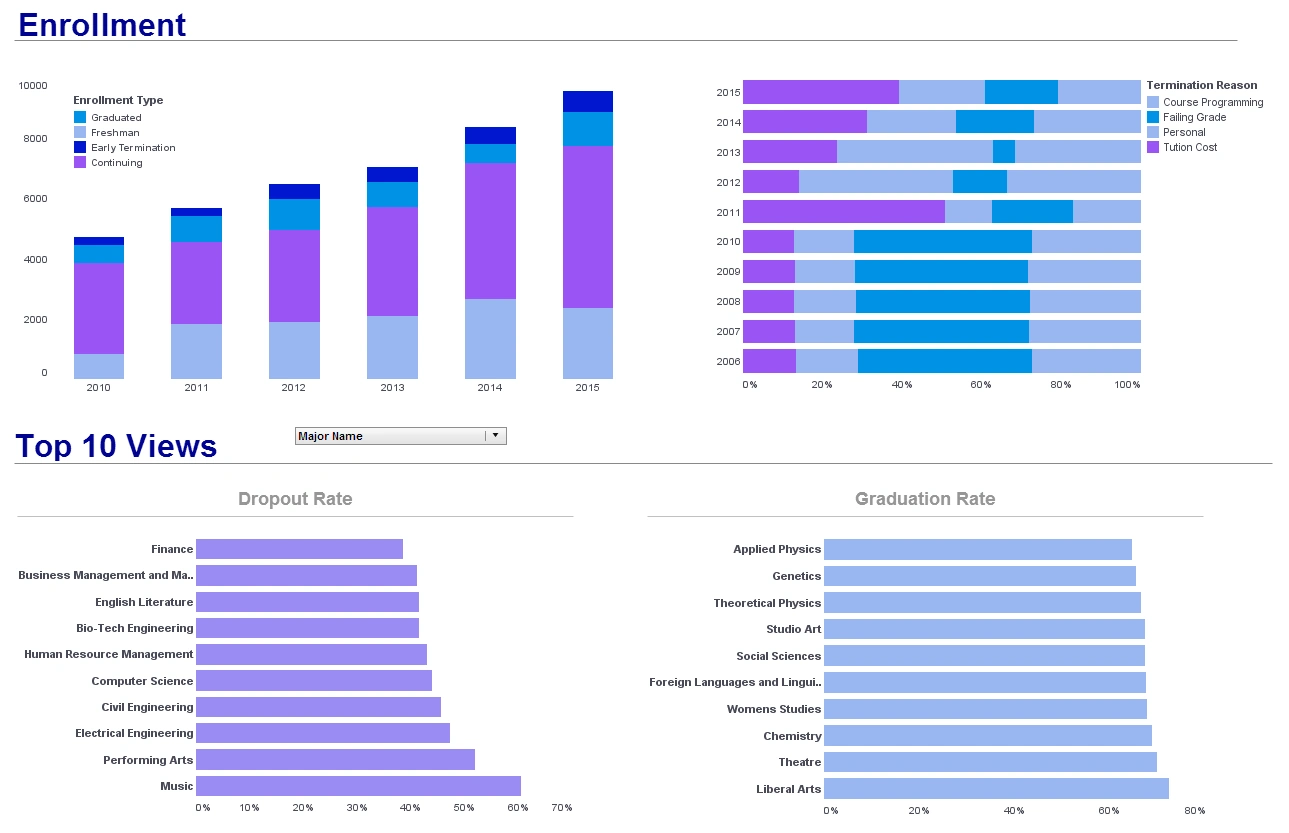
This university student retention dashboard breaks down dropouts and graduations by major while also displaying reasons for dropouts. Dashboards like this can help schools direct faculty to improve student retention. An enrollment type by year breakdown helps administrators know where to direct funds and also helps identify particular academic programs with student retention problems.
Higher Education KPI Dashboard
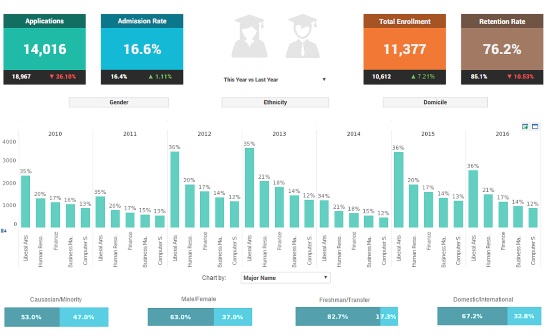
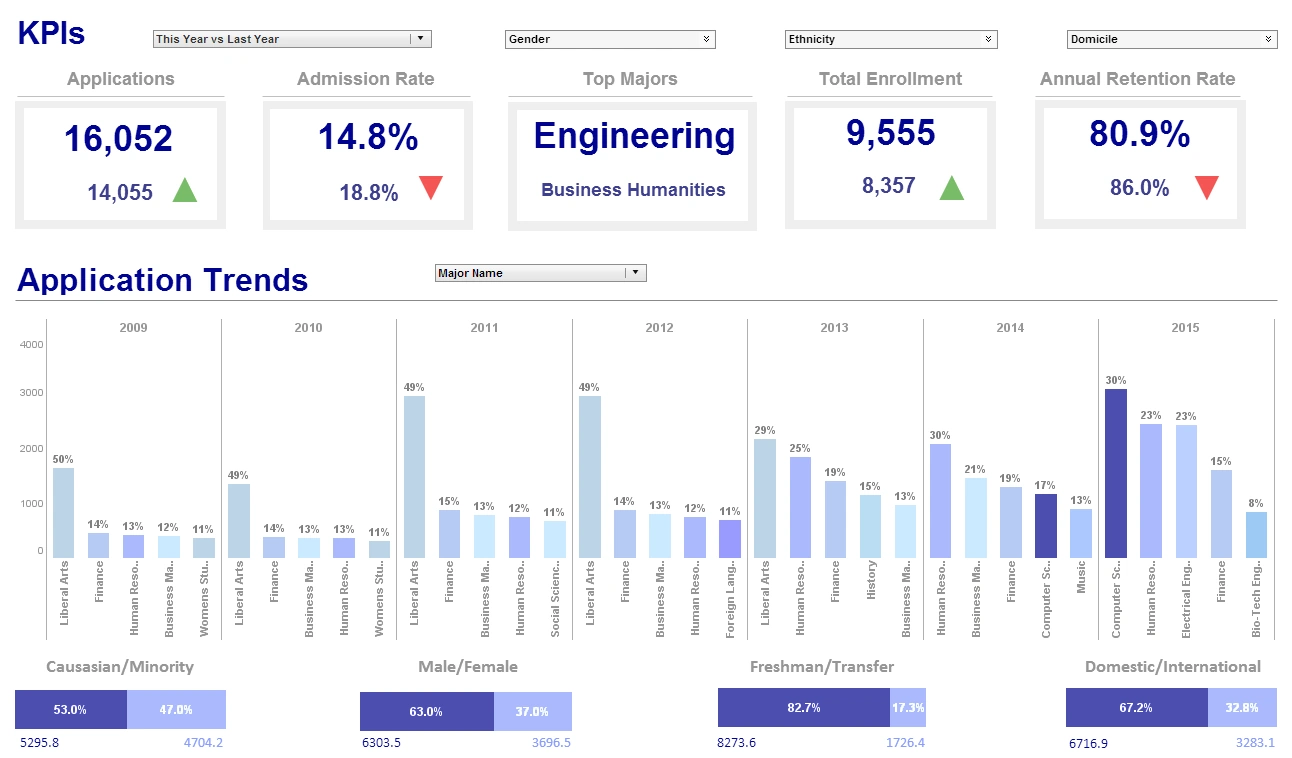
This higher education KPI dashboard shows a school administrator what the progression of major choices has been over the past several years, and breaks down the student population into various demographics, including race, gender, and other categories. The option to break down demographic data by class and major makes it easier for schools to implement and track the progress of diversity initiatives. Large, easy to read text KPIs display the dashboard's most important aggregates, with percent change from previous period displayed underneath them, giving college presidents an at a glance view of educational and social progress.
Academic Performance Report
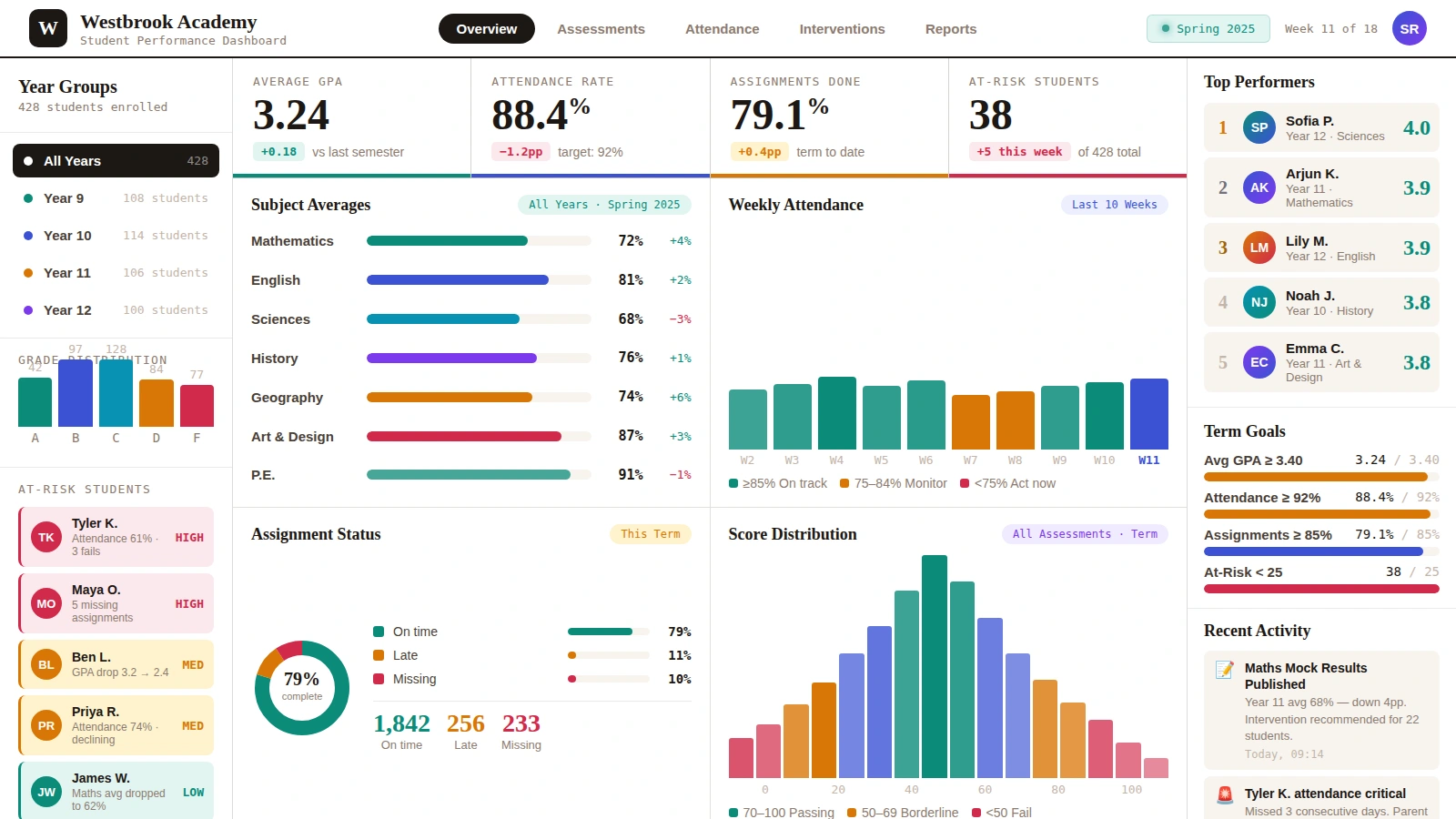
This academic performance report, built by InetSoft partner Assembly, helps teachers and school administrators track overall student performance. Charts display both student performance ratings and also student performance relative to the rest of their classes. A chart breaking down performance by ethnicity helps teachers and administrators ensure that no one is being marginalized or left behind. A table of individual student data, combined with a plethora of filters, helps the user drill down into identifying particular students who need extra attention.
Student Behavior Report
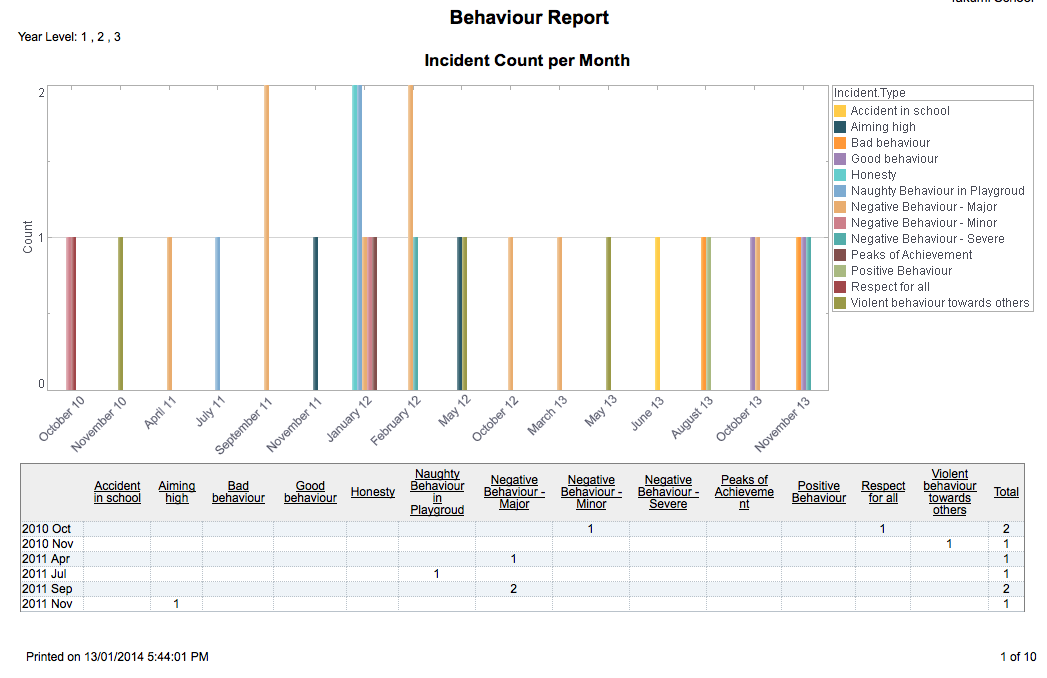
This student behavior report, built by InetSoft partner Assembly, aids in discipline and behavior correction by tracking incidents of both good and bad behavior by student. Different types of behavior are represented by different colors, with good behavior indicated by "calmer" colors such as blue and green, and negative incidents indicated by "hotter" colors such as orange or yellow.
AI Capabilities in University Dashboards
Modern university dashboards increasingly rely on artificial intelligence to help institutions improve student outcomes, optimize resources, and make faster, data‑driven decisions. AI enhances traditional reporting by adding predictive insights, automated alerts, and intelligent recommendations that support administrators, faculty, admissions teams, and finance offices.
Predictive Analytics for Student Success
AI models analyze historical and real‑time data to identify students who may be at risk academically or socially. Predictive indicators include GPA trends, LMS engagement, attendance patterns, and course performance.
- Retention predictions — Forecast which students are likely to return next term.
- Risk scoring — AI‑generated risk levels based on academic and behavioral signals.
- Intervention recommendations — Suggested actions for advisors and faculty.
AI‑Enhanced Admissions & Enrollment Insights
AI helps admissions teams understand applicant behavior, forecast enrollment, and optimize recruitment strategies.
- Yield forecasting — Predict which admitted students are most likely to enroll.
- Application funnel optimization — Identify bottlenecks in the admissions process.
- Demographic trend analysis — Spot shifts in applicant populations.
AI for Academic Performance Monitoring
AI helps faculty and academic leaders detect performance issues early and understand course‑level trends.
- DFW pattern detection — Identify courses with high drop, fail, or withdrawal rates.
- Grade distribution forecasts — Predict expected grade outcomes.
- Engagement insights — Analyze LMS activity for early warning signals.
AI‑Driven Financial & Operational Intelligence
AI supports finance and operations teams by forecasting budgets, modeling tuition revenue, and optimizing campus resources.
- Tuition revenue forecasting — Predict revenue based on enrollment trends.
- Budget variance prediction — Identify departments likely to exceed or underspend.
- Facility utilization optimization — Recommend classroom and lab scheduling improvements.
Natural Language Querying (NLQ)
AI‑powered natural language querying allows users to ask questions in plain English and receive instant visual answers.
- Ask‑a‑question analytics — Users type questions like “Show retention by major.”
- Instant chart generation — AI selects the best visualization automatically.
- Semantic understanding — AI interprets institutional terminology.
Automated Alerts & Smart Notifications
AI monitors key metrics and sends alerts when thresholds are crossed or unusual patterns appear.
- Anomaly detection — Identify unexpected changes in enrollment, grades, or attendance.
- Threshold alerts — Notify staff when KPIs fall outside acceptable ranges.
- Trend change detection — Highlight emerging patterns before they escalate.
AI‑Assisted Dashboard Creation
AI helps users build dashboards faster by recommending charts, KPIs, filters, and layouts based on the data selected.
- Smart chart suggestions — AI chooses the best visualization for each metric.
- Automatic KPI identification — AI detects important metrics in SIS, LMS, and finance data.
- Guided layout recommendations — AI proposes dashboard structures for each role.

University Dashboard FAQ
What is a university dashboard?
A university dashboard is a visual analytics tool that brings together data from SIS, LMS, CRM, and financial systems to help institutions monitor enrollment, retention, academic performance, and operational efficiency.
What KPIs should a university dashboard include?
Common KPIs include retention rate, persistence rate, graduation rate, enrollment trends, yield rate, DFW rate, tuition revenue, financial aid distribution, and course pass rates. You can explore more in the KPI lists.
Who uses university dashboards?
Administrators, faculty, admissions teams, institutional research staff, finance offices, and IT departments all rely on dashboards to make data‑informed decisions.
How do dashboards help improve student retention?
Dashboards highlight early warning indicators such as GPA decline, low LMS engagement, attendance issues, and course performance trends. Advisors can use these insights to intervene earlier and more effectively.
What systems should a university dashboard connect to?
Most dashboards connect to Student Information Systems (SIS), Learning Management Systems (LMS), Customer Relationship Management (CRM) platforms, financial systems, and campus operations tools.
Can a university dashboard support predictive analytics?
Yes. Modern dashboards include AI‑powered features such as retention predictions, risk scoring, yield forecasting, and budget modeling. See the AI capabilities section for details.
What makes InetSoft effective for higher education dashboards?
InetSoft combines ease of use with advanced data modeling, flexible deployment, SIS/LMS connectivity, and strong support for student success, admissions, academic performance, and financial analytics.
Can dashboards help admissions teams?
Yes. Admissions dashboards track application volume, acceptance rate, yield rate, funnel progression, demographic trends, and campus visit conversions. They help teams optimize recruitment strategies and forecast enrollment.
Do university dashboards support faculty needs?
Faculty use dashboards to monitor course pass rates, grade distributions, DFW patterns, student engagement, and workload metrics. These insights help improve teaching strategies and course design.
Can dashboards be customized for different roles?
Yes. Role‑based dashboards ensure administrators, faculty, admissions teams, and finance offices each see the metrics most relevant to their responsibilities. Explore role‑based use cases.
Can dashboards be shared across departments?
Dashboards can be shared through secure links, embedded in portals, or integrated into campus systems. Permissions ensure each user sees only the data they are authorized to access.
Do university dashboards support real‑time data?
Yes. Dashboards can refresh automatically using live SIS, LMS, and operational data feeds, making them suitable for real‑time monitoring and decision‑making.
More Articles About Higher Education Dashboards
-
Unified Admissions Analytics
for Universities
This case study from Indiana University describes how a university admissions office integrated multiple data streams—Common App, test scores, financial aid—into a single dashboard. The dashboard improved forecasting accuracy, automated manual workflows, and increased enrollment yield. Staff gained real-time visibility into applicant engagement and operational efficiency. -
Campus Call Center Performance Insights
Midwest State University deployed a university‑wide support dashboard to monitor call volumes, response patterns, and service trends across multiple campuses. University staff learned to recognize anomalies in support metrics, enabling proactive resource allocation. The tool improved operational oversight and student satisfaction response. -
Browser‑Based Academic Analytics Platform
This article showcases a zero‑client, browser-deployed dashboard system used at universities like Carnegie Mellon, Rutgers, and Florida International. The solution supports self-service visualization without requiring installations or heavy IT support. It enables rapid deployment, intuitive use, and scalable performance across higher education institutions. -
Interactive University KPI Dashboard
Examples
This article presents sample dashboards used by higher education institutions to track metrics such as retention rates, graduation demographics, housing usage, and faculty ratios. The visuals help administrators compare academic performance and resource utilization across departments. Dashboards are shown as tools for operational insight, benchmarking, and strategic planning. -
Executive Dashboards at
Sullivan University
Sullivan University selected InetSoft Style Scope to deliver tablet-accessible dashboards to executive leadership, replacing ad-hoc report requests. The executive dashboards offered real-time institutional insight without reliance on IT staff for report generation. Leadership gained clarity on financials, enrollment, and strategic metrics. -
Campus Reporting
Platform at Simpson University
Simpson University adopted Style Intelligence to consolidate cloud and on‑premise data systems into a centralized dashboard infrastructure. Power users gained self-service access to institutional metrics and analytics, dramatically reducing IT backlog. The project delivered operational efficiencies and lowered total cost of ownership. -
Institution‑Wide
Analytics for Christian University
In the same story, Simpson University used self-service dashboards to empower non-technical staff across departments to build and share reports. The initiative enabled real-time visibility into enrollment, finance, and academic performance data. Staff cited improved data access and reduced turnaround time on reporting inquiries. -
University Data Mashup Strategy
The article emphasizes how higher education institutions leverage data mashup capabilities to blend enrollment, demographic, academic, and financial data. Administrators can drill down into student profiles, retention risks, and budget allocations via flexible dashboards. This approach supports benchmarking across peer institutions and departments. -
Higher Ed Strategic Decision
Support System
At Indiana University, dashboards transitioned from reactive reports to predictive operational tools by integrating analytics into admissions and student services. Real-time dashboards empowered staff to act on trends in retention, system usage, and support requests. The transformation improved data-driven decision-making across the university. -
Student Retention And Diversity Metric
Dashboards
Example dashboards track student retention by major, demographics, and reasons for attrition to help guide interventions. Diversity metrics and program participation trends are visualized alongside academic performance. These dashboards help institutions identify underperforming programs or student cohorts and target resources more efficiently.