Designing Business Intelligence Systems and Dashboards That Drive Better Decision-Making
Designing an effective Business Intelligence (BI) system is no longer a matter of assembling charts, connecting a few data sources, and hoping users will find their way to insight. Modern organizations operate in environments defined by speed, complexity, and constant change. Decision-makers need clarity, not clutter; context, not noise; and workflows that guide them toward action rather than overwhelm them with raw information. BI design has evolved into a discipline that blends data modeling, visual communication, user experience, and operational strategy. When executed well, it becomes a competitive advantage that shapes how organizations think, plan, and respond.
Why Business Intelligence Design Matters
The purpose of BI design is to transform data into a decision-ready format. This requires more than technical capability. It demands intentional design choices that align analytics with the way people actually work. A well-designed BI system reduces cognitive load, accelerates interpretation, and ensures that insights are consistent across teams. Poor design, on the other hand, leads to misinterpretation, low adoption, and fragmented decision-making.
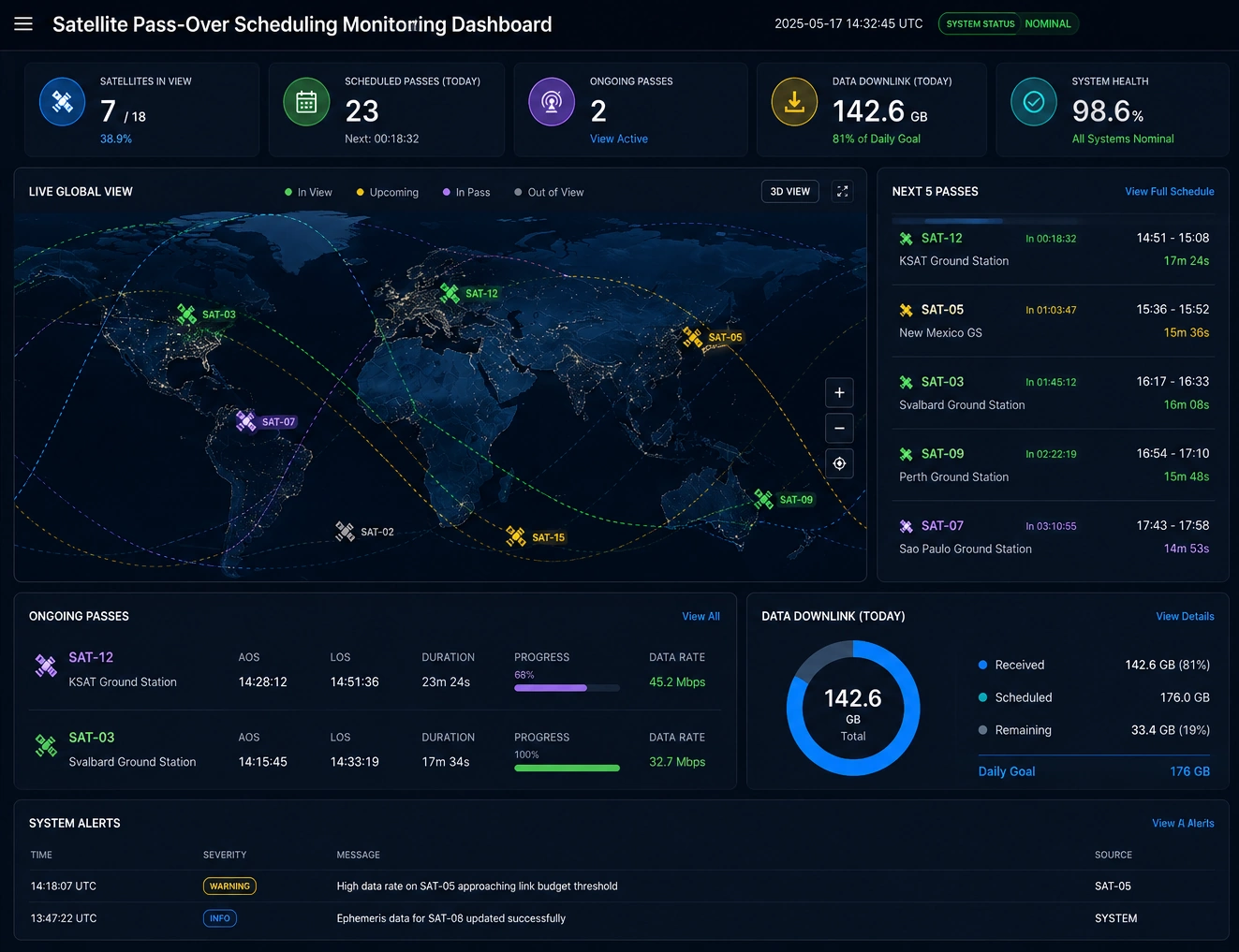

Organizations that prioritize BI design consistently report improvements in operational efficiency, forecasting accuracy, and strategic alignment. They also experience higher trust in data, because well-designed dashboards reinforce clarity and consistency. As BI tools become more powerful and more accessible, design becomes the differentiator that determines whether analytics deliver value or simply add complexity.
Core Principles of Effective BI Design
User-Centered Insight Delivery
Every dashboard should begin with a clear understanding of who will use it and what decisions it must support. Executives require high-level KPIs, trend signals, and scenario comparisons. Analysts need flexible exploration paths, drill-down capabilities, and the ability to pivot between dimensions. Operational teams depend on real-time alerts, threshold indicators, and workflow triggers. Designing for everyone at once results in dashboards that serve no one well. User-centered BI design ensures that each audience receives the right level of detail, in the right format, at the right time.
Consistent Visual Standards
Visual consistency is essential for reducing cognitive friction. When colors, chart types, typography, and layout patterns follow a unified design system, users spend less time interpreting and more time understanding. Consistency also reinforces trust: when KPIs appear in predictable locations and follow predictable rules, users gain confidence in the data. A strong BI design framework includes standardized palettes, chart usage guidelines, spacing rules, and interaction patterns that apply across all dashboards.

Data Modeling That Supports the Story
A dashboard is only as strong as the data model behind it. Clean hierarchies, conformed dimensions, and well-defined metrics ensure that insights remain accurate and repeatable. Poor modeling leads to conflicting numbers, broken drill paths, and inconsistent definitions. Effective BI design integrates data modeling into the design process rather than treating it as a separate technical task. The structure of the data should support the narrative the dashboard is intended to convey.
Adaptive and Responsive Layouts
Modern BI environments must support multiple devices, embedded analytics, and dynamic resizing. Dashboards should adapt gracefully to different screen sizes without compromising clarity. Responsive design ensures that mobile users, field teams, and embedded application users receive the same quality of insight as desktop users. This requires thoughtful layout planning, flexible grid systems, and visual components that maintain readability at any scale.
Key Features of High-Impact BI Dashboards
High-impact dashboards share a set of common characteristics that make them effective across industries and use cases. These features help users move from observation to action with minimal friction.
Role-Based KPI Frameworks provide tailored metrics aligned to specific responsibilities. Instead of overwhelming users with dozens of indicators, role-based design focuses on the KPIs that matter most to each decision-maker.
Real-Time Operational Monitoring enables teams to respond quickly to emerging issues. Live data streams, anomaly detection, and alerting mechanisms help organizations maintain situational awareness and reduce downtime.
Guided Analytics Workflows offer structured exploration paths that reduce analysis friction. These workflows help users navigate complex data without requiring advanced analytical skills.
Predictive and Prescriptive Insights integrate forecasting models directly into dashboards. This allows users to evaluate future scenarios, assess risk, and make proactive decisions.
Self-Service Exploration Tools empower non-technical users to answer their own questions. When designed well, self-service capabilities reduce bottlenecks and democratize access to insight.

How Strong BI Design Improves Decision-Making
Faster Time to Insight
Clear layouts, intuitive navigation, and well-structured data reduce the time required to interpret information. Users can identify trends, anomalies, and opportunities more quickly, enabling faster responses to changing conditions.
Higher Data Trust and Adoption
When dashboards are consistent, accurate, and easy to use, adoption increases across the organization. Users trust data that is presented clearly and reliably. Strong BI design reinforces that trust by eliminating ambiguity and ensuring that metrics are defined and displayed consistently.
Better Alignment Across Teams
Shared KPI definitions and standardized visualizations ensure that every department is working from the same source of truth. This alignment reduces conflict, improves collaboration, and supports unified strategic planning.
Operational Efficiency Gains
Real-time dashboards help teams identify bottlenecks, reduce downtime, and optimize resource allocation. When insights are delivered in a timely and actionable format, organizations can streamline processes and improve performance.

Example Use Cases
Executive Strategy Dashboards
Executives rely on dashboards that provide a clear view of organizational performance. These dashboards typically include high-level KPIs, forecasting models, and scenario simulations that support quarterly and annual planning. Effective design ensures that leaders can quickly assess progress, identify risks, and make informed decisions.
Operational Control Centers
Operational teams require real-time visibility into processes, equipment, and workflows. Dashboards designed for control centers must prioritize speed, clarity, and alerting. They often include live data feeds, threshold indicators, and drill-down paths that allow teams to diagnose issues quickly.
Financial Performance Dashboards
Finance teams depend on dashboards that provide accurate and timely insight into revenue, expenses, margins, and cash flow. Strong BI design ensures that financial dashboards maintain strict consistency in metric definitions and support detailed variance analysis.
Customer and Sales Intelligence
Sales and marketing teams use dashboards to track pipeline health, customer behavior, churn risk, and campaign performance. Effective design highlights opportunities, flags risks, and supports segmentation analysis that guides strategic action.
Why InetSoft Excels at BI Design
InetSoft’s BI platform is built for organizations that need flexible, scalable, and visually consistent analytics. With powerful data modeling, adaptive dashboards, and a robust self-service layer, InetSoft enables teams to design BI experiences that match their decision-making needs. The platform supports responsive layouts, embedded analytics, and governed data structures that ensure accuracy and consistency across all dashboards.
By combining visual design standards with enterprise-grade data modeling, InetSoft helps organizations create BI systems that deliver clarity, speed, and strategic value. Whether supporting executives, analysts, or operational teams, InetSoft provides the tools needed to design dashboards that truly drive better decisions.