What Is an Exception Dashboard?
An exception dashboard is a business intelligence dashboard designed to highlight metrics, events, and conditions that fall outside predefined performance thresholds. Rather than displaying every operational detail, exception dashboards focus attention on anomalies, risks, violations, and performance issues that require immediate action.
Organizations use exception dashboards to improve operational awareness, accelerate decision-making, and help managers focus on the areas that have the greatest business impact. Instead of searching through reports for potential problems, users can quickly identify exceptions and investigate root causes using interactive analytics tools such as StyleBI.

Understanding Exception Dashboards
Most organizations generate large volumes of operational data every day. Monitoring every transaction, KPI, customer interaction, or inventory movement can overwhelm decision-makers. Exception dashboards solve this problem by applying business rules that identify unusual conditions and highlight items requiring attention.
An exception occurs whenever a metric exceeds, falls below, or deviates from an expected value. These exceptions are then displayed prominently so users can prioritize corrective actions.
Rather than asking, "What happened today?" an exception dashboard answers, "What needs attention right now?"
How Exception Dashboards Work
Exception dashboards continuously monitor business data against predefined criteria, thresholds, or key performance indicators. When a condition meets the exception criteria, the dashboard highlights it using visual indicators such as colors, alerts, icons, notifications, or rankings.
Typical exception monitoring includes:
- KPI threshold violations.
- Unexpected revenue declines.
- Inventory shortages.
- Production defects.
- Customer service backlogs.
- Fraud indicators.
- Website outages.
- Compliance violations.
Key Components of an Exception Dashboard
Exception Indicators
Color-coded status lights, warning icons, gauges, and visual signals help users identify critical issues at a glance.
Threshold Monitoring
Business rules define acceptable operating ranges and identify deviations that require investigation.
Prioritization
Exceptions are often ranked by severity, financial impact, or operational risk so users know where to focus first.
Drill-Down Analysis
Users can move from summary views into detailed data to identify underlying causes.
Alerts and Notifications
Automated alerts ensure stakeholders become aware of important issues as soon as they occur.
Benefits of Exception Dashboards
- Faster identification of business problems.
- Reduced time spent reviewing routine metrics.
- Improved operational efficiency.
- Faster response to emerging risks.
- Better resource prioritization.
- Increased accountability.
- Enhanced executive visibility.
- More proactive decision-making.
By focusing attention only on unusual events, exception dashboards help organizations manage by exception rather than trying to monitor every activity equally.
Common Exception Dashboard Use Cases
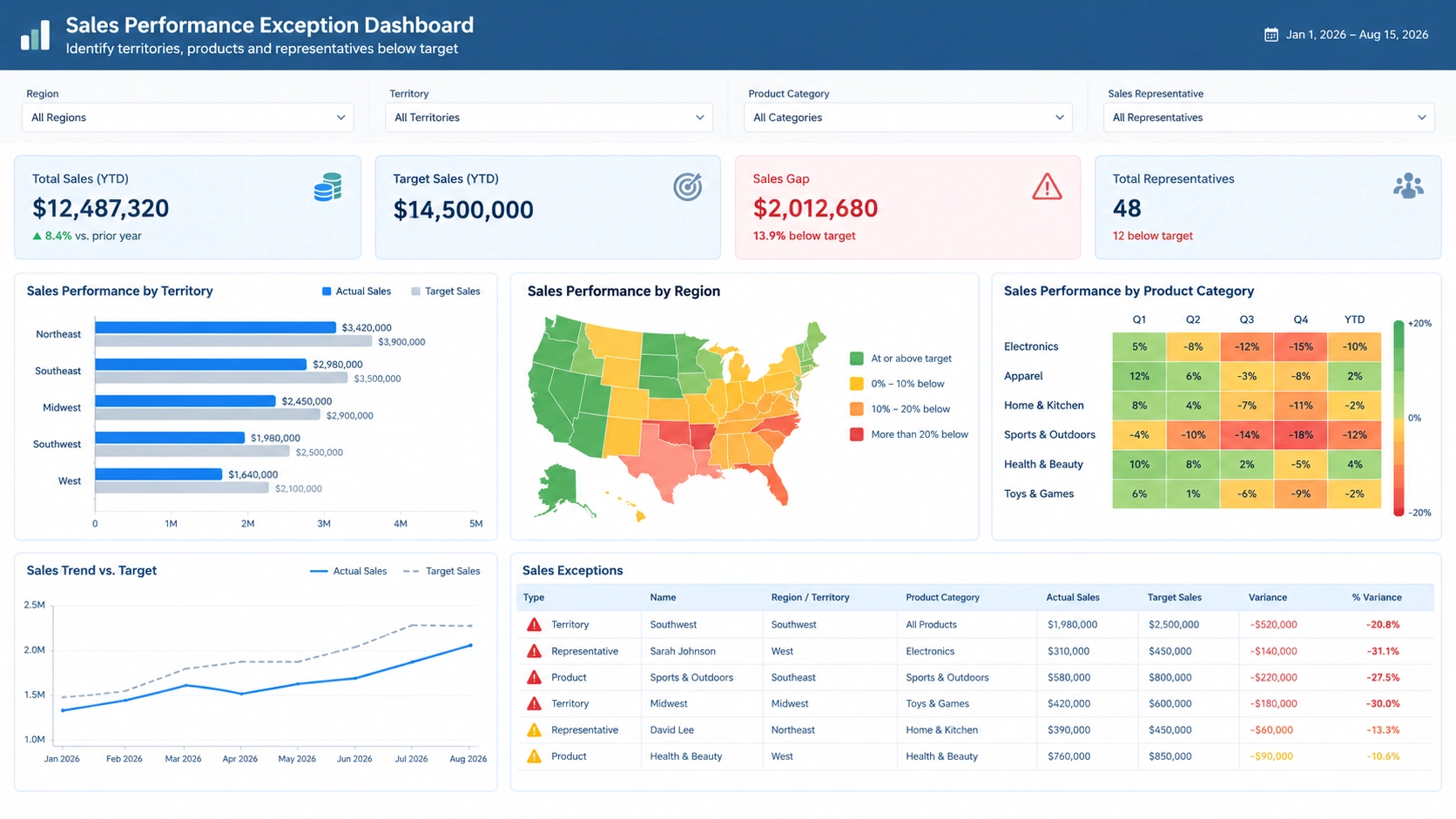
Sales Performance Monitoring
Managers identify territories, products, or representatives that fall below sales targets.
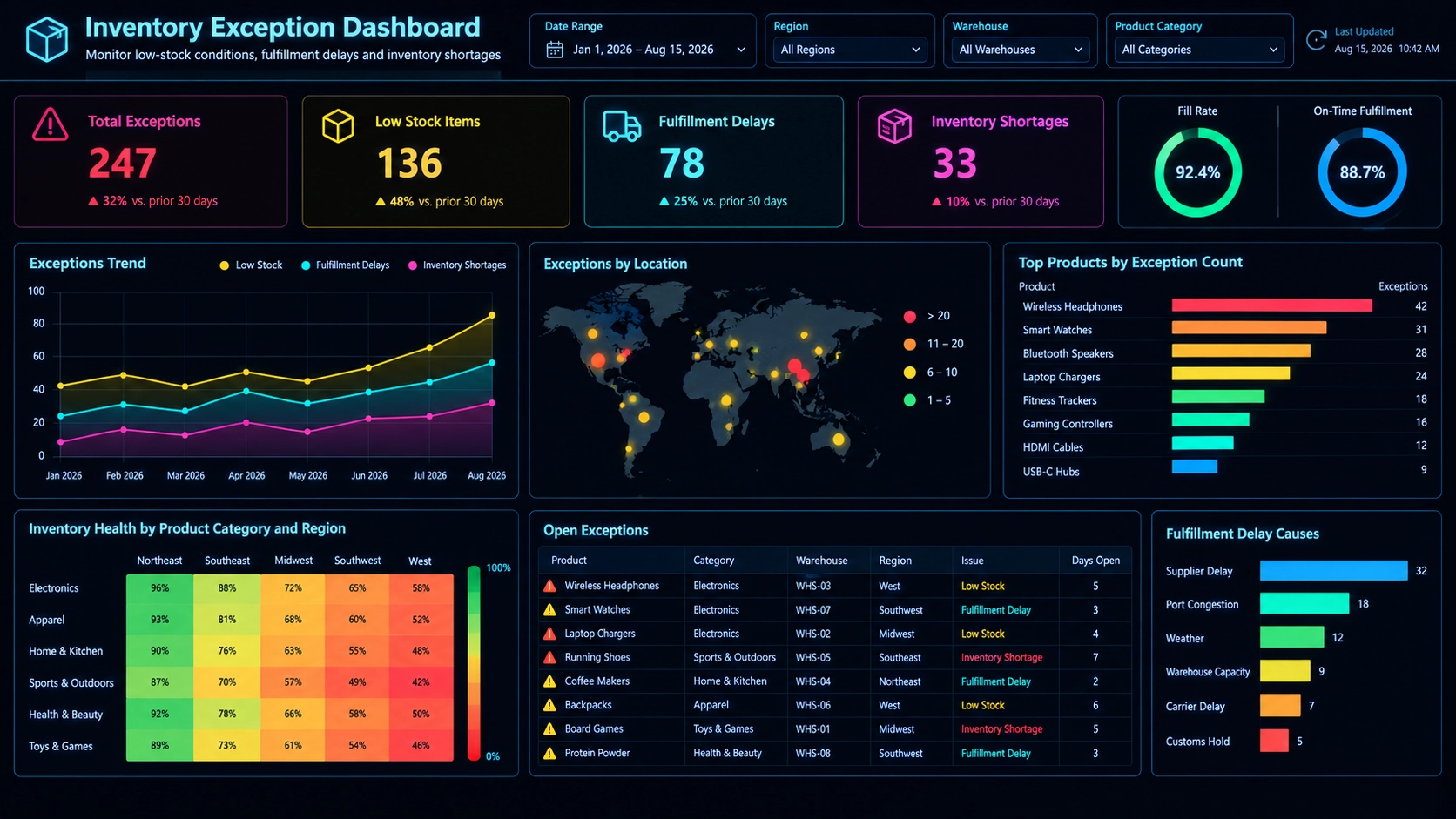
Inventory Management
Supply chain teams monitor low-stock conditions, fulfillment delays, and inventory shortages.
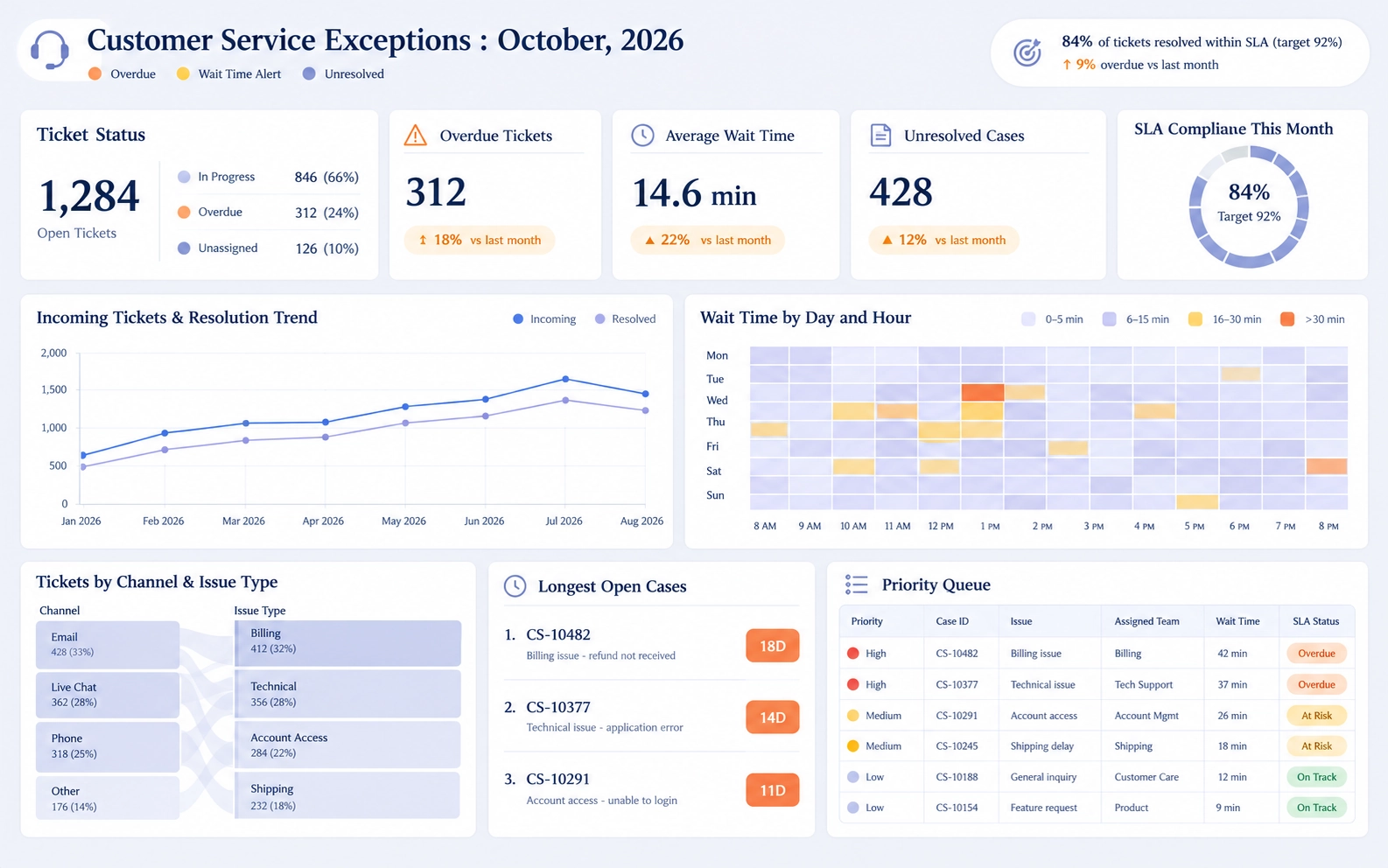
Customer Service Operations
Service managers track overdue tickets, rising wait times, and unresolved support cases.
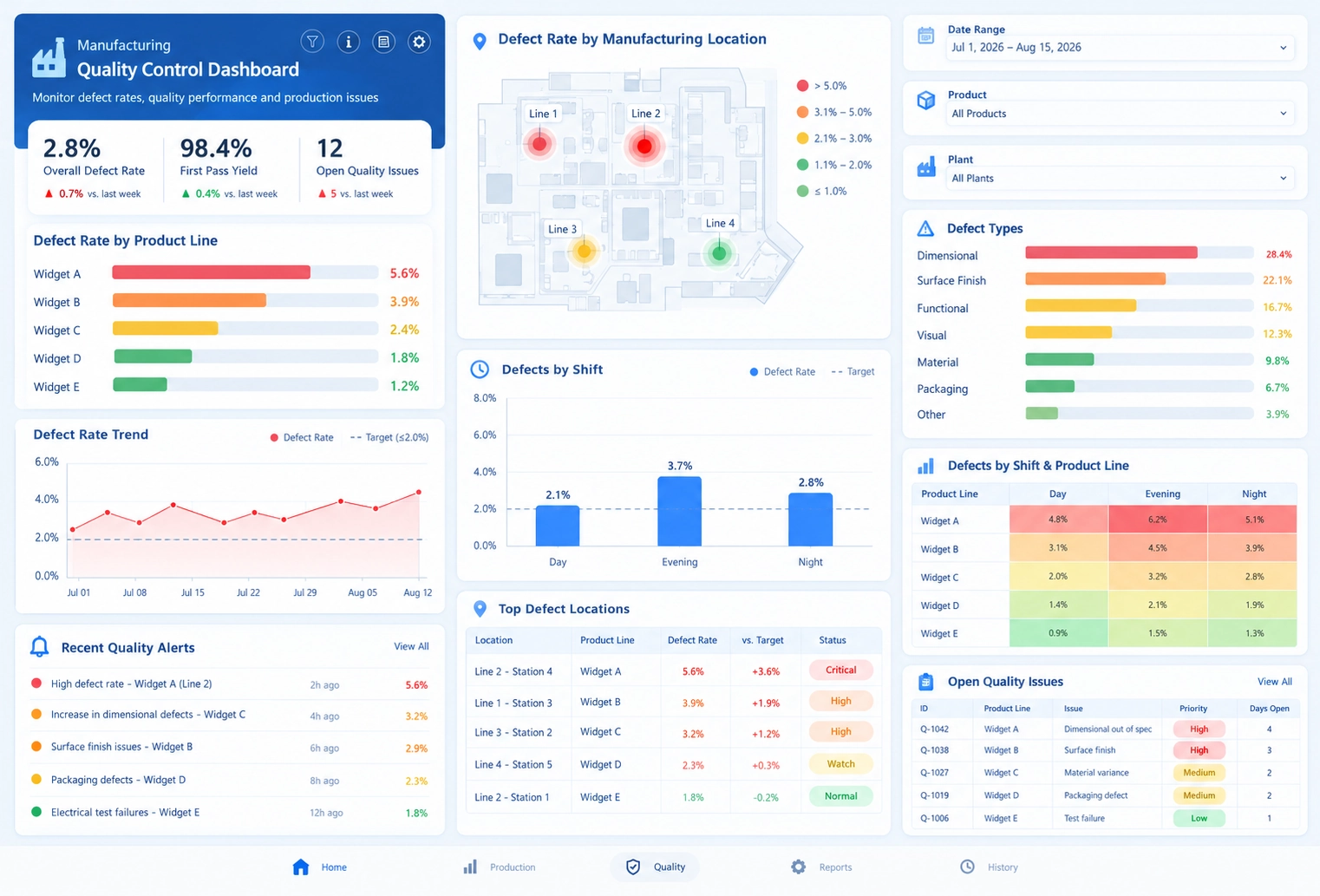
Manufacturing Quality Control
Production teams investigate defect rates that exceed acceptable limits.
Financial Risk Management
Finance departments monitor unusual transactions, budget overruns, and cash flow concerns.
Building Exception Dashboards with StyleBI
StyleBI enables organizations to create interactive exception dashboards that combine real-time monitoring, KPI tracking, data visualization, and alerting capabilities in a single environment.
Users can define thresholds for critical business metrics and automatically highlight violations with conditional formatting. Executives and operational managers can quickly identify issues through color-coded scorecards, KPI indicators, heat maps, and exception reports.
StyleBI also supports drill-down analytics, allowing users to investigate exceptions, identify contributing factors, and take corrective action without switching between multiple reporting systems.
By integrating data from ERP, CRM, financial, operational, and cloud applications, StyleBI provides a comprehensive view of exception conditions across the enterprise.
Real-World Use Case: Retail Inventory Exception Dashboard
A national retailer manages inventory across hundreds of stores and distribution centers. Maintaining product availability is critical because stockouts directly impact revenue and customer satisfaction.
The company uses a StyleBI exception dashboard to monitor inventory levels for thousands of products. Management establishes rules that flag any item with less than seven days of available inventory as an exception.
The dashboard immediately highlights affected locations using red indicators and ranks shortages based on projected revenue impact. Supply chain managers can drill into the exception to identify specific products, suppliers, distribution centers, and shipment delays contributing to the issue.
During a seasonal demand surge, the dashboard identifies multiple high-demand products at risk of stockout. Managers quickly redistribute inventory from nearby warehouses and expedite replenishment orders before customers are affected.
By focusing attention on exception conditions rather than reviewing all inventory records, the retailer improves operational efficiency and reduces lost sales opportunities.
Best Practices for Designing Exception Dashboards
- Focus on the most important business exceptions.
- Use clear and consistent threshold definitions.
- Limit visual clutter.
- Highlight severity levels with color and indicators.
- Enable drill-down analysis for root cause investigation.
- Provide real-time or near-real-time updates.
- Implement automated alerts for critical events.
- Review exception rules regularly as business requirements evolve.
Maintain Stronger Control Over Business Performance
An exception dashboard is a specialized business intelligence tool that helps organizations focus on anomalies, threshold violations, and high-priority business issues. By highlighting only the metrics and events that require action, exception dashboards improve efficiency, reduce information overload, and accelerate decision-making.
With StyleBI, organizations can build interactive exception dashboards that provide real-time visibility into operational risks, automate alerting, and enable fast root cause analysis. As a result, teams can resolve issues more quickly and maintain stronger control over business performance.