From Sigma To StyleBI In Forensic Engineering Dashboards
Apex Forensic Analytics is a mid-sized forensic engineering and failure analysis firm specializing in structural collapses, metallurgical failures, industrial accidents, and complex insurance disputes. Its engineers and scientists work with massive volumes of case data: photographs, lab results, chain-of-custody records, inspection notes, CAD references, and legal timelines.
For years, Apex relied on Sigma as its primary dashboard and analytics layer on top of cloud data warehouses. Sigma helped the firm move away from static spreadsheets, but as the caseload grew and clients demanded more interactive, scenario-driven insights, the limitations of their existing setup became impossible to ignore.
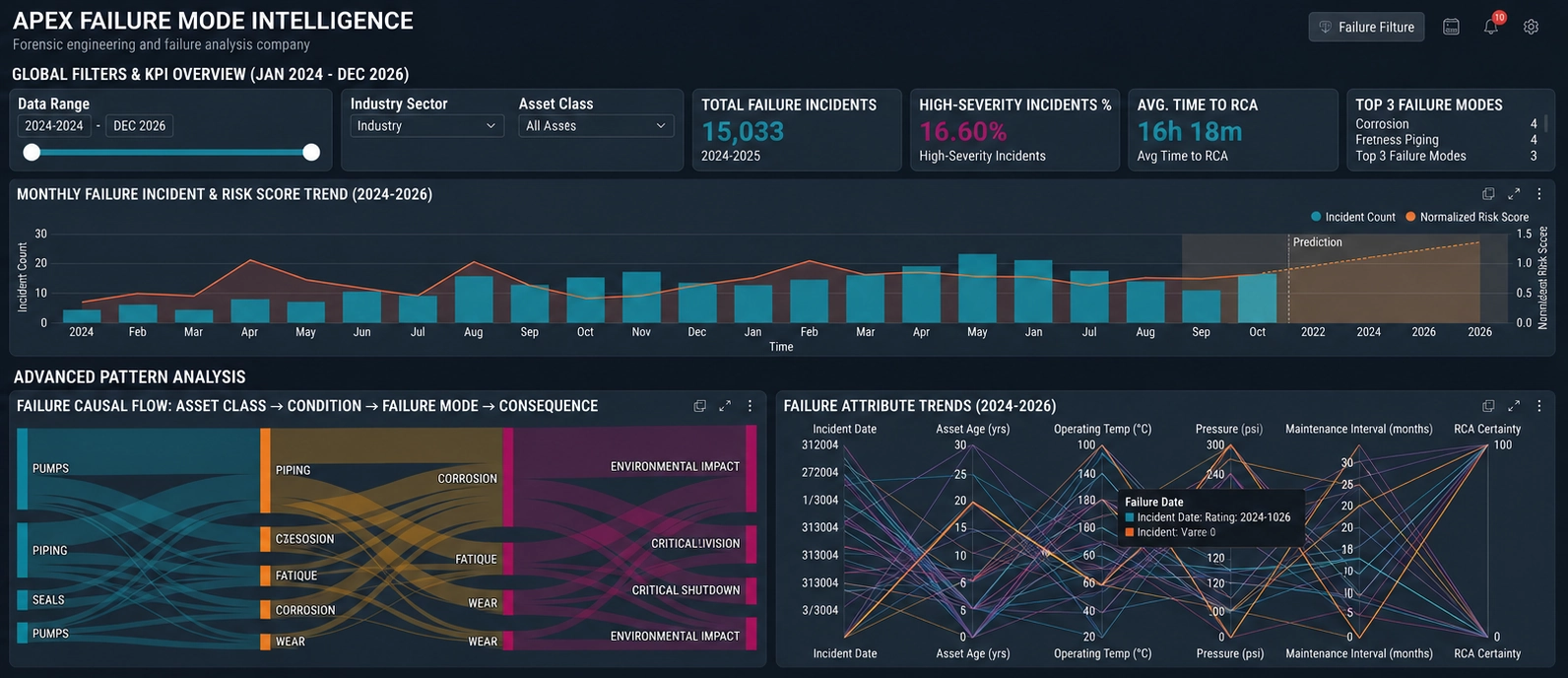
The firm’s leadership realized that dashboards were no longer just internal reporting tools. They had become part of the deliverable itself: visual narratives that insurers, attorneys, and risk managers used to understand what failed, why it failed, and how similar incidents could be prevented. Apex needed a platform that could support highly specialized workflows, complex data relationships, and non-technical users without sacrificing governance or performance. That realization triggered a strategic evaluation of alternatives and ultimately led them to StyleBI.

Limitations Of The Existing Sigma Environment
Sigma had initially been attractive because it promised spreadsheet-like familiarity on top of modern data infrastructure. Engineers could build basic reports without learning a new programming language, and the firm could centralize data in a single warehouse. However, as Apex’s forensic practice matured, several pain points emerged. Complex case structures, where a single incident might involve dozens of samples, multiple facilities, and overlapping timelines, were difficult to model cleanly in Sigma’s interface. Dashboards became cluttered, and performance degraded when users attempted to slice data across many dimensions.
Another challenge was workflow alignment. Forensic engineering is not a generic analytics use case; it involves strict chain-of-custody tracking, versioned lab results, and legally defensible documentation. Sigma’s dashboards were good at aggregating numbers but less effective at guiding users through the investigative process. Engineers often reverted to external tools or manual checklists to ensure that all required steps were completed. This fragmentation increased the risk of oversight and made it harder for managers to see, at a glance, where each case stood in the investigative pipeline.
Collaboration also suffered. While Sigma allowed multiple users to access dashboards, it did not provide the kind of scenario-based, role-aware experiences Apex wanted. Senior engineers, lab technicians, and litigation support staff all needed different views of the same data, with tailored filters, workflows, and annotations. Building and maintaining these variations in Sigma required significant effort, and changes often broke existing reports. Over time, the analytics team found itself spending more time maintaining dashboards than improving them.

Strategic Reasons For Choosing StyleBI
When Apex began evaluating alternatives, StyleBI stood out because it approached dashboards as narrative and workflow tools rather than just visual aggregations. The platform’s emphasis on scenario-driven design aligned perfectly with forensic engineering, where each case is a story with a beginning, middle, and end. StyleBI allowed Apex to build dashboards that mirrored the actual investigative lifecycle: incident intake, evidence collection, lab analysis, engineering conclusions, and client reporting.
Another decisive factor was StyleBI’s flexibility in modeling complex relationships. Apex’s data model includes cases, incidents, samples, tests, facilities, clients, and legal matters, all interconnected. StyleBI’s ability to handle these relationships without forcing engineers into rigid structures meant that dashboards could reflect reality more accurately. Instead of flattening data into oversimplified tables, Apex could preserve the richness of its case records and still deliver fast, intuitive visualizations.
Governance and auditability were equally important. In forensic engineering, every chart and metric may eventually be scrutinized in court. StyleBI’s approach to data lineage, version control, and controlled access gave Apex confidence that dashboards would remain defensible. Changes to calculations, filters, or data sources could be tracked and documented, ensuring that any question about “what the dashboard showed at the time” could be answered with precision.
Migration Journey From Sigma To StyleBI
The migration began with a careful inventory of existing Sigma dashboards. Apex categorized them into three groups: operational case management, lab performance metrics, and client-facing risk summaries. Rather than attempting a one-to-one recreation, the team used the transition as an opportunity to rethink how each dashboard served its audience. StyleBI’s design philosophy encouraged them to start with questions and workflows instead of charts.
For operational case management, Apex built a “Case Command Center” in StyleBI. This dashboard replaced several fragmented Sigma reports with a single, cohesive view. Engineers could see open cases, current investigative stage, assigned team members, outstanding tasks, and upcoming deadlines. Drill-down paths allowed users to move from high-level metrics into detailed evidence records, lab results, and historical notes without leaving the dashboard. The result was a more intuitive, narrative-driven experience that Sigma had struggled to provide.
Lab performance dashboards were redesigned to focus on throughput, quality, and compliance. StyleBI’s ability to handle complex filters and time-based comparisons made it easier to track test turnaround times, rework rates, and adherence to protocols. Managers could quickly identify bottlenecks, such as specific test types or equipment that consistently delayed cases. In Sigma, these insights required multiple overlapping dashboards and manual exports; in StyleBI, they became part of a single, interactive view.
Client-facing risk summaries underwent the most dramatic transformation. Instead of static charts exported from Sigma, Apex used StyleBI to create interactive narratives that could be shared with insurers and legal teams. These dashboards highlighted patterns across incidents, such as recurring material defects, common environmental conditions, or design oversights. Clients could explore scenarios, adjust filters, and see how risk profiles changed across portfolios of assets. This level of engagement turned dashboards into collaborative tools rather than one-way reports.

Impact On Daily Forensic Engineering Workflows
The switch to StyleBI changed how Apex’s engineers interacted with data on a daily basis. Instead of logging into Sigma to pull generic reports, they now enter dashboards that are explicitly designed around their roles and responsibilities. A structural engineer might start the day in a view that lists all cases involving load-bearing failures, with quick access to relevant drawings, test results, and site photos. A metallurgist might see a dashboard focused on fatigue and corrosion cases, with filters for alloy type, environment, and failure mode.
Chain-of-custody tracking became more transparent. StyleBI dashboards show the journey of each sample from collection to final report, including who handled it, when tests were performed, and whether any anomalies were detected. This visibility reduces the risk of missing documentation and makes audits far less painful. In Sigma, such tracking required multiple reports and manual cross-referencing; in StyleBI, it is woven into the core case dashboards.
Collaboration improved as well. StyleBI’s role-aware design allows Apex to present different layers of detail to different users without duplicating dashboards. Senior leadership can see strategic metrics, such as case volume by incident type or revenue by client, while investigators focus on operational details. Comments, annotations, and shared views help teams align on interpretations of data, which is critical when preparing expert reports or testimony.
Business Outcomes And Future Direction
Within months of switching from Sigma to StyleBI, Apex observed tangible benefits. Case cycle times decreased because engineers spent less time hunting for information and more time analyzing failures. Lab managers used performance dashboards to justify investments in new equipment and training, backed by clear evidence of bottlenecks. Clients responded positively to the new interactive risk summaries, often requesting follow-up sessions to explore scenarios in more depth.
The firm also noticed a cultural shift. Data was no longer perceived as something managed by a small analytics team; it became a shared asset embedded in everyday workflows. StyleBI’s dashboards encouraged curiosity and exploration, leading engineers to spot patterns they might have missed in static Sigma reports. These insights fed back into design recommendations, maintenance guidelines, and risk mitigation strategies, strengthening Apex’s value proposition in the forensic engineering market.
Looking ahead, Apex plans to extend its StyleBI environment to cover predictive and preventive analytics. By combining historical failure data with external information such as weather, usage patterns, and material specifications, the firm aims to help clients identify assets at elevated risk before incidents occur. While Sigma helped Apex take its first steps into modern analytics, StyleBI has become the platform on which the firm can build a truly scenario-driven, future-oriented forensic engineering practice.