Using StyleBI for Complex Transformation Logic in the BI Layer
In many organizations, complex transformation logic still lives in a patchwork of SQL scripts, legacy ETL tools, and Excel workbooks. That makes analytics brittle, hard to govern, and slow to change. StyleBI takes a different approach: it brings a full data transformation pipeline directly into the BI layer, so you can centralize business logic where it is designed, governed, and reused alongside dashboards and reports.
Instead of treating data preparation as a separate, upstream project, StyleBI lets you model joins, aggregations, calculations, and data quality rules inside a governed semantic layer and visual transformation flows. The result is a BI environment where complex logic is explicit, versionable, and reusable—without forcing every change through a data warehouse team.
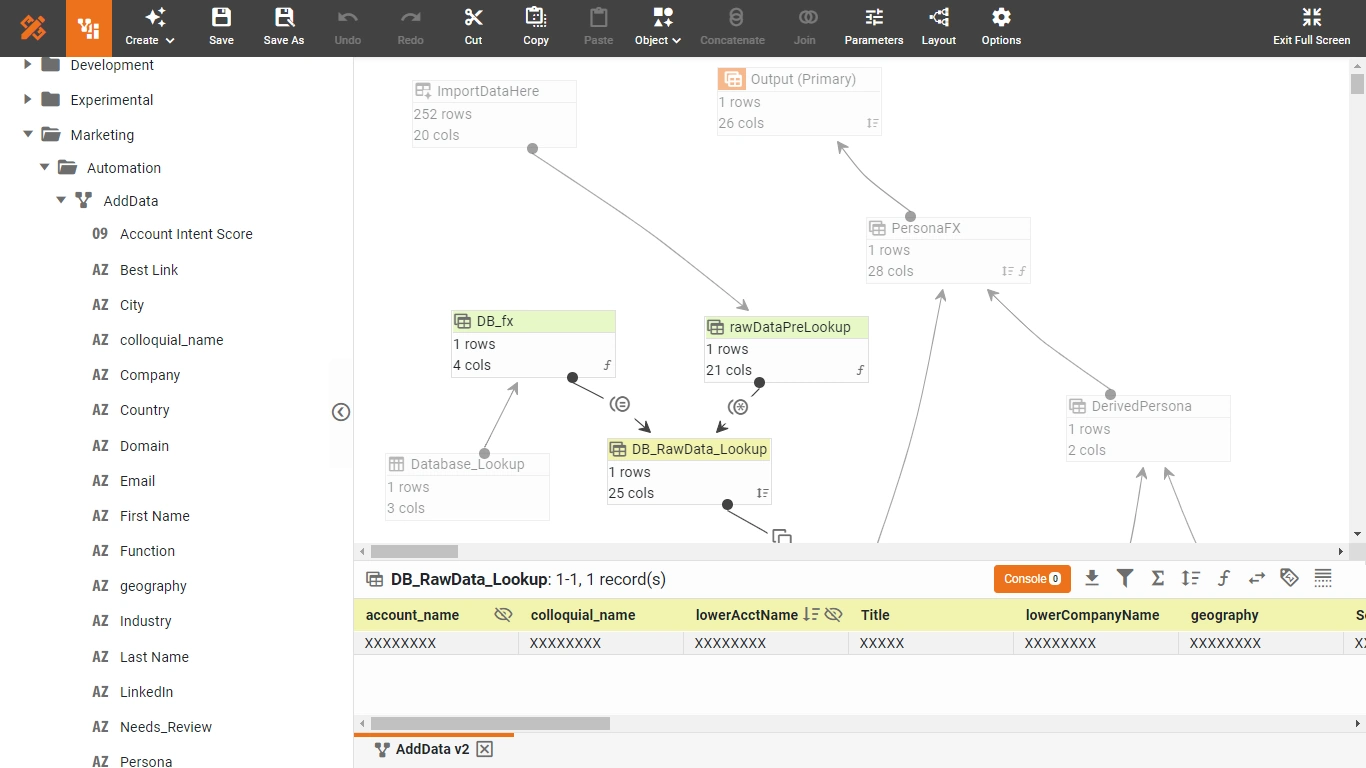

Why Move Complex Transformations into the BI Layer?
Traditional BI stacks push most transformation logic into ETL or ELT pipelines. That works for stable, slowly changing requirements, but it breaks down when business questions evolve weekly. Moving transformation logic into StyleBI’s BI layer offers several advantages:
- Faster iteration: Analysts can adjust logic in hours instead of waiting for ETL release cycles.
- Closer to the user: The people who understand the metrics can see and refine the logic that defines them.
- Governed reuse: Once a transformation is defined in the semantic layer, it can be reused across dashboards and reports.
- Reduced tool sprawl: Fewer separate ETL tools and Excel workflows to maintain and audit.
StyleBI is built around a data mashup engine and transformation pipeline, so this isn’t an afterthought. It is a core design principle: let the BI platform own the business logic, while still connecting to any underlying data source.
StyleBI’s Transformation Building Blocks
StyleBI provides both visual and scriptable ways to define complex transformations. At a high level, you work with:
- Data mashup and joins: Combine relational databases, cloud sources, flat files, and APIs into unified datasets.
- Filters and row-level logic: Apply conditional filters, case expressions, and row-level rules without hand-written SQL.
- Aggregations and groupings: Summaries, rollups, and window-style calculations can be defined in the BI layer.
- Calculated fields: Derive metrics such as margins, growth rates, and custom KPIs using expressions.
- Data cleansing operations: Standardize formats, handle nulls, map codes to labels, and normalize values.
- Unions and blends: Stack similar datasets or blend different grains into a coherent analytical view.
Analysts can build these flows visually, while power users can extend them with scripting for edge cases or advanced logic. That combination is what makes StyleBI suitable for both self-service and highly engineered BI solutions.

Centralizing Business Logic in the Semantic Layer
One of the most powerful aspects of StyleBI is its semantic model. Instead of each dashboard defining its own version of “revenue,” “active customer,” or “on-time shipment,” you define those metrics once in a governed layer. The semantic layer then exposes consistent fields and measures to all reports and dashboards.
When you implement complex transformation logic here, you get:
- Single source of truth: KPIs and calculations are defined once and reused everywhere.
- Governance and security: Role-based access, row-level security, and object permissions apply to the transformed data.
- Maintainability: Changes to logic are made in one place, not in dozens of dashboards.
- Auditability: It is easier to trace how a metric is computed and who changed it.
For example, if “Net Revenue” requires subtracting discounts, returns, and taxes, you can implement that as a calculated field in the semantic layer, referencing multiple tables and transformation steps. Every dashboard that uses Net Revenue automatically inherits the correct logic.
Examples of Complex Transformation Logic in StyleBI
1. Multi-Source Customer 360 View
Suppose you want a customer 360 dataset that merges CRM, billing, and support data. In StyleBI, you can:
- Connect to multiple sources: CRM in the cloud, billing in an on-prem database, support tickets in a SaaS tool.
- Define joins: Join on customer IDs, with fallback logic for missing or inconsistent keys.
- Create derived attributes: Lifetime value, churn risk scores, last interaction date, and support intensity.
- Apply data quality rules: Standardize email formats, deduplicate customers, and flag incomplete records.
All of this logic lives in the BI layer, so any dashboard—sales, marketing, or support—can reuse the same curated customer 360 view.

2. Time-Series and Window Calculations
Many advanced metrics rely on time-aware logic: moving averages, period-over-period comparisons, and cumulative totals. In StyleBI, you can:
- Group by time buckets: Day, week, month, quarter, or custom fiscal periods.
- Define running totals: Cumulative revenue or active users over time.
- Compute period deltas: Month-over-month growth, year-over-year comparisons, and percentage changes.
These transformations can be encapsulated in reusable views, so you don’t have to rebuild the same time-series logic for every chart.
3. Complex Conditional Business Rules
Business rules often go beyond simple filters. For example, you might need to:
- Assign tiers: Classify customers into bronze, silver, gold based on multiple thresholds.
- Apply regional overrides: Use different discount rules by region or product line.
- Implement exception handling: Flag transactions that violate policy or require manual review.
In StyleBI, these rules can be implemented as calculated fields and transformation steps, using conditional expressions and lookups. Because they live in the BI layer, they are transparent and easy to adjust as policies change.

Visual Pipelines Plus Scripting for Edge Cases
A key strength of StyleBI is that it doesn’t force you to choose between visual design and code. You can:
- Start visually: Drag-and-drop joins, filters, and aggregations to build the core pipeline.
- Refine with expressions: Use formula editors for calculated fields and conditional logic.
- Extend with scripting: For very specific transformations, add script-based steps where needed.
This hybrid approach lets business analysts own most of the transformation logic, while data engineers can step in for performance tuning or specialized operations without rewriting everything in a separate ETL tool.
Performance and Refresh Strategies
When you move complex transformations into the BI layer, you also need to think about performance and refresh. StyleBI supports:
- Scheduled refreshes: Run transformation pipelines on a schedule so dashboards hit pre-transformed data.
- Incremental updates: Where possible, process only new or changed data instead of full reloads.
- Push-down optimization: Let databases handle heavy joins and aggregations when it makes sense.
- Caching and reuse: Reuse transformed datasets across multiple dashboards to avoid duplicate work.
The goal is to keep the BI layer rich in logic without sacrificing responsiveness. By combining scheduled pipelines with smart push-down and caching, StyleBI can handle complex transformations at scale.

Governance, Security, and Collaboration
Complex transformation logic is only valuable if it is trusted. StyleBI’s governance features help ensure that:
- Role-based access control: Only authorized users can modify core transformation logic.
- Row-level security: Sensitive data is filtered per user or group, even after transformations.
- Object-level permissions: Control who can see or reuse specific transformed datasets and metrics.
- Auditability: Changes to shared logic can be tracked and reviewed.
This makes it realistic to centralize complex logic in the BI layer without losing control. Business users get flexibility, while data teams retain oversight.
Best Practices for Using StyleBI as Your Transformation Hub
To get the most out of StyleBI for complex transformation logic, it helps to follow a few guiding principles:
- Model once, reuse everywhere: Put shared metrics and transformations in the semantic layer, not in individual dashboards.
- Separate core and experimental logic: Keep a curated layer for production metrics and a sandbox area for exploration.
- Document your pipelines: Use naming conventions and descriptions so others can understand and trust the logic.
- Push heavy work downstream when needed: Let databases or warehouses handle very large joins and aggregations, with StyleBI orchestrating and enriching.
- Iterate with users: Treat transformation logic as a living asset; refine it based on feedback from dashboard consumers.
Over time, this approach turns StyleBI into the central place where business logic lives—visible, governed, and directly connected to the visual analytics that depend on it.

Changes the Way Analytics Is Built and maintained
Using StyleBI to handle complex transformation logic within the BI layer changes the way analytics is built and maintained. Instead of scattering logic across ETL tools, SQL scripts, and spreadsheets, you consolidate it into a semantic, visual, and scriptable environment that is close to the dashboards and users it serves.
With its data mashup engine, semantic layer, visual pipelines, and governance features, StyleBI lets you design sophisticated transformations without losing agility. The BI layer becomes more than a visualization surface—it becomes the place where data is shaped, business rules are enforced, and metrics are defined once and trusted everywhere.