Database Reporting Software in 2026:
How Modern Tools Turn Raw Queries into Real-Time,
Self-Service Analytics
Database reporting software has evolved far beyond static reports and nightly batch jobs. In 2026, teams expect live connectivity to their databases, interactive dashboards, and automated distribution of pixel-perfect reports— all from a single platform.
This article explores how modern tools transform raw queries into real-time, self-service analytics and what to look for when evaluating solutions.
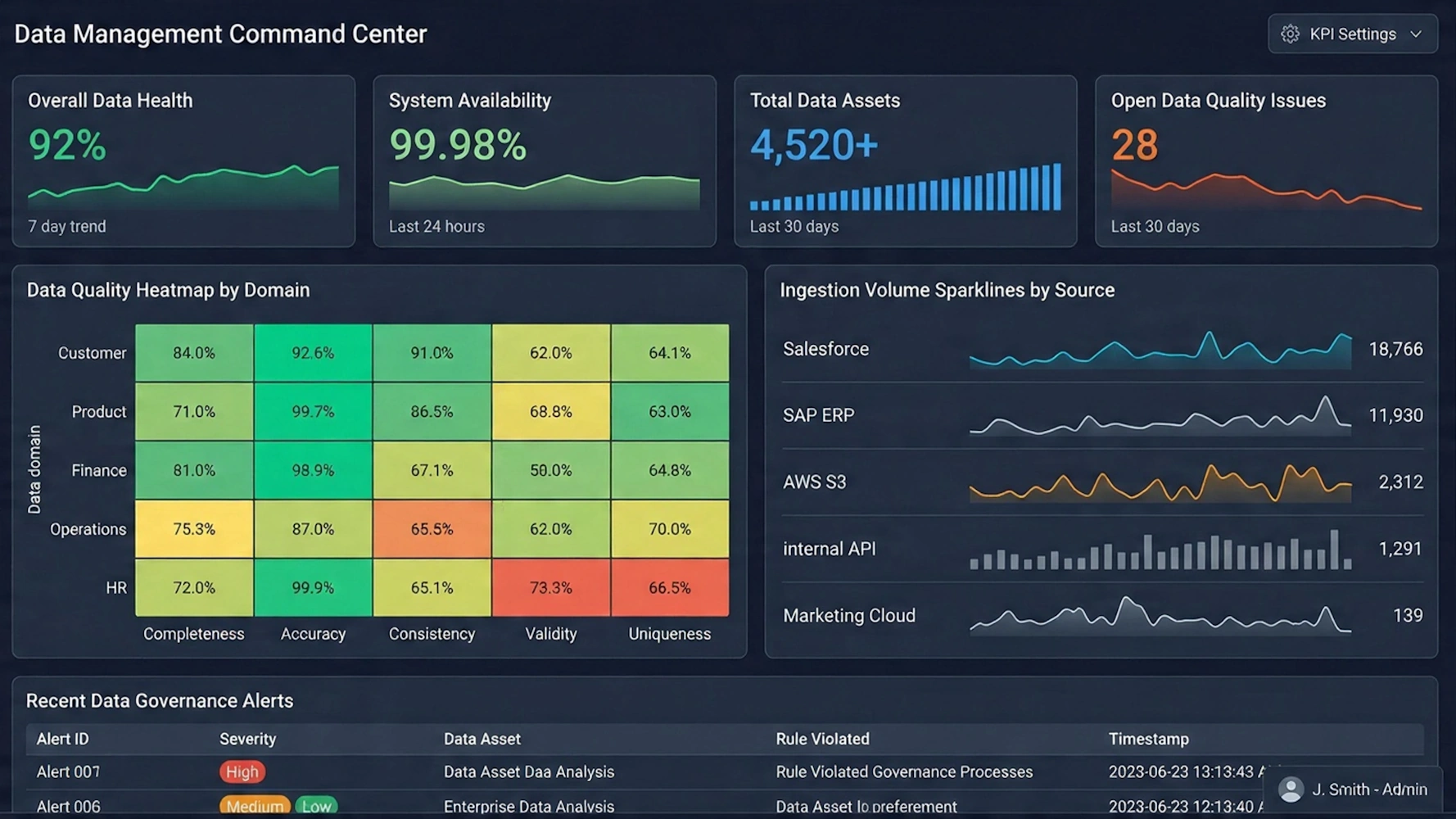

From Legacy Report Writers to Unified Analytics Platforms
For years, organizations relied on traditional report writers such as Crystal Reports, SSRS, or custom SQL scripts. These tools were powerful but rigid: reports were often static, required developer intervention for every change, and produced outputs that quickly went out of date. As data volumes and business expectations grew, this model became a bottleneck.
Modern database reporting software blends classic reporting capabilities with business intelligence (BI) features. Instead of separate tools for dashboards, ad hoc analysis, and paginated reports, unified platforms provide:
- Interactive dashboards: Visual exploration of data with filters, drill-downs, and responsive layouts.
- Paginated reports: Pixel-perfect, printable outputs for invoices, statements, and regulatory documents.
- Self-service analytics: Business users can build and modify views without writing SQL.
- Embedded experiences: Reports and dashboards integrated directly into internal or customer-facing applications.

Direct Database Connectivity and Semantic Layers
At the core of database reporting software is its connection to data sources. Modern tools support a wide range of databases—relational, cloud data warehouses, and sometimes NoSQL systems—while offering flexible query strategies.
Key capabilities include:
- Live queries: Directly query the database for up-to-the-minute results when freshness is critical.
- Caching and extracts: Improve performance by pre-aggregating or caching data for heavy dashboards.
- Semantic layer: A business-friendly model that translates complex schemas and SQL into reusable metrics and dimensions.
The semantic layer is especially important. It allows data teams to define governed measures—such as revenue, margin, or utilization—once, and then reuse them across reports and dashboards. This reduces inconsistencies and prevents each report author from reinventing logic in their own queries.

Self-Service Reporting Without Sacrificing Governance
One of the biggest shifts in 2026 is the expectation that non-technical users can answer their own questions. Database reporting software now routinely includes drag-and-drop interfaces, guided report builders, and reusable templates that hide the complexity of SQL.
Effective platforms balance self-service with control through:
- Role-based access: Users see only the data and features appropriate to their role.
- Data security rules: Row-level and column-level security enforced at the data model or connection level.
- Certified content: Curated dashboards and reports that serve as trusted sources of truth.
- Reusable components: Shared filters, prompts, and layouts that keep experiences consistent.
This combination lets business users explore data safely while data teams maintain oversight of definitions, performance, and compliance.
Automation, Scheduling, and Distribution at Scale
Automation is no longer a “nice to have” in database reporting software—it is expected. Organizations need to deliver the right information to the right people at the right time, without manual intervention.
Modern tools typically support:
- Scheduled refreshes: Automatically update data extracts or cached datasets on a defined cadence.
- Report scheduling: Generate and send reports via email or file drop at specific times.
- Bursting and parameterization: Create one report template and distribute personalized versions to many recipients.
- Multi-tenant distribution: Serve different customers or departments from a shared infrastructure while isolating their data.
These capabilities are especially valuable for finance, operations, and customer-facing portals where recurring, personalized reports are essential.

Dashboards Versus Paginated Reports: When to Use Each
People searching for “database reporting software” are often unsure whether they need dashboards, paginated reports, or both. In practice, most organizations benefit from a combination.
Dashboards
Dashboards are best when:
- Monitoring is continuous: Executives and managers need at-a-glance views of KPIs.
- Interactivity matters: Users want to filter, drill down, and pivot data on the fly.
- Devices vary: Content must adapt to desktops, tablets, and phones.
Paginated reports
Paginated reports are ideal when:
- Layout is strict: Invoices, statements, and regulatory forms must match exact formats.
- Print or PDF is required: Outputs need to be archived, signed, or shared externally.
- Detail is dense: Long tables, grouped summaries, and appendices are needed.
The most flexible database reporting platforms support both styles from the same data model, allowing organizations to reuse logic and maintain consistency across all outputs.
Embedded Reporting and White-Label Experiences
Another major trend is embedding reporting and analytics directly into applications, portals, and customer experiences. Instead of sending users to a separate BI site, organizations integrate dashboards and reports where work already happens.
Key embedded capabilities include:
- Single sign-on (SSO): Seamless authentication from the host application.
- White-labeling: Custom branding, themes, and layouts that match the host product.
- API-driven control: Programmatic creation, modification, and distribution of reports.
- Tenant-aware security: Automatic filtering so each customer or department sees only their data.
For software vendors and internal platform teams, embedded reporting turns analytics into a core feature rather than an afterthought.

What to Look for When Choosing Database Reporting Software
With so many options available, it helps to evaluate tools against a clear set of criteria. When assessing database reporting software, consider the following dimensions:
- Data connectivity: Does it support your databases, warehouses, and cloud platforms natively?
- Performance: Can it handle large datasets, complex joins, and many concurrent users?
- Modeling and semantics: Is there a robust way to define reusable metrics and business logic?
- Self-service: Can non-technical users build and modify reports without writing SQL?
- Governance and security: Are row-level security, roles, and auditing built in?
- Reporting styles: Does it support both interactive dashboards and paginated, print-ready reports?
- Automation: Are scheduling, bursting, and distribution flexible and reliable?
- Embedded options: Are there APIs and SDKs for integrating reports into other applications?
- Scalability and licensing: Will the platform scale with your data, users, and use cases?

Delivering Real-Time, Governed, and Self-Service Analytics
In 2026, “database reporting software” is no longer just about generating static tables from SQL queries. It is about delivering real-time, governed, and self-service analytics experiences that combine dashboards, paginated reports, and embedded views in a single, coherent platform.
Organizations that modernize their reporting stack gain faster decision-making, reduced IT bottlenecks, and more consistent definitions of critical metrics. Whether you are replacing legacy report writers, consolidating tools, or embedding analytics into your products, the right database reporting software can turn raw queries into actionable, real-time insight for everyone who needs it.

Related Resources
Reporting API Tag Library - The following appendices describe various JSP tags for using InetSoft's Dashboard Reporting API to integrate dashboards and reports in your Web application. The cache tag caches the content of the report page. This tag must be the first report tag in the page. The cache tag is required.The create tag generates the report and serves any resources required to display the report. This tag must be inserted after the cache tag, but before any other report tags. If there is any HTML content or JSP tags that write HTML content before the create tag, the resourceUri attribute must be set to the URL of the Servlet Repository. The create tag is required. The create tag can contain parameter tags. The parameter tag defines parameters that are passed to the report. This tag must be enclosed within a create tag. The parameter tag is optional...
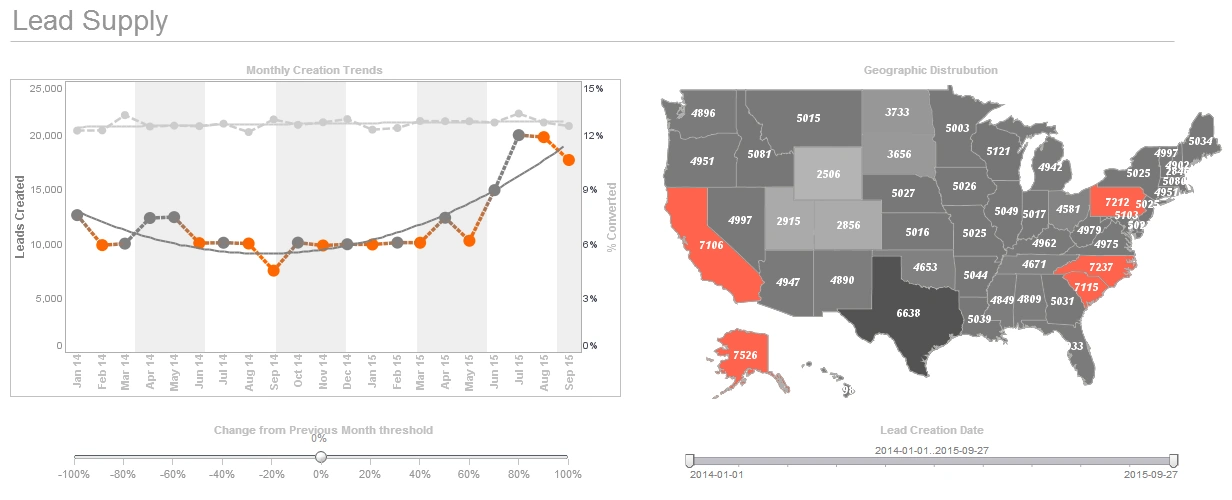
Reporting Business Intelligence - A discussion of how InetSoft's business intelligence reporting and dashboard software can shorten the development cycle with capabilities such as live data preview, live editing and hot deployment. As reporting business intelligence tools have become more prevalent in the market place, they have become more user-centric. Thus, they place less emphasis on providing tools for developers who will actually implement the reporting system. StyleBI is a total dashboard and reporting solution that offers powerful and flexible tools to report designers and developers who are tasked with creating an internal or customer facing reporting system. By providing powerful reporting elements, and reusable and sharable reporting components, StyleBI helps these developers to drastically shorten the development cycle and reduce maintenance overhead. This article examines some common problems that report designers and developers face when implementing such a system and see how StyleBI offers a solution to each problem in an innovative and unique way...
Reporting Classes and Packages - InetSoft consists of a large number of classes, divided into several packages: inetsoft.report This is the main package. It contains the main API classes, most of which play a major role in creating reports. inetsoft.sree This package is the root of all server-side classes that run inside an application server. inetsoft.uql This package contains all the data source connection, and querying classes. inetsoft.graph This package contains the chart and graph engine. Since there are a large number of classes in the StyleBI API, we will list the frequently used classes and packages. It is not necessary to understand all classes in the package to develop reports with StyleBI. Creating a professional looking report programmatically requires only a few function calls. In the latter part of this document, we will cover the advanced features in StyleBI and go into more details on the internals of the classes. The inetsoft.report.ReportSheet is the base class for report generation. Each report is represented as a ReportSheet object. Conceptually, a ReportSheet is a runtime report template that lays out the formatting of a report. The actual data in a concrete report can either be embedded in the report or be supplied with a lens object (e.g., TableLens, ChartLens, etc...
Reporting and Dashboard Development Tool - Looking for a good reporting and dashboard development tool? InetSoft's pioneering dashboard reporting application produces great-looking web-based dashboards with an easy-to-use drag-and-drop designer. View a demo and try interactive examples...
Reporting Design Patterns - Reporting design patterns are an important part of the object-oriented design of InetSoft Enterprise products. The use of design patterns not only facilitates ease of use; it also helps programmers understand the high-level framework behind the object design. This chapter documents the design patterns used in the InetSoft enterprise-specific classes. The proxy design pattern is used extensively in the design of InetSoft Enterprise products. This pattern is applied to allow the server components to support multiple communication protocols and is used in the clustering of servers for better scalability. InetSoft Enterprise products support both Java RMI and standard CORBA communications between client and servers. Both RMI and CORBA server components use the same implementation of the repository class. The client can choose between the three varieties of server: RMI, CORBA and servlet (regular Java class). To the client, all three servers share the same API. The details of the protocol are hidden behind the client-side proxies...
Reporting Designer - InetSoft's Style Report software is available as a stand-alone application or as part of StyleBI, InetSoft's business intelligence software. The Style Report Software by InetSoft ensures nothing but the best reporting services for any business. Our unique design enables managers to easily monitor, analyze, and understand business data with the various reporting elements InetSoft has to offer...
Reporting Document Creation Software - Looking for good reporting document creation software. InetSoft's pioneering dashboard reporting application produces great-looking web-based reports with an easy-to-use drag-and-drop designer. View a demo and try interactive examples...
Reporting Function as a Web Service - StyleBI provides a number of server side reporting functions that are accessible as Web services. These Web services enable clients which may be running on different operating systems and using different programming languages to access server side enterprise reporting tools through remote procedure calls. There are two Web services provided. Microsoft IIS (Internet Information Server) is a commonly used Web server on the windows platform. From a request-serving perspective, IIS natively supports serving only static files but has the facility to execute add-ons/plug-ins. This applies to all IIS versions. These add-ons/plug-ins are configured as 'Application Mappings' on IIS and are mapped to certain resource extensions (e.g., ".jsp"). IIS simply executes the configured add-on to handle a particular resource extension whenever it is requested. IIS is not inherently J2EE compliant and therefore cannot directly deploy servlets/JSPs. Since StyleBI is a 100% Java tool, it can only be deployed on a J2EE compliant application server. There are many available options for Java add-ons/plug-ins, and a few of those options are discussed here. Since InetSoft Enterprise products are servlet based, all commands to the reporting engine are sent via a servlet (repository servlet) in the form of HTTP URL requests with appropriate parameters...
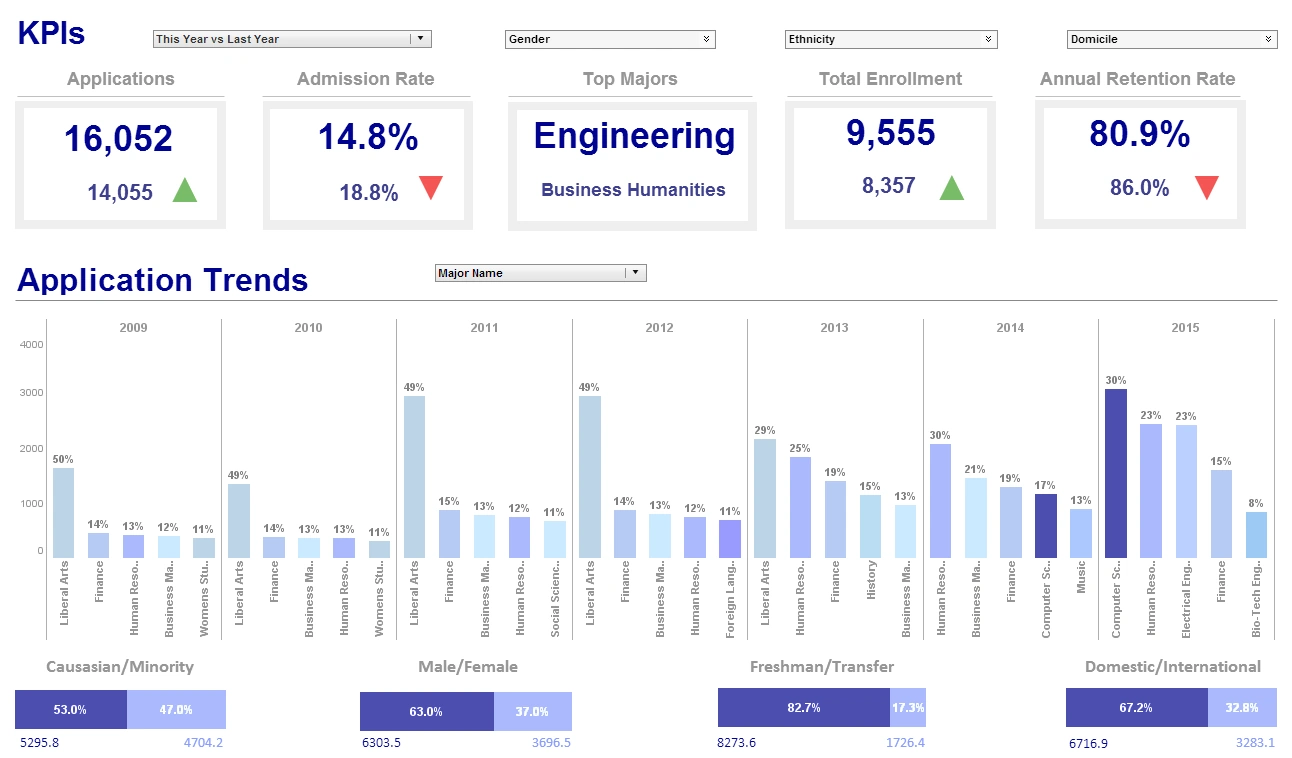
Reporting and Inquiry Tools - Looking for good reporting and inquiry tools? InetSoft's pioneering dashboard reporting application enables self-service for data exploration. Users need not rely on database experts to create new reports for them. View a demo and try interactive examples...
Reporting Integration - One of the greatest advantages of StyleBI is its flexibility and adaptability; it does not limit you to a single deployment or presentation framework. Instead, you can seamlessly integrate StyleBI components into your unique application at many different levels. Because StyleBI is implemented entirely in Java, it is immediately compatible with any J2EE compliant environment. You can make use of web services, customize the built-in portal, and pass credentials directly from your application to the Style Intelligence framework for single sign-on. This document discusses these and other ways to integrate Style Intelligence into an existing environment. It contains the following major topics. CSS interface customization is about customizing the look and feel of the built-in InetSoft portal using CSS files to incorporate the different presentation themes in a custom report portal. Dashboard integration is about using the InetSoft dashboard in your Web application context root...
Reporting JavaScript Object Reference - StyleBI provides a few global functions in addition to those defined by the standard JavaScript runtime (see Appendix JS:General JavaScript Functions). This section presents the additional functions. addParameter(name, default, type, alias, hidden) Adds a parameter to the report. This function is available only within the onInit Handler, and is equivalent to defining a report parameter using the 'Parameter Definition' dialog box in Report Designer. The 'hidden' flag allows you to suppress user prompting for the parameter, equivalent to deselecting the 'Prompt User' option in the 'Parameter Definition' dialog box. You can usually accomplish the same thing using the 'new' operator, but this sometimes does not handle Java packages correctly. The getImage() method checks whether the argument specifies a valid resource. If it does not specify a resource, then getImage() treats the parameter as an encoded image. Both ASCII Hex and ASCII85 are supported (useful for XML data). If the script is running inside Report Designer, the log message is displayed in the Console window...
Reporting Security - Information about security, permission and integration features of InetSoft software. Admin overhead is kept to a minimum, but control over security is maximized, including the ability to secure specific data cells. Security is a very important aspect of any software product. A security schema is what allows a reporting solution to function at the enterprise level. With proper security, powerful business intelligence software like StyleBI or web reporting software like Style Report can be made available to every person in the company. Each division can have its own data sources, and each person within the division can have his or her own access rights to the data and reports. Since InetSoft's software is usually embedded within a website, or another application, a single sign-on (SSO) capability eases the end user experience. InetSoft's software integrates with existing LDAP security models (iPlanet/SunOne, Active Directory, or Open LDAP). Simply enter the server settings, and InetSoft's software will import the users, and roles. These users/roles can then be used when setting the permissions for InetSoft's software components. The other option when creating SSO is to implement a Security Provider interface. This simple Java interface includes methods like authenticate, and checkPermission...