What Free Tool Would You Recommend to Make a Top Colleges Dashboard?
Tableau Public
Tableau Public is a free version of the popular Tableau software, allowing users to create and share interactive dashboards online. It's user-friendly and offers a wide range of visualization options, making it a great choice for building a top colleges dashboard.
Why Choose StyleBI?
- Schema-Free Data Mashup: StyleBI allows users to blend data from multiple sources—structured or semi-structured—without requiring a formal data warehouse or predefined schema. This is ideal for comparing colleges with data coming from federal datasets, rankings, spreadsheets, or APIs.
- Advanced Charting & Visual Design: StyleBI offers extensive control over dashboards, with dynamic filters, KPI tiles, responsive layouts, and advanced chart types (including heatmaps, bullet charts, and radar graphs) that can present educational metrics in richer formats than typical tools.
- Free Community Edition: For personal projects, prototypes, or academic analysis, StyleBI’s open source community edition offers a free and robust option with many of the same features as its enterprise counterpart.
- Customizable and Embeddable: Users can fully tailor dashboards and embed them into websites or learning portals, making it useful for educational blogs, college advising platforms, or student tools.
- Microservice Architecture: For developers or tech-savvy users, StyleBI is uniquely modular, allowing backend deployment as a microservice within a larger app, and enabling dashboards to scale as needed.

Where Can You Get the Data to Make a Top College Dashboard?
Building a meaningful and insightful dashboard that compares top colleges requires accurate, comprehensive, and up-to-date data. Fortunately, there are several public and private sources that provide extensive information on U.S. colleges and universities. Below are the most reputable and widely used sources, along with what types of data they offer and how you can use them in a dashboard project.
1. U.S. Department of Education College Scorecard
College Scorecard offers an API and downloadable datasets covering nearly every accredited post-secondary institution in the United States. The data includes:
- Graduation rates
- Average annual cost
- Student demographics
- Post-graduation earnings
- Loan repayment rates and debt levels
- Acceptance rates and enrollment figures
This is one of the most data-rich and frequently updated sources, ideal for constructing a comprehensive dashboard comparing schools across multiple dimensions.
2. National Center for Education Statistics (IPEDS)
The Integrated Postsecondary Education Data System (IPEDS) is a collection of interrelated surveys conducted annually by the U.S. Department of Education. It contains detailed information on:
- Institution characteristics (public/private, location, size)
- Tuition and fees
- Graduation and retention rates
- Financial aid distribution
- Faculty and staff metrics
IPEDS data can be exported in Excel or CSV formats and is useful for historical analysis and benchmarking colleges based on standardized reporting.
3. U.S. News & World Report Rankings
While not open data, U.S. News is a well-known source for annual college rankings and evaluation criteria. It provides information such as:
- Academic reputation and peer assessments
- Student-to-faculty ratios
- Alumni giving rates
- Retention and graduation outcomes
Data from U.S. News is mostly proprietary, but summarized information can be manually extracted and merged with public datasets to enrich visual comparisons.
4. College Board (BigFuture)
BigFuture by College Board is a comprehensive college search tool offering qualitative and quantitative insights. It includes:
- Academic offerings and majors
- Campus life and student activities
- Test score ranges (SAT/ACT)
- Application deadlines and admission rates
While not designed as a raw data source, it can be a valuable supplement for user-generated dashboards focused on the student experience.
5. Common Data Set (CDS)
The Common Data Set is a collaborative initiative among higher education institutions and publishers to improve data quality. Many colleges publish their CDS documents on their websites, covering:
- Enrollment breakdowns
- Admissions statistics
- Financial aid information
- Student life and housing
The data is usually downloadable in PDF or Excel formats and is ideal for supplementing public dashboards with school-specific metrics.
6. College Navigator
College Navigator is a user-friendly tool provided by NCES for browsing and comparing colleges. It consolidates many IPEDS data points into a searchable interface and allows:
- Custom college lists by criteria (location, size, programs)
- On-the-fly comparisons
- Quick downloads of data tables in Excel format
7. State-Level Department of Education Websites
Many states publish their own dashboards and datasets on public institutions and performance. These can include:
- Regional tuition data
- In-state vs. out-of-state enrollment trends
- Degree production and labor market alignment
These sources are often underutilized and can give more granular insights into local education outcomes.
How to Use These Sources in Your Dashboard
Most of the data from the sources above can be exported as CSV or Excel files and imported into BI tools like Google Looker Studio, Tableau Public, or InetSoft StyleBI. Once the data is cleaned and transformed, you can create interactive dashboards that include:
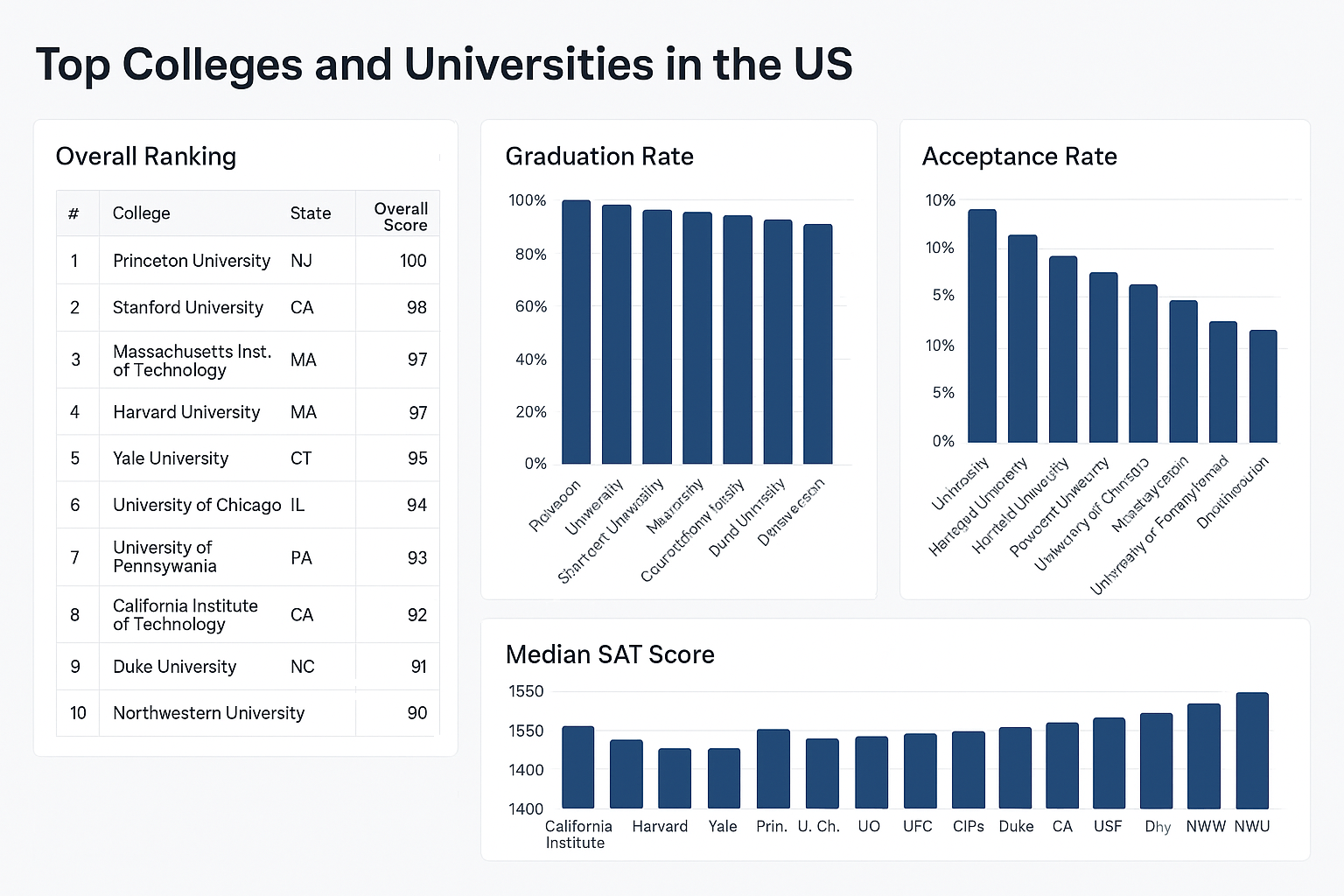
- Ranking charts for tuition, earnings, or graduation rates
- Geographical maps showing college locations
- Filters for public/private, region, or degree types
- Trend lines for enrollment growth or tuition over time

More Articles About College Dashboards
-
insights into student retention with
machine learning
This article explores how colleges and universities leverage machine learning to analyze student behavior and reduce dropout rates. It highlights real‑time dashboards tracking performance and predictive outreach strategies. The goal is improving retention through targeted interventions and smarter admissions targeting. -
university support call center performance
dashboard
Midwest State University implemented a user support dashboard to monitor campus-wide call center operations and student service trends in real time. KPIs include call volume, response patterns, and weekly trends across different campuses. The dashboard improved operational awareness and enabled proactive student support. -
zero‑client university analytics platform
This piece describes a zero‑client dashboard system deployed at universities like Rutgers and Carnegie Mellon. It emphasizes rapid deployment, self-service capabilities, and full browser access requiring no installations. The solution delivers unified views of institutional performance with minimal IT overhead. -
examples of higher education
dashboards
The article showcases university dashboard examples tracking student demographics, retention, housing, meal plan usage, and faculty ratios. It includes visual KPI dashboards like retention trends by major and demographics by class. The visualizations help institutions benchmark operations and monitor academic performance. -
how dashboards support
innovation
in education
Working with universities such as Georgia Tech and Florida International University, InetSoft illustrates how dashboards enable monitoring of course completion rates, faculty‑to‑student ratios, and graduation demographics. It discusses introducing gamification and immersive learning alongside analytics tools to enrich student experience. Dashboards are positioned as integral to evolving educational strategy through data insight. -
data mashup techniques for university
analytics
The article explains how higher education institutions can combine multiple internal and external data sources into unified dashboards. It outlines a step‑by‑step process from defining goals and sourcing LMS, enrollment, and survey data to designing mashups. Institutions use this approach to track retention drivers, outcomes, and student profiles. -
admissions analytics
dashboard
at a university
This is based on a presentation by Indiana University showing how an admissions dashboard unified data from Common App, financial aid, and test scores. Administrators gained real‑time insights into applicant trends and resource requirements. The dashboard streamlined decision‑making in the admissions office and improved operational efficiency. -
campus project management case study dashboards
State University used dashboards to manage multiple campus expansion projects across 50 buildings for 30,000 students. The dashboards aggregated financial, schedule, and risk metrics to provide transparency and aid decision‑making. Automating data reporting freed staff time and improved visibility for senior leadership. -
education analytics and reporting for schools and districts
This solution overview explains how InetSoft supports dashboards for K–12 districts and higher education. It highlights data-level security, localization, and self‑service analytics for different user roles like parents, teachers, and administrators. The platform is shown as scalable and suitable for multi‑lingual, high‑concurrency educational environments. -
school dashboard application for performance
analytics
InetSoft's dashboard app for schools enables interactive filtering and visualization of attendance, test scores, demographics, and assignment performance. Users with basic Excel skills can create and modify dashboards without BI developer support. The tool is framed as easy for administrators and educators to deploy in both K‑12 and higher education contexts.