How the National Park Service Uses StyleBI
The National Park Service (NPS) manages more than 400 parks, monuments, historic sites, and conservation areas across the United States.
Each site generates vast amounts of operational, environmental, financial, and visitor‑related data.
Turning that data into actionable insight is essential for protecting natural resources, improving visitor experience, and ensuring long‑term sustainability.
StyleBI, with its flexible data modeling, governed self‑service, and powerful dashboarding capabilities, offers a uniquely effective platform for the NPS to modernize analytics across its diverse mission areas.
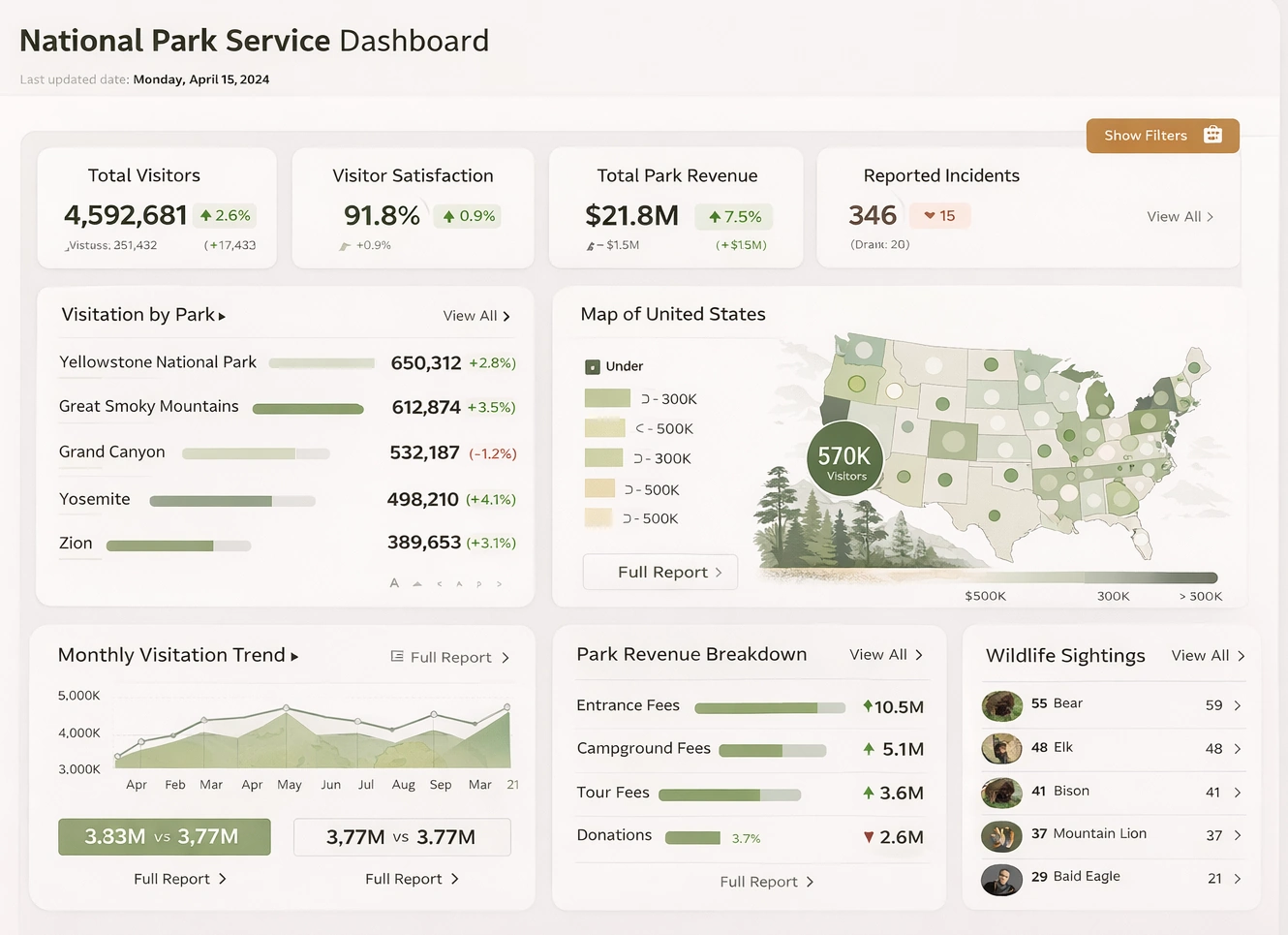
Centralizing Data Across a Vast, Distributed System
One of the biggest challenges for the NPS is the sheer scale and diversity of its data sources. Each park collects information on attendance, wildlife, maintenance, staffing, weather, safety incidents, and more. These datasets often live in separate systems, spreadsheets, or local databases. StyleBI’s semantic layer and data transformation engine allow the NPS to unify these sources into a single, governed model.
With a centralized model, park managers and regional administrators can view standardized metrics without worrying about inconsistent definitions or duplicated calculations. For example, “visitor count,” “trail usage,” or “maintenance backlog” can be defined once and reused across dashboards, ensuring accuracy and comparability across parks.

Improving Visitor Experience Through Real‑Time Insights
Visitor experience is a core mission of the NPS. StyleBI enables real‑time dashboards that track attendance, peak congestion periods, parking availability, shuttle usage, and trail traffic. These insights help park staff make informed decisions about staffing, crowd control, and resource allocation.
- Predicting peak visitation using historical patterns and weather data.
- Monitoring parking lots to reduce congestion and improve traffic flow.
- Tracking trail usage to identify overused areas and protect sensitive ecosystems.
- Analyzing visitor demographics to tailor programs and improve accessibility.
Because StyleBI supports interactive public dashboards, the NPS can also share selected metrics with visitors. For example, a public‑facing dashboard could show current crowd levels, shuttle wait times, or trail closures, helping visitors plan their trips more effectively.
Enhancing Conservation and Resource Management
Conservation is at the heart of the NPS mission. StyleBI allows scientists, rangers, and environmental managers to visualize ecological data in ways that reveal trends and risks. Wildlife populations, water quality, air quality, vegetation health, and climate indicators can all be monitored through unified dashboards.
- Wildlife monitoring dashboards track species counts, migration patterns, and habitat conditions.
- Environmental quality dashboards visualize pollutants, temperature changes, and water chemistry.
- Fire management dashboards integrate weather, fuel moisture, and historical burn data.
- Climate impact dashboards show long‑term shifts in temperature, precipitation, and ecosystem health.
StyleBI’s ability to blend real‑time sensor data with historical datasets gives conservation teams a powerful tool for early detection and long‑term planning. Because the platform supports both dashboards and pixel‑perfect reports, the NPS can generate regulatory documents, scientific summaries, and public reports from the same data model.

Strengthening Operational Efficiency
The NPS manages thousands of buildings, trails, vehicles, and infrastructure assets. Maintenance backlogs are a major challenge, and data‑driven planning is essential. StyleBI helps streamline operations by providing visibility into work orders, asset conditions, staffing levels, and budget allocations.
- Maintenance dashboards show overdue tasks, priority repairs, and resource needs.
- Asset lifecycle dashboards track aging infrastructure and forecast replacement costs.
- Staffing dashboards help managers align personnel with seasonal demand.
- Budget dashboards compare spending across parks and highlight funding gaps.
Because StyleBI supports multi‑tenant isolation, each park can maintain its own secure workspace while still contributing to national‑level reporting. This structure allows local autonomy without sacrificing centralized oversight.
Supporting Education and Community Engagement
Education is another key mission area for the NPS. StyleBI can track participation in ranger programs, school visits, volunteer activities, and community events. Dashboards can reveal which programs are most effective, which demographics are underserved, and how engagement varies by season or region.
Public dashboards can also be used to share educational content, such as wildlife statistics, historical timelines, or conservation progress. Because StyleBI supports custom branding, the NPS can create visually consistent dashboards that match each park’s identity.
Improving Safety and Emergency Response
Safety incidents, search‑and‑rescue operations, weather alerts, and trail hazards are critical data points for park operations. StyleBI enables real‑time monitoring and historical analysis of safety data, helping parks reduce risks and respond more effectively.
- Incident dashboards track injuries, accidents, and high‑risk areas.
- Search‑and‑rescue dashboards analyze response times and resource usage.
- Weather dashboards integrate forecasts and sensor data for proactive planning.
- Trail hazard dashboards highlight closures, erosion, and wildlife activity.
These insights help the NPS allocate rangers, improve signage, and identify patterns that may require policy changes or infrastructure improvements.

Empowering Non‑Technical Users
Many NPS staff members are not data analysts. StyleBI’s governed self‑service tools allow rangers, educators, administrators, and volunteers to explore data without compromising accuracy or security. Users can create their own dashboards, filter datasets, and build visualizations while relying on the semantic layer to ensure consistent definitions.
This democratization of analytics reduces the burden on IT teams and accelerates decision‑making across the organization.
Scalable, Flexible Deployment for a National Agency
The NPS operates in remote locations with varying levels of connectivity. StyleBI’s lightweight architecture and flexible deployment options—on‑premises, cloud, hybrid, or embedded—make it ideal for a distributed agency. Parks with limited bandwidth can run local instances, while larger parks or regional offices can use cloud‑based deployments.
Because StyleBI scales from small teams to enterprise‑wide deployments, the NPS can adopt it incrementally, starting with pilot parks and expanding as needs grow.
Modernizing Its Digital Infrastructure
The National Park Service faces complex challenges that require clear, timely, and accurate data. StyleBI provides a unified platform that supports conservation, visitor experience, operations, safety, education, and strategic planning. By centralizing data, empowering staff, and enabling both internal and public dashboards, StyleBI helps the NPS fulfill its mission of preserving America’s natural and cultural treasures for future generations.
As the NPS continues to modernize its digital infrastructure, a flexible and powerful analytics platform like StyleBI becomes not just useful, but essential for informed stewardship and sustainable park management.

Related Articles
Secure Data Encryption Business Intelligence Solutions - Organizations handling sensitive data need business intelligence solutions that do more than visualize metrics. They must protect information with strong encryption, enforce access controls, and support regulatory compliance across industries such as healthcare, finance, government, and SaaS. This article describes BI solutions and capabilities that offer secure data encryption and compliance-ready features for modern enterprises. Recommended BI Solutions with Strong Security and Compliance The following BI platforms provide secure data handling, encryption options, and governance features designed for regulated environments and security-conscious organizations...
Seeking Business Intelligence Companies? - Are you seeking business intelligence companies? InetSoft is a pioneer in dashboard reporting making possible the easy creation of great-looking analytics. View a demo and try interactive examples...
Selecting Business Intelligence Tools? - Are you in the process of selecting business intelligence tools? InetSoft is a pioneer in dashboard reporting making possible the easy creation of great-looking analytics. View a demo and try interactive examples...
Self-hosted Business Intelligence - Looking for a good self hosted business intelligence? Unlike many other modern BI providers, InetSoft's server-based solution is designed to be hosted wherever you want it. You are free to choose whichever cloud computing service or install the application in your own network. The pioneering dashboard reporting tool makes producing great-looking web-based reports and dashboards easy with a drag-and-drop designer and the ability to connect to all your data sources, on premise or in the cloud. Maximize self-service for all types of users. No dedicated BI developer required. View a demo and try interactive examples. ..
Self-service Apache Business Intelligence Tool - Looking for a good business intelligence tool to run on Apache? InetSoft's pioneering dashboard reporting application produces great-looking web-based dashboards with an easy-to-use drag-and-drop designer. Maximize self-service for all types of users. View a demo and try interactive examples...
Self-service BI and Data Mashups - This whole theme of the evolving role of IT really seems to come into focus here as we’re talking about self-service BI and dashboards and data mashups and so forth. Our whole paradigm is built around the maximum amount of self-service to the end users. And that starts at the mashup level and goes all the way up to the dashboard level and goes all the way up to the dashboard level. And IT’s role in all of this is around the initial setup of the underlying sources, the raw data sources, establishment of security best practices and governance, and then making sure performance is right. And essentially they are building this meta data layer where the users can accomplish anything they want to. And it’s provided with drag and drop, point and click interfaces that don’t require any programming, any APIs, nothing technical at all. So either the business users or the business analysts, essentially anyone who is at all facile with Excel, can really play around in their own sandbox and do whatever they want...
Self-service BI - The Benefits - First, business analysts are no longer dependent on their IT departments because the BI tools in place allow them to take advantage of the existing data infrastructure. Currently, analysts either need have sophisticated technology skills, or they have to rely on IT departments to fulfill their data requests. Using self-service BI, analysts will no longer need to wait on IT departments to fulfill their requests and won’t need to have advanced technical skills to perform their job. Second, it is easier to share the results of analysis with business users, leading to better decision making. Currently, analysts are forced to expend unreasonable amounts of time and system resources by creating multiple custom reports or again must rely on an IT department to generate their reports. Using self-service BI, analysts are easily able to create custom reports and data mashups and even business users can create custom dashboards and drill down for detailed information...

Setting a Business Intelligence Strategy - So here is where we are today in terms of setting a business intelligence strategy. We know we have to take some steps to get there. This is our future state which will obviously require this next step in what is our roadmap to get to the future state, both from an organizational perspective, as well as from a BI solutions and tools perspective. And just continuing down this thread, a BI strategy helps us define what metrics we need to track to be successful, what is most important to our executives, and how should we align organizationally to fulfill that BI vision. Finally, ultimately, what is our data warehouse or set of operational data stores? What is our architecture, and what tools are needed to meet these needs according to our vision...
Should KPIs Be Selected Bottom-Up or Top-Down - This is one of the most challenging issues in business intelligence. It’s unlike any other software segment, where you can define your requirements, and you can define your metrics, take CRM or ERP, for instance, and you will probably be OK with what you set up for a couple of years with just minor changes. But business intelligence and performance management are completely different. Because by design, you go through the regular cycle of defining your metrics and defining how you will source and calculate them. You actually develop them and roll them out, and you test them. You put them in front of the business users, and after a few months have passed since the beginning of the BI project, guess what happens. The people who asked for those metrics are gone. Or the work has changed. Or you have just acquired another company. Or you have just gone global. Or you have a new competitor. The world where you create your KPIs is very complex and challenging, and often changing...
SharePoint BI Tools - it's no wonder that so many businesses adopt Microsoft SharePoint as a collaboration tool. SharePoint sites provide an easy way for organizations to share information and coordinate on projects and tasks. However, using SharePoint alone as a business intelligence tool has definite limitations...
Single Sign-on Business Intelligence - Single sign-on is the process of passing user credentials from one application directly to StyleBI without having to explicitly login again. For instance, say the user logs into their company portal and clicks on a link called “reports.” This link directly opens the reporting portal without a secondary authentication login challenge. Single sign-on can be implemented in two ways: * Single Sign-On Using HTTP Session Attributes * Single Sign-On Using Forms With Hidden Fields. Single sign-on can be implemented by setting an attribute in the HTTP session. This session attribute must be set in the same web application as the reporting server. Therefore, this method is usually implemented when the StyleBI webapp is integrated with an existing J2EE application. If not, you need to create an intermediary application (JSP, Servlet) that runs in the same context as the reporting server. A simpler alternative in this case is the form-based implementation...
Simple Dashboard Software - Nervous that not having IT or programming experience will stop you from building your own dashboards? For those who lack know-how experience, the idea of self-service dashboard building can seem overwhelming. With InetSoft's software, creating dashboards is a quick and simple process, so you can start analyzing business data right away. InetSoft's simple dashboard software is designed with simplicity in mind for both the dashboard designer and the user of the interactive reports...
SME Business Intelligence Software - Are you a small or mid-sized firm looking for good business intelligence software? InetSoft, a pioneer in self-service dashboarding, gets high grades for personalized support. View a demo and try interactive examples...
Snowflake Business Intelligence - Looking for a good solution for Snowflake business intelligence? InetSoft's pioneering dashboard reporting application produces great-looking web-based dashboards with an easy-to-use drag-and-drop designer. View a demo and try interactive examples...
Software for Performance Metrics -Performance metrics software is a business management tool which allows a business to keep track of all aspects of their daily activity. Software for performance metrics should allow businesses to monitor critical business processes and activities using metrics of business performance which trigger alerts when potential problems arise and when goals are met...
Software for Sharing Dashboards -InetSoft's robust data mashup engine enables data from many different sources to be combined into single shared dashboards, for the creation of efficient, automated reports, and intuitive, interactive dashboards. InetSoft's advanced capabilities in both visualization and reporting make it stand out from other BI vendors, whose software is usually only capable of one of those two functions...
Software Reporting Tools -Information, by it's very nature, is messy. Every time a sale is made, that's a data point; every time someone is late to work, that's a data point; every time an email is sent, that's a data point. Properly implemented and highly visual software reporting tools will increase your business's analytical capabilities, helping you make better decisions...