Comparing the Leading Ad Hoc Analysis Tools in 2026
What Is Ad Hoc Analysis?
Ad hoc analysis is the ability to explore data when either the empirical questions are unclear, or when new questions arise that do not fit neatly into existing analytical frameworks.
Ad hoc analysis is especially relevant to business intelligence solutions because it is not possible to anticipate and codify every question within structured business reports and dashboards.
Therefore a good business intelligence solution is one that includes a powerful yet intuitive ad hoc analysis software application.
Shift From Static Reporting to Interactive Exploration
Ad hoc analysis has shifted from static reporting to highly interactive, self-service exploration that must still respect governance, data quality, and performance constraints. The tools in this comparison—InetSoft, Ajelix, UI Bakery, Budibase, DronaHQ, Claris FileMaker, Quick Base, insightsoftware, Zoho, and Phocas—span classic business intelligence platforms, low-code app builders, and cloud-based analytics suites. Each approaches ad hoc analysis differently, from semantic-layer driven dashboards to spreadsheet-like modeling, embedded analytics, or verticalized financial reporting. Understanding these differences is critical when choosing a platform that can support both business users and technical teams without creating new silos.
At a high level, InetSoft, Phocas, Zoho Analytics, and insightsoftware sit closest to traditional BI and analytics, with strong capabilities for data modeling, interactive dashboards, and governed self-service. Quick Base, Claris FileMaker, Budibase, UI Bakery, and DronaHQ are more focused on low-code application development and workflow automation, but they increasingly embed analytics and ad hoc reporting into the apps they generate. Ajelix occupies a more modern, AI-assisted niche, emphasizing formula-driven modeling and automation for spreadsheet-centric teams. The result is a spectrum: from platforms that treat ad hoc analysis as the core product to those that treat it as a feature embedded in broader application experiences.
Comparison Overview
InetSoft vs Zoho and Phocas: classic BI and guided exploration
InetSoft is designed as a full-featured BI and data intelligence platform, with a strong emphasis on data virtualization, mashups, and a semantic layer that abstracts complex sources into reusable logical views. For ad hoc analysis, this means business users can explore data through interactive dashboards, pivot tables, and drill-down paths without needing to understand the underlying schema. InetSoft’s ability to blend real-time and cached data, plus its support for governed self-service, makes it well suited to enterprises that want flexible exploration but must maintain strict control over data access and performance.
Zoho Analytics offers a more cloud-native take on ad hoc analysis, with a focus on ease of use and rapid onboarding. Its strengths lie in quick data ingestion from SaaS apps, automated modeling, and intuitive drag-and-drop dashboards. For many small and mid-sized organizations, Zoho provides enough semantic structure to enable ad hoc analysis without heavy IT involvement. However, compared to InetSoft, its data virtualization and complex mashup capabilities are more limited, making InetSoft a better fit for heterogeneous, large-scale environments where data resides across many on-prem and cloud systems.
Phocas, by contrast, is highly specialized around sales, inventory, and financial analytics, particularly for distribution and manufacturing. Its ad hoc capabilities are extremely approachable: users can slice and dice data across dimensions, drill into hierarchies, and build custom views with minimal training. The platform’s strength is guided exploration—pre-built data models and domain-specific metrics that make it easy for non-technical users to answer complex questions. While InetSoft offers broader modeling flexibility and Zoho offers broader SaaS connectivity, Phocas often wins in environments where the primary need is fast, intuitive analysis of transactional and margin data by frontline commercial teams.
insightsoftware and Quick Base: operational and financial ad hoc analysis
insightsoftware focuses heavily on financial and ERP reporting, providing deep integrations with systems like Oracle, SAP, and Microsoft Dynamics. Its ad hoc analysis capabilities are tailored to finance and FP&A users who need to drill into GL balances, budgets, forecasts, and operational metrics. The platform often exposes data through Excel-like interfaces or specialized reporting tools, allowing analysts to pivot, filter, and slice data while maintaining a direct link to governed ERP data. Compared to general-purpose BI tools, insightsoftware’s advantage is domain depth: it understands financial structures and offers templates that accelerate ad hoc analysis in that context.
Quick Base sits in the no-code application space, but its data-centric design makes it surprisingly strong for ad hoc operational reporting. Users build tables, relationships, and workflows, then create reports and dashboards that can be filtered, grouped, and summarized on the fly. For process-heavy environments—such as project management, service delivery, or compliance tracking—Quick Base enables business users to design their own data models and then explore them interactively. While it lacks the advanced visualization and semantic-layer sophistication of InetSoft or Zoho, its tight coupling of workflow and data makes ad hoc analysis highly relevant to day-to-day operations.
When comparing insightsoftware and Quick Base, the key distinction is domain and depth. insightsoftware is ideal when the core ad hoc questions revolve around financial statements, ERP data, and regulatory reporting. Quick Base is better when the questions are operational: “Where are tasks stuck?”, “Which projects are at risk?”, or “How are service tickets trending?” Both tools support non-technical users, but insightsoftware leans into finance expertise, while Quick Base leans into workflow ownership by business teams.

Low-code builders: UI Bakery, Budibase, DronaHQ, and Claris FileMaker
UI Bakery, Budibase, and DronaHQ are modern low-code platforms that help teams build internal tools and front-ends for databases and APIs. In these environments, ad hoc analysis is often delivered through custom views, filters, and dashboards embedded in the apps themselves. UI Bakery emphasizes rapid UI composition and integration with data sources, making it easy to create analytical pages with tables, charts, and filters. Budibase adds an open-source angle, appealing to teams that want self-hosted control and extensibility. DronaHQ focuses on connecting to APIs and databases, providing a rich component library for building data-heavy portals and admin panels.
Claris FileMaker represents a more established approach to custom database applications. It allows developers and power users to design data schemas, forms, and reports, then expose them through desktop, web, or mobile clients. Ad hoc analysis in FileMaker typically takes the form of custom layouts, find requests, and scripted reports that users can adjust on demand. While its visualization capabilities are more limited than modern BI tools, FileMaker excels at tightly coupling data entry, workflow, and reporting in bespoke solutions. For organizations with unique processes and on-prem data, FileMaker can deliver highly tailored ad hoc analysis that general-purpose BI tools would struggle to model.
Compared to InetSoft, Zoho, or Phocas, these low-code platforms are less about broad, multi-source analytics and more about embedding analysis into specific workflows. Their strength is context: the same app that captures data also presents it back in meaningful ways. However, this can lead to fragmentation if each team builds its own analytical app without a shared semantic layer. Enterprises that adopt UI Bakery, Budibase, DronaHQ, or FileMaker for ad hoc analysis should consider how to standardize metrics and definitions across apps to avoid conflicting views of the truth.
Ajelix and spreadsheet-centric ad hoc analysis
Ajelix targets teams that live in spreadsheets, offering automation, AI assistance, and collaboration features that enhance traditional Excel-style modeling. For ad hoc analysis, this environment is familiar and flexible: users can build formulas, pivot tables, and scenarios quickly, then use Ajelix’s automation to streamline repetitive tasks or generate documentation. The platform’s AI capabilities can help suggest formulas, clean data, or generate reports, reducing the friction of complex spreadsheet work.
The trade-off is governance and scalability. While Ajelix improves the spreadsheet experience, it still inherits many of the challenges of spreadsheet-based analytics: version control, fragmented models, and limited central oversight. Compared to InetSoft or Zoho, which provide centralized semantic layers and role-based access, Ajelix is more decentralized. It shines in small teams or departments that need agility and are comfortable managing their own models, but it may require additional controls or integration if used as a primary ad hoc analysis platform across an entire enterprise.

Choosing the right tool for ad hoc analysis
Selecting among these tools depends on where your organization’s analytical gravity lies. If you need a robust, governed BI platform with strong data virtualization and mashup capabilities, InetSoft stands out. If your priority is cloud-based ease of use and quick integration with SaaS apps, Zoho Analytics is compelling. For domain-specific, guided exploration in sales, inventory, and margin analysis, Phocas offers a highly approachable experience. Finance-heavy organizations may gravitate toward insightsoftware for its ERP and GL depth, while process-centric teams may prefer Quick Base for its blend of workflow and reporting.
Organizations building many internal tools and custom workflows might lean toward UI Bakery, Budibase, DronaHQ, or Claris FileMaker, embedding ad hoc analysis directly into the applications that run their operations. Spreadsheet-centric teams can extend their familiar environment with Ajelix, gaining automation and AI assistance without abandoning their existing models. In practice, many enterprises will use a combination: a central BI platform like InetSoft or Zoho for cross-organizational metrics, plus specialized tools like Phocas or insightsoftware for domain analytics, and low-code builders for workflow-specific reporting.
The most important consideration is alignment between the tool’s strengths and your analytical culture. If non-technical users are expected to explore data independently, prioritize platforms with intuitive, guided ad hoc interfaces and strong semantic layers. If technical teams will curate models and build custom apps, low-code platforms and spreadsheet-enhancing tools may be more appropriate. By mapping these tools to your data landscape, governance requirements, and user skills, you can assemble an ad hoc analysis stack that delivers both flexibility and trust in the numbers.
How is Ad Hoc Analysis Used in Biotech?
Ad hoc analysis allows researchers, scientists, and professionals in the biotech industry to explore data, identify patterns, and gain insights in real-time without the need for pre-defined queries or reports. In the biotech field, ad hoc analysis is widely used for various purposes:
-
Drug Development and Clinical Trials: Biotech companies use ad hoc analysis to analyze clinical trial data, evaluate the efficacy and safety of drugs, and identify potential adverse effects. Researchers can explore patient data, treatment outcomes, and biomarker responses to make data-driven decisions during the drug development process.
-
Genomics and Proteomics Studies: Ad hoc analysis is instrumental in genomics and proteomics research, where vast amounts of genetic and protein data are generated. Scientists can explore gene expression patterns, protein interactions, and identify genetic variations associated with diseases.
-
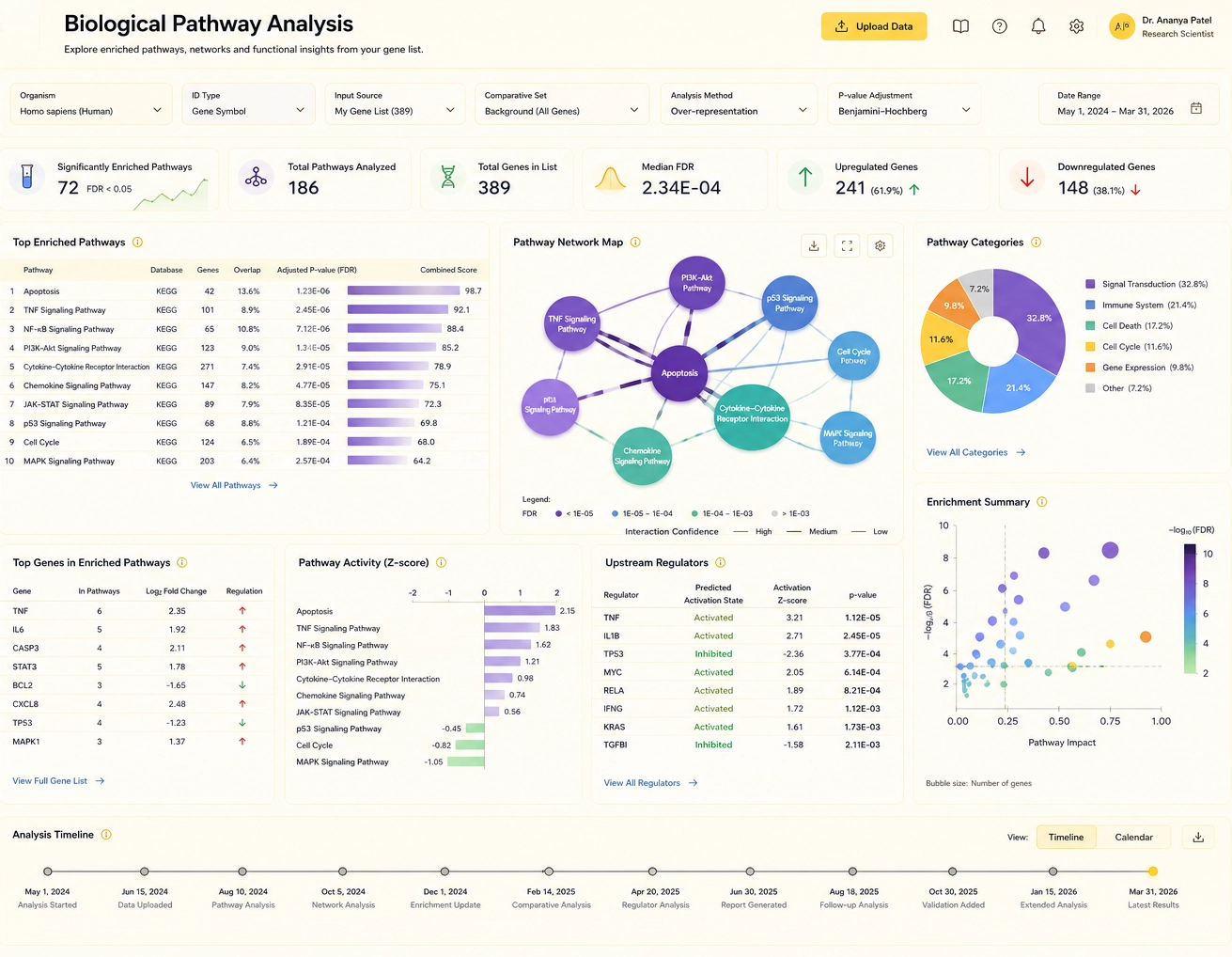
Biological Pathway Analysis: Ad hoc analysis allows biotech researchers to explore and visualize biological pathways, signaling cascades, and regulatory networks. This helps in understanding disease mechanisms, drug targets, and potential therapeutic interventions.
-
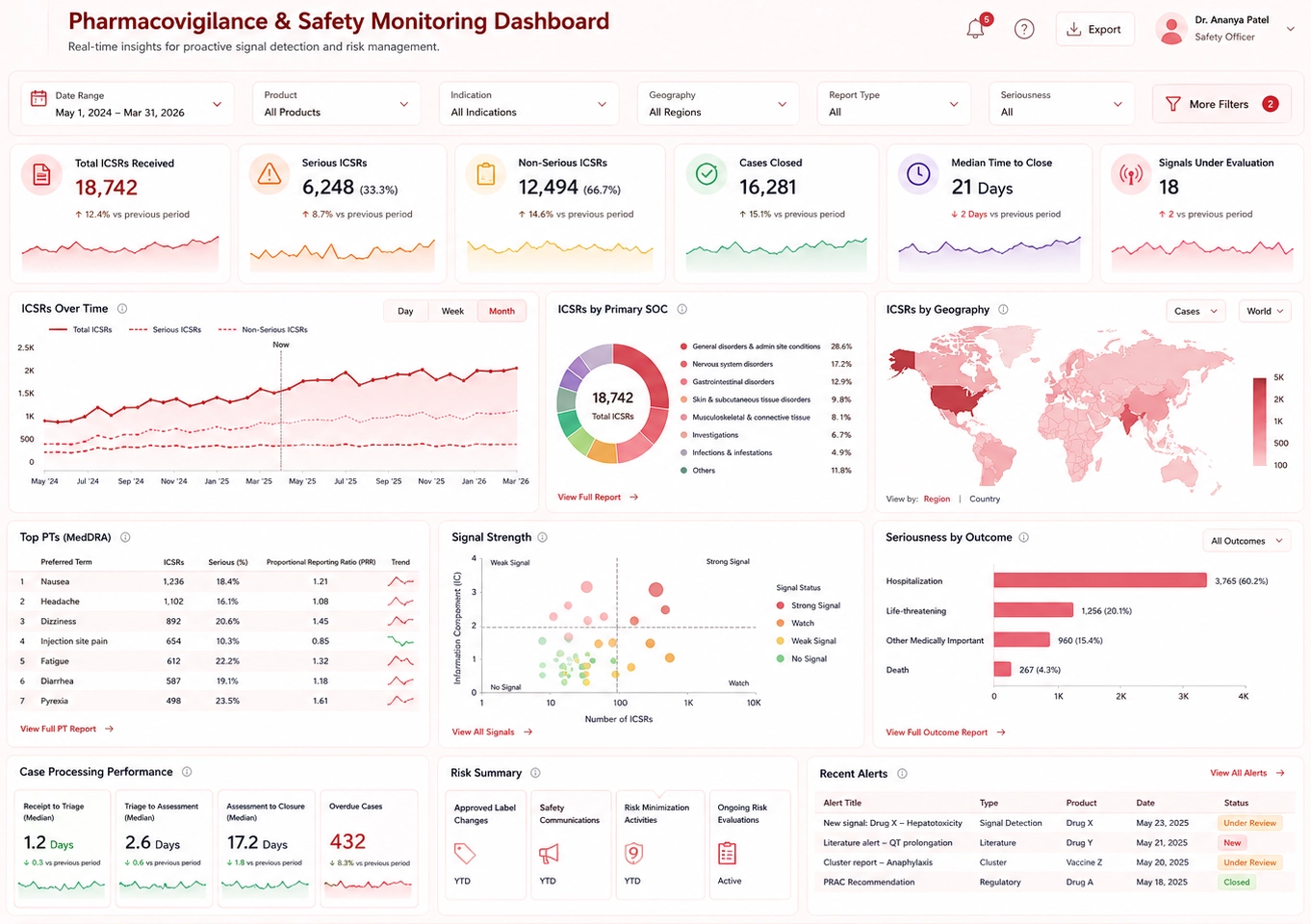
Pharmacovigilance and Safety Monitoring: Ad hoc analysis is employed to monitor adverse events and safety data related to drugs or therapies. Biotech companies can quickly assess the safety profiles of their products and take necessary actions if any concerns arise.
-
Disease Biomarker Identification: Ad hoc analysis helps in the discovery of disease biomarkers by exploring large-scale biological data and identifying potential indicators for disease presence, progression, or treatment response.
-
Data Integration and Exploration: Biotech research often involves integrating data from multiple sources, such as omics data, clinical data, and external databases. Ad hoc analysis enables scientists to explore and make connections between these diverse datasets, fostering data-driven hypotheses.
-
Real-time Monitoring of Experiments: Biotech researchers use ad hoc analysis to monitor ongoing experiments in real-time. This allows them to adjust experimental parameters, optimize protocols, and ensure the quality and validity of data being generated.
-
Drug Repurposing: Ad hoc analysis can be used to explore existing drug data and identify potential new therapeutic uses for drugs already approved for other indications. This approach can expedite the drug development process and reduce costs.
-
Market and Competitive Analysis: Biotech companies use ad hoc analysis to evaluate market trends, competition, and customer behavior. It helps in understanding market dynamics and making informed business decisions.
-
Regulatory Compliance and Reporting: Ad hoc analysis assists biotech companies in preparing data for regulatory submissions and compliance audits. It allows them to generate on-demand reports and analytics required by regulatory agencies.
What is the Connection Between Ad Hoc Analysis and Machine Learning?
Ad hoc analysis and machine learning are two distinct but complementary approaches to data analysis. They can be used together to enhance data exploration, gain insights, and make data-driven decisions. Here's are some points of contact between ad hoc analysis and machine learning:
-
Data Exploration and Preprocessing: Ad hoc analysis often serves as an initial step in data exploration. Researchers and analysts use ad hoc analysis to examine and understand the data, identify patterns, outliers, and data quality issues. This process of data exploration and preprocessing is essential before applying machine learning algorithms to the data.
-
Feature Engineering: Feature engineering is a critical aspect of preparing data for machine learning models. Ad hoc analysis helps in selecting relevant features (variables) from the dataset that are most informative for the machine learning task. By understanding the data through ad hoc analysis, researchers can create meaningful features for the machine learning model.
-
Model Selection and Evaluation: Ad hoc analysis can assist in choosing the appropriate machine learning model for a specific problem. Researchers can compare the performance of different algorithms through ad hoc analysis and select the one that best fits the data and the problem at hand. Additionally, ad hoc analysis can be used to evaluate the model's performance and identify areas for improvement.
-
Hyperparameter Tuning: Machine learning models often have hyperparameters that need to be tuned for optimal performance. Ad hoc analysis can be used to experiment with different hyperparameter settings, helping researchers find the best configuration that maximizes the model's accuracy or other performance metrics.
-
Interpreting Model Outputs: Machine learning models can be complex and difficult to interpret, especially for non-experts. Ad hoc analysis can aid in understanding how a model arrived at specific predictions or classifications. By exploring the model's outputs and analyzing its decision-making process, researchers can gain insights into the factors that influence the model's results.
-
Model Validation and Testing: Ad hoc analysis is instrumental in validating and testing machine learning models. Researchers can use it to assess the model's performance on a holdout dataset or during cross-validation. This helps in understanding how well the model generalizes to new, unseen data.
-
Ensemble Methods: Ad hoc analysis can be employed to build and analyze ensemble models, where multiple machine learning models are combined to improve predictive performance. Through ad hoc analysis, researchers can evaluate different ensemble strategies and determine their effectiveness.
-
Data Visualization for Model Insights: Ad hoc analysis often involves data visualization, which is a powerful tool for understanding both the data and the model's behavior. Visualization techniques can be used to interpret complex machine learning models, investigate feature importance, and gain insights into model predictions.
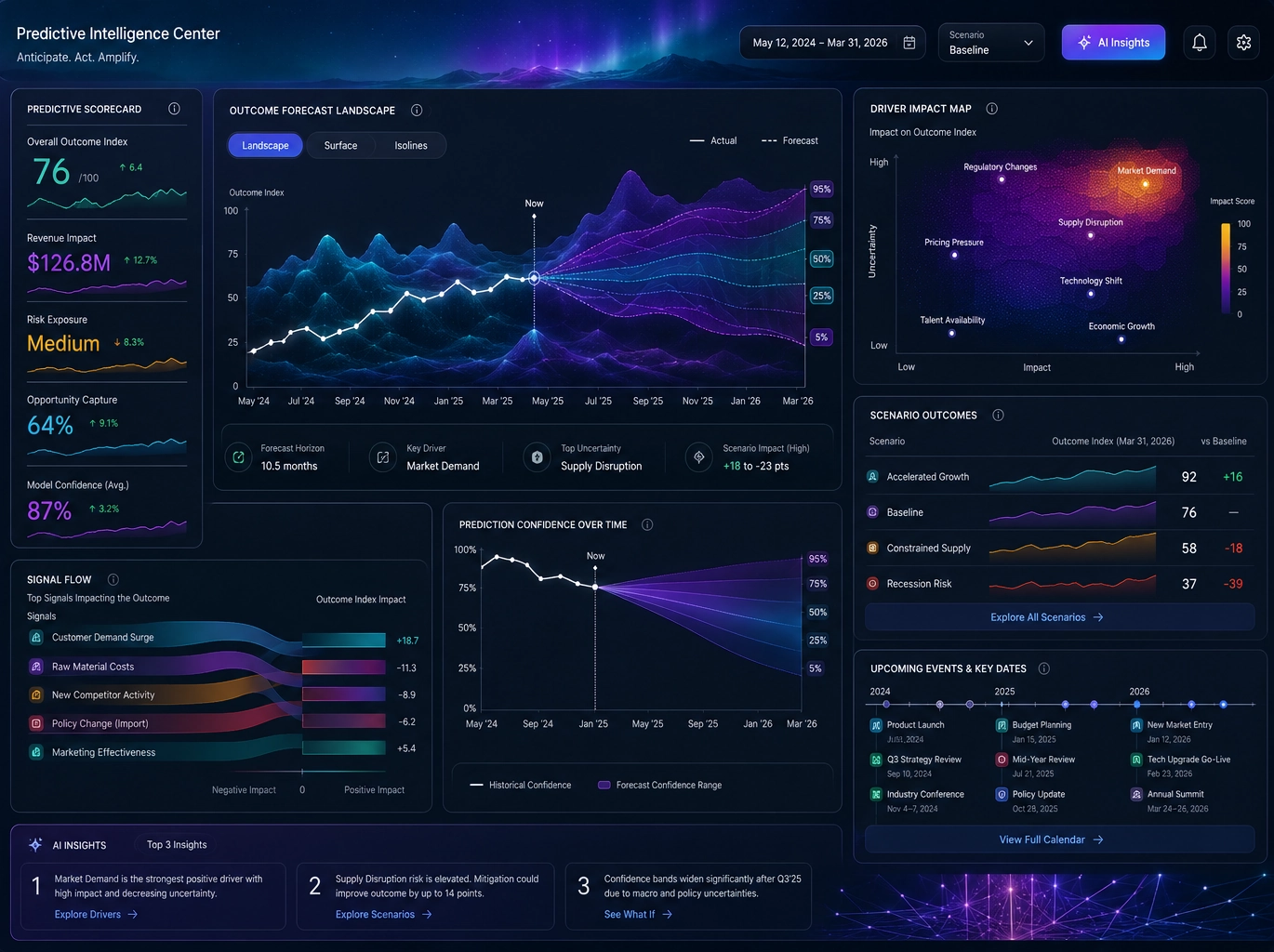
Ad hoc analysis helps researchers explore and understand the data, preprocess it for machine learning, and evaluate the performance of the models. On the other hand, machine learning provides the predictive power to make data-driven decisions based on the insights gained from ad hoc analysis. Together, these approaches enable data-driven innovation and decision-making in various domains, including biotech, finance, healthcare, and many others.

Read More About Ad Hoc Analysis
Ad Hoc Analysis and OLAP Tools - Why do organizations go with an ad hoc analysis approach along with OLAP tools? It's important for organizations to consider a broad spectrum of data to make relevant, informed decisions. In an enterprise reporting environment, it is crucial for organizations to utilize an ad hoc analysis approach along with OLAP tools. Disregarding or missing key information can have adverse effects on any organization...
What is Ad Hoc Reporting? - In a strict sense, an ad hoc report is a report that is created on the fly, displaying information in a table or a chart that is the result of a question that has not already been codified in a production report. There is a limit to the number of such production reports and business questions that can be anticipated and coded in advance so that users can consult them whenever they want. In a broad sense, ad hoc reporting is just a way to answer unanticipated questions...
What is the Difference Between Business Intelligence and Business Analytics? - What is the difference between business intelligence and business analytics? Since the two words are often incorrectly used interchangeably, the distinction can be confusing. Business intelligence is an umbrella term that refers to the methods, processes, and technologies which organizations use to turn large amounts of data into actionable information. This includes analytics, data warehousing, performance management, and other technologies that provide historical, current, and predictive views of an organization's operation. Business analytics consists of the discovery of meaningful patterns in data, using statistics, computer programming, and operations research. Analytics can therefore be described as the prescriptive and predictive function of business intelligence reporting...
Solution to Create Ad Hoc Reports - Are you looking for a good solution to create ad hoc reports? InetSoft offers reporting software that can be deployed wherever you want: on premise, in any cloud location you want, or hosted by InetSoft. The small footprint, 100% Java, pure Web architecture delivers an embedding and integration-ready platform. This software, designed for ad hoc reporting, not only integrates with any Web user interface, it also leverages the same application server platform as that of the embedding application...
Business Intelligence Initiative Begins with Canned Reporting - Typically this is the way organizations start with some sort of business intelligence initiative. It begins with canned reporting. This could be a sales report, or it could be regular financial statements. Reports are really designed to answer a specific question or maybe a set of specific questions. Some of you may have experienced reporting packages like Crystal Reports. You might already understand the value of pure reporting; really just getting information in a pixel perfect format to your end user to answer those questions. However, there are situations when a canned report falls short of what you need...
Report Based Ad Hoc Analysis - In the enterprise reporting environment, ad hoc reports offer basic frameworks for analysis. InetSoft's StyleBI™ implements self-service enabled ad hoc analysis via end-user defined data mashup. This function you won't find among any other business intelligence solution. The key advantages of the Style Intelligence solution are...
Ad Hoc Query Tool - Looking for an ad hoc query tool? InetSoft offers ad hoc query and reporting software to build ad hoc queries with a drag and drop designer. The query application includes powerful database access capabilities connecting to disparate data sources and permitting ad hoc query analysis for business users and database analysts alike. Based on a product that has won 8 JDJ Readers Choice Awards in a row, you have a great option to evaluate...

How Long Do These Visualization Applications Take to Implement? - How long do these visualization applications take to implement? That's a good question. We are typically implementing large projects in three to six or eight weeks. It often depends on the feedback cycles with the customer. For example, recently we put in a an operational dashboard for a healthcare center, for clinical and financial analysis. I think it was three weeks. We had a pre-set template we had to adjust to the data, work with the users, and train them. We just put in a large state university, one of the largest in the country. A million alumni entities, six million gift transactions, and 60 tables, that was a four week cycle...
Demographic Analysis Examples - If you are looking for some ideas on how to analyze demographic data, take a little time to examine these demographic dashboard examples. Data can be explored using a wide range of built-in functions as are detailed in the different sections (with screenshots) below. The more you experiment with this demographic dashboard example, the more you will see how a well-designed dashboard with powerful interactive features can analyze data effortlessly...
What KPIs and Analytics Does a Mining Production Analyst Use? - Effective production management is essential to maximizing output, reducing costs, and ensuring safety in the dynamic and complicated world of mining. Key performance indicators (KPIs) and advanced analytics are used by mining production analysts to evaluate operational efficiency and identify areas for improvement...
Insurance Claims Dashboard - The Insurance Claims Dashboard example here demonstrates InetSoft's user-friendly analytical dashboards, perfect for organizations in need of a customizable and interactive software to assist in everyday operations. The particular chart below portrays some of the many tools that InetSoft carries in addition to featuring a multi-dimensional view on the data. InetSoft's solution provides users with a large collection of visualizations and charts to create dashboards that meet their criteria or are easy to analyze. Simplifying the process even further, the point and click environment allows users to easily drill down into their data sets by claim type, claim status, gender, and age for a detailed analysis...

What KPIs and Analytics Does a Budget Analyst Use? - The effective allocation and management of resources is ensured through budgeting. A budget analyst is in charge of creating, analyzing, and maintaining an organization's financial budget. Budget analysts use a variety of Key Performance Indicators (KPIs) and analytics to monitor financial performance, spot patterns, and reach informed judgments in order to efficiently carry out their responsibilities...