Good Options for Analytics Software That Supports Big Data Processing
Choosing analytics software for big data processing means balancing scalability, performance, flexibility, and ease of use.
This article explains what “good options” look like, how to compare them, and which capabilities matter most for modern data teams.
The right platform should turn complex, high-volume data into timely and actionable insights.
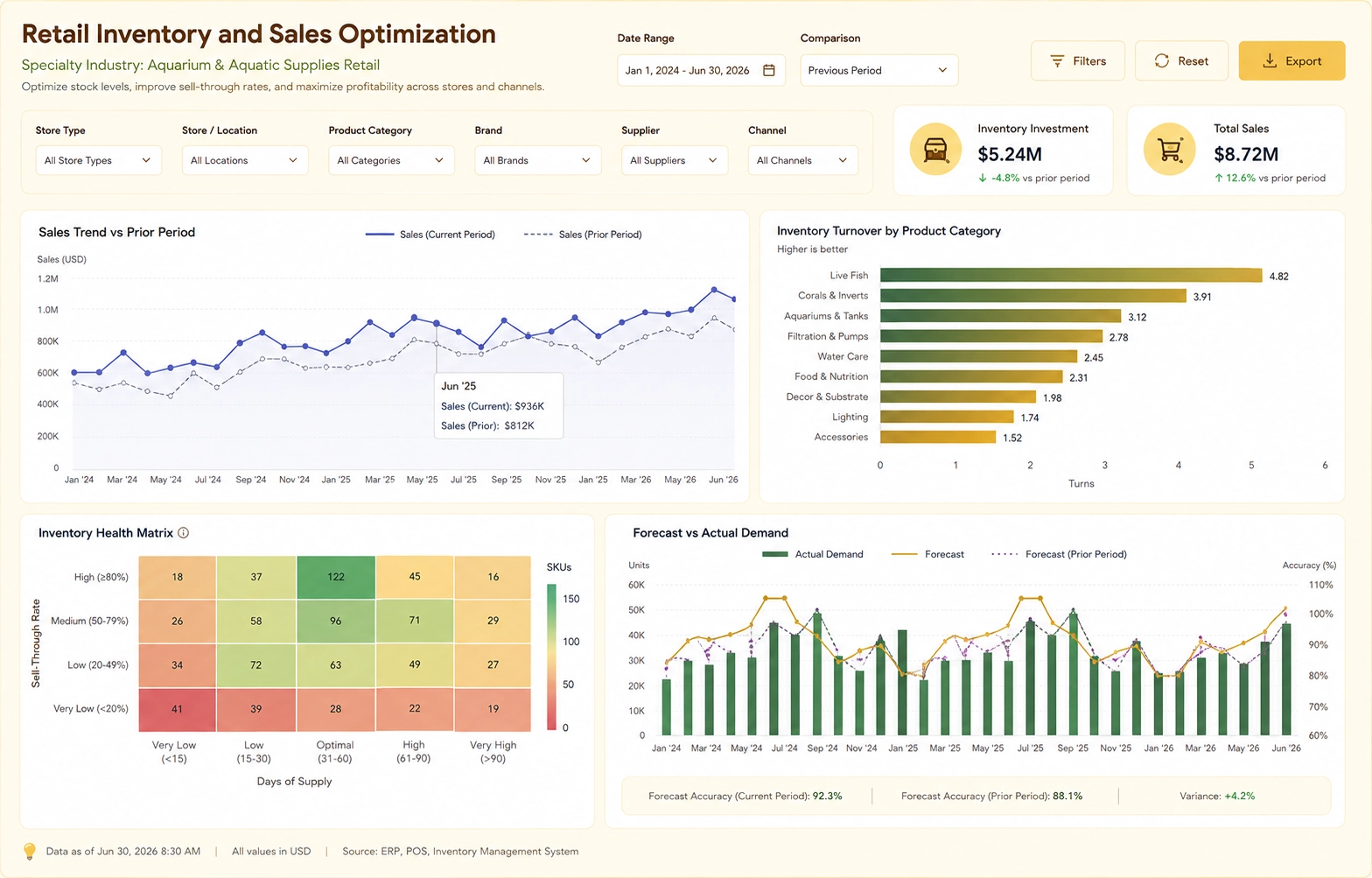

What makes analytics software good for big data?
Big data environments generate high volumes of structured and unstructured information at high velocity. Analytics software must handle this scale while still delivering fast, reliable insights to business users and technical teams.
- Scalability: Ability to process large datasets across distributed storage and compute.
- Performance: Efficient query execution, caching, and optimized data pipelines.
- Connectivity: Native integration with data lakes, warehouses, streaming platforms, and cloud services.
- Governance: Role-based access, data lineage, and compliance-friendly controls.
- Usability: Intuitive dashboards, self-service analytics, and support for advanced users.

Key categories of analytics software for big data
Instead of focusing on a single product, it helps to think in terms of categories. Many organizations combine tools from several categories to build a complete big data analytics stack.
1. Cloud-native analytics platforms
These platforms are built to run on cloud infrastructure and scale horizontally. They often provide managed services for storage, compute, and visualization in one environment.
- Pros: Elastic scaling, reduced infrastructure management, tight integration with cloud data services.
- Best for: Teams that prefer managed services and need rapid deployment across regions.
2. Distributed processing and query engines
Distributed engines focus on processing large datasets efficiently, often separating storage from compute. They are ideal when you already have big data infrastructure and need powerful analytics on top of it.
- Pros: High performance on large datasets, support for complex queries and transformations.
- Best for: Data engineering and analytics teams working with data lakes and large warehouses.
3. Business intelligence and dashboard tools
BI tools provide visual dashboards, reports, and self-service exploration. When connected to big data backends, they allow non-technical users to interact with large datasets without writing code.
- Pros: Rich visualizations, interactive dashboards, user-friendly interfaces.
- Best for: Business users who need fast, visual access to big data insights.
4. Advanced analytics and data science platforms
These platforms support machine learning, statistical modeling, and advanced data preparation. They are designed for data scientists and analysts who need flexible tools for experimentation and production workflows.
- Pros: Support for ML pipelines, notebooks, and complex modeling on large datasets.
- Best for: Organizations investing in predictive analytics and AI on top of big data.

Essential capabilities to look for
When comparing options, focus on capabilities rather than just feature lists. The right combination of capabilities ensures your analytics stack can grow with your data and your business.
- Support for large-scale storage: Compatibility with data lakes, warehouses, and object storage.
- Streaming and real-time analytics: Ability to process event streams and near-real-time data.
- Flexible data modeling: Support for structured, semi-structured, and unstructured data.
- Query optimization: Indexing, caching, and cost-based optimization for big data queries.
- Security and governance: Fine-grained permissions, auditing, and encryption.
- Extensibility: APIs, SDKs, and integration hooks for custom applications and workflows.

How to choose the right analytics software for big data
A “good option” depends on your data landscape, team skills, and business goals. Use a structured evaluation approach to avoid over-buying or underestimating future needs.
1. Assess your data environment
- Volume and growth: Estimate current data size and expected growth over the next few years.
- Variety: Identify data types: transactional, logs, IoT, documents, images, and more.
- Velocity: Determine how often data arrives and how quickly it must be analyzed.
2. Map user roles and use cases
- Business users: Need dashboards, reports, and guided analytics.
- Analysts: Need ad hoc querying, data exploration, and visualization flexibility.
- Data engineers: Need robust pipelines, orchestration, and monitoring.
- Data scientists: Need access to large datasets for modeling and experimentation.
3. Evaluate total cost and operational impact
- Licensing and cloud costs: Consider compute, storage, and user-based pricing.
- Maintenance effort: Compare managed services versus self-hosted or hybrid deployments.
- Skill requirements: Align tools with the skills your team already has or plans to build.
4. Test with realistic workloads
- Pilot projects: Run proof-of-concept workloads using representative datasets.
- Performance benchmarks: Measure query times, concurrency, and resource usage.
- User feedback: Collect input from both technical and business users before committing.

Examples of strong big data analytics setups
Many organizations end up with a layered architecture rather than a single tool. Here are common patterns that represent “good options” for big data analytics in practice.
Pattern 1: Cloud data lake plus BI dashboards
- Storage: Central data lake for raw and curated data.
- Processing: Distributed query engine or warehouse for transformations and aggregation.
- Analytics: BI tool connected to curated views for dashboards and reports.
Pattern 2: Streaming analytics for real-time insights
- Ingestion: Event streaming platform capturing logs, metrics, and transactions.
- Processing: Stream processing engine for real-time transformations and alerts.
- Visualization: Dashboards showing live KPIs and operational metrics.
Pattern 3: Data science platform on top of big data
- Data access: Secure connectivity from notebooks and ML tools to big data storage.
- Modeling: Training and evaluating models on large historical datasets.
- Operationalization: Deploying models back into the analytics stack for predictive insights.

Frequently asked questions about big data analytics software
What is the most important factor when choosing big data analytics software?
The most important factor is alignment with your data architecture and use cases. A tool that integrates cleanly with your existing storage, pipelines, and security model will deliver more value than a feature-rich product that is difficult to connect or maintain.
Do I need a single platform or multiple tools?
Most organizations use multiple tools that specialize in different layers: storage, processing, visualization, and advanced analytics. A single platform can simplify management, but a modular approach often provides more flexibility and better fit for complex big data environments.
How can I future-proof my analytics stack?
Focus on open standards, strong integration capabilities, and elastic scaling. Choose software that can adapt to new data sources, higher volumes, and emerging analytics techniques without requiring a complete rebuild.
Is big data analytics only for large enterprises?
No. Cloud-native tools and managed services have lowered the barrier for smaller organizations. Any team dealing with rapidly growing data volumes or complex data types can benefit from analytics software designed for big data processing.
Comparison of Analytics Software Vendors for Big Data Processing
This is a comparison of top vendors across connectivity, scalability, modeling flexibility, interactivity, and embedding strength.