Top 50 Features of Business Intelligence Software
- Data mashup engine – InetSoft’s data mashup engine lets you combine data from multiple disparate sources in real time. It supports relational databases, web services, spreadsheets, OLAP, and more in a unified layer. This reduces ETL overhead and lets analysts iterate quickly on new questions without waiting for IT.
- Data Block technology – Data Blocks encapsulate reusable, analytic-ready data sets. They can be shared across dashboards and reports, ensuring consistency of metrics and logic. This modular approach speeds development and simplifies maintenance as business rules evolve.
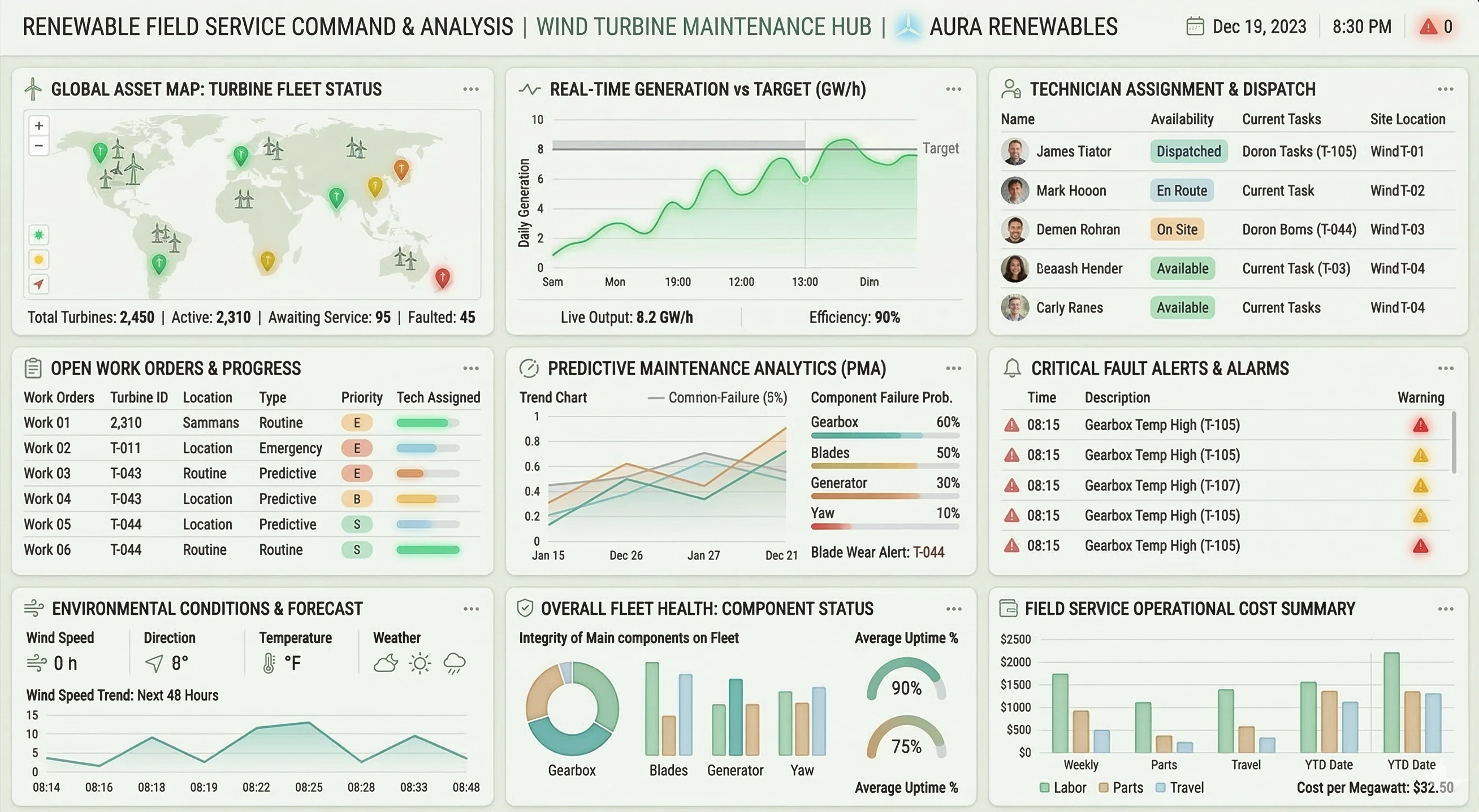
- Interactive dashboards – Users can build highly interactive dashboards with filters, drill-downs, and dynamic selections. Visuals respond instantly to user input, making it easy to explore trends and outliers. This interactivity supports both executive overviews and deep-dive analysis in one place.
- Self-service BI – Business users can create and modify their own views without heavy IT involvement. A visual, web-based interface guides them through selecting data, building charts, and saving dashboards. This democratizes analytics and reduces bottlenecks on central BI teams.
- Pixel-perfect reporting – InetSoft supports highly formatted, production-grade reports for invoices, statements, and regulatory documents. Designers can control layout down to the pixel, including headers, footers, and pagination. This makes it suitable for both analytical and operational reporting needs.
- Ad hoc reporting – Users can quickly assemble ad hoc reports from available data sources. Drag-and-drop fields, grouping, and filtering make it easy to answer one-off questions. These ad hoc views can later be promoted into standard reports if they prove valuable.
- Embedded analytics – InetSoft can be embedded into other applications and portals. This allows software vendors and internal teams to deliver analytics directly within existing workflows. Embedded dashboards inherit security and context, providing a seamless user experience.
- Web-based design environment – Both dashboard and report design are done in a browser-based interface. This eliminates desktop installs and simplifies administration and upgrades. Teams can collaborate more easily because everyone works in the same environment.
- On-premises and cloud deployment – InetSoft supports flexible deployment models, including on-premises, private cloud, and public cloud. Organizations can choose the model that best fits their security, compliance, and cost requirements. This flexibility also eases migration as strategies change over time.
- Row-level security – Fine-grained security rules can restrict which records each user can see. Policies can be driven by roles, groups, or attributes such as region or department. This ensures sensitive data is protected while still enabling broad self-service access.
- Role-based access control – Administrators can define roles for designers, viewers, power users, and administrators. Each role has tailored permissions for creating, editing, and sharing content. This structure keeps governance tight while still empowering the right people.
- Scheduling and distribution – Reports and dashboards can be scheduled for automatic generation and delivery. Output can be sent via email, file shares, or other channels in formats like PDF or Excel. This ensures stakeholders receive timely information without manual effort.
- Advanced caching and aggregation – Pre-calculated aggregations and intelligent caching reduce query times for common analyses. The system can materialize frequently accessed data summaries. This improves performance for end users without requiring manual data warehouse tuning.
- Multi-source data blending – InetSoft can join data across heterogeneous systems without preloading everything into a warehouse. You can blend CRM, ERP, web analytics, and spreadsheets in a single view. This gives a more complete picture of performance and customer behavior.
- Real-time and near real-time analytics – The platform can query live data sources for up-to-date insights. This is useful for operational dashboards that monitor KPIs throughout the day. Users can react faster to issues and opportunities as they emerge.
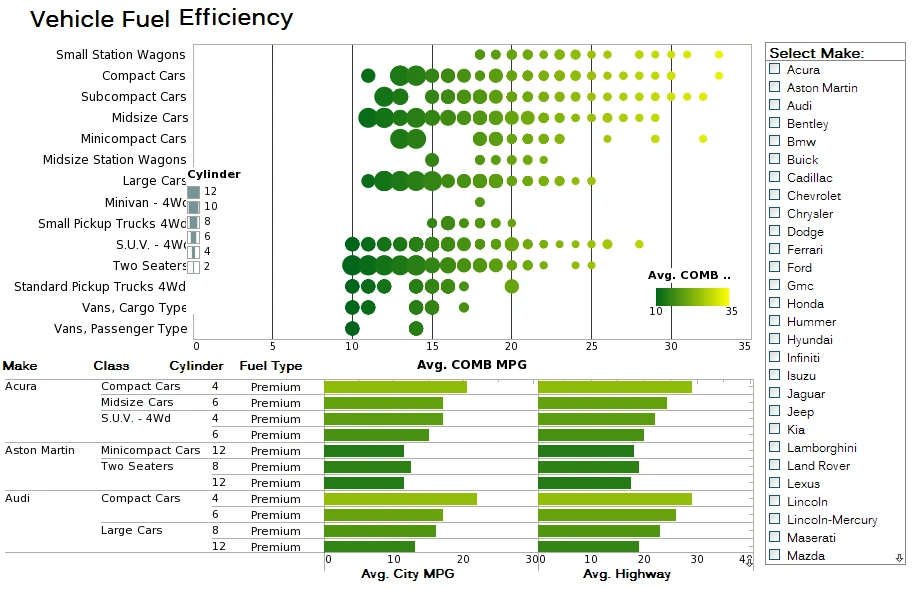
- Advanced charting and visualization – InetSoft offers a wide range of charts, maps, gauges, and other visuals. Designers can customize colors, labels, and interactions to match business needs and branding. Rich visual options help communicate complex data clearly and intuitively.
- Drill-down and drill-through – Users can click on high-level metrics to see more detailed breakdowns. Drill-down paths can follow hierarchies like region→country→city or year→quarter→month. Drill-through to underlying records or external systems provides additional context when needed.
- Hierarchies and dimensional analysis – InetSoft supports dimensional modeling concepts like hierarchies and levels. Users can pivot and slice data across dimensions such as time, geography, and product. This makes it easier to analyze performance from multiple perspectives.
- Calculated fields and expressions – Designers can define custom calculations using expressions and formulas. These can include conditional logic, aggregations, and business-specific metrics. Centralizing calculations in the BI layer ensures consistency across all content.
- Data preparation and transformation – The mashup interface includes tools for joins, filters, aggregations, and data cleansing. Users can profile data visually as they transform it, catching issues early. This reduces the need for separate data prep tools in many scenarios.
- Support for diverse data sources – InetSoft connects to SQL databases, OLAP cubes, REST/JSON APIs, Salesforce, Google Analytics, and more. It can also read flat files and spreadsheets for quick analysis. This breadth of connectivity reduces integration friction and expands analytic reach.
- Mobile-friendly dashboards – Dashboards can be viewed on tablets and smartphones with responsive layouts. Key interactions like filtering and drilling remain usable on touch devices. This keeps decision-makers connected to insights while away from their desks.
- Multi-tenant architecture – InetSoft can be configured for multi-tenant use, ideal for SaaS providers and shared environments. Each tenant can have its own data, security, and branding. This enables scalable, secure analytics services for many clients at once.
- Branding and white-labeling – Organizations can customize logos, colors, and styles to match corporate identity. For embedded use, InetSoft can appear as a native part of another application. Consistent branding improves user trust and adoption.
- Versioning and lifecycle management – Content can be updated and promoted through development, test, and production environments. Administrators can manage changes to dashboards, reports, and data models in a controlled way. This reduces risk when rolling out new analytics to large audiences.
- Content management and governance – Administrators can control which dashboards and reports are published, updated, or archived. Metadata and descriptions help users find relevant content. This centralized governance ensures quality and prevents proliferation of outdated or redundant analytics.
- Collaboration and sharing – Users can share dashboards and reports with individuals or groups. Shared content can include annotations, comments, or saved filter states. This supports collaborative decision-making and knowledge transfer across teams.
- Export to multiple formats – Reports and dashboards can be exported to PDF, Excel, PowerPoint, and image formats. This makes it easy to incorporate analytics into presentations and documents. Offline exports also help when stakeholders lack direct system access.
- Parameterization and prompts – Designers can add parameters to reports and dashboards to control scope. Users can select values like date ranges, regions, or product lines at runtime. This keeps content flexible without requiring multiple hard-coded variants.
- Alerting and threshold monitoring – InetSoft can monitor KPIs and trigger alerts when thresholds are crossed. Alerts can be delivered via email or other channels with links back to relevant views. This turns dashboards from passive displays into proactive monitoring tools.
- Support for big data platforms – The platform can connect to large-scale data stores and warehouses. Push-down queries and optimized connectors help maintain performance on big data sets. This allows organizations to leverage existing investments in modern data platforms.
- Machine learning integration – InetSoft supports scenarios that combine BI with machine learning outputs. Predictive scores or classifications can be visualized alongside traditional metrics. This helps operationalize data science work for business users.
- Audit and usage tracking – Administrators can track who accessed which dashboards and reports and when. Usage metrics help identify popular content and potential training needs. Audit trails also support compliance and governance requirements.
- Internationalization and localization – The interface and content can be localized for different languages and regions. Date, number, and currency formats can be adjusted to local conventions. This makes InetSoft suitable for global deployments with diverse user bases.
- Performance optimization features – Caching, query optimization, and aggregation strategies help keep dashboards responsive. Designers can tune data refresh strategies based on business needs. These capabilities support both high concurrency and complex analytics.
- Portal and single sign-on integration – InetSoft can integrate with enterprise portals and SSO solutions. Users can log in with existing credentials and see content based on their roles. This simplifies user management and improves security.
- Template-based design – Designers can create templates for common dashboard and report layouts. Templates enforce consistency in look, feel, and structure across the organization. They also speed up development for new content creators.
- Time-series and trend analysis – InetSoft supports time-aware calculations and visualizations. Users can compare periods, calculate growth rates, and highlight seasonality. This is essential for understanding performance over time and forecasting needs.
- What-if and scenario analysis – Some visualizations can incorporate parameters or sliders to simulate changes. Users can adjust assumptions and immediately see the impact on key metrics. This supports planning, budgeting, and strategic decision-making.
- Security integration with directories – InetSoft can integrate with LDAP, Active Directory, and similar systems. User and group information can be synchronized to drive role-based access. This reduces duplication of identity management and keeps permissions aligned.
- Extensibility via APIs – APIs allow developers to automate tasks and integrate InetSoft with other systems. They can manage content, trigger refreshes, or embed specific views programmatically. This extensibility makes InetSoft a flexible component in a broader data ecosystem.
- KPI scorecards – InetSoft can present key performance indicators in scorecard-style views that emphasize targets, status, and trends. Users can quickly assess whether metrics are on track without scanning dense reports. This makes executive monitoring more focused and actionable.
- Geospatial mapping – Location-based data can be visualized on interactive maps for regional and site-level analysis. Users can explore performance by territory, branch, service area, or customer concentration. Mapping adds important geographic context that standard charts cannot easily convey.
- Conditional formatting – Designers can apply visual rules that highlight exceptions, outliers, and threshold breaches directly in tables and charts. Colors, icons, and styling can change automatically based on business logic. This helps users spot issues faster and prioritize attention where it is needed most.
- Report bursting – A single report can be generated and distributed in personalized slices for different recipients or groups. For example, managers can automatically receive only the data for their region or department. This improves relevance while reducing manual report preparation.
- Reusable report components – Common report sections such as headers, tables, charts, and parameter panels can be reused across multiple assets. This reduces duplication and keeps formatting and logic consistent. Reusability also shortens development time for new analytics content.
- Custom scripting and event handling – Developers can add custom logic to reports and dashboards to support advanced behaviors. Scripts can control calculations, visibility, formatting, and interactions based on runtime conditions. This provides deeper flexibility for specialized business requirements.
- Server clustering and scalability – InetSoft can be deployed in clustered environments to support higher concurrency and improved resilience. Workloads can be distributed across servers to maintain responsiveness as usage grows. This makes the platform suitable for enterprise-scale deployments.
- Metadata search and content discovery – Users can locate dashboards, reports, and data assets more efficiently through organized metadata and searchable content. Clear naming, descriptions, and categorization reduce time spent hunting for the right analysis. Better discovery also increases reuse of trusted analytics.
- Personalized views and saved states – Users can save preferred filters, prompts, and dashboard views for repeated use. This allows each person to return quickly to the context most relevant to their role. Personalized states improve adoption by making analytics feel tailored rather than generic.



Related Topics
Business Intelligence BI - Primary benefits and differentiators of InetSoft's business intelligence software including how it accommodates data exploration through visualization and maximum self-service...
Business Intelligence Concepts - We will begin with an introduction to the high level tools available in InetSoft. Later in this chapter we discuss the object oriented design patterns used in StyleBI. To allow easy construction of reports, the InetSoft package includes a number of adapters which are used to wrap an object so that it conforms to the predefined API. • The decorator design pattern is a powerful way to add or modify the attributes of an object. The factory design pattern is used by StyleBI to provide platform- and JDK version-independent ways to create certain types of objects. • The builder design pattern is used in InetSoft products for importing and exporting reports to and from external formats. • A singleton is a type of object that always has one instance in every Java virtual machine. Users of the object share the same instance across a single process...
Business Intelligence Customer Experiences - Read about business intelligence customer experiences. Hear how companies give their executives performance management dashboards. Read how others use data mashup functionality to unify disparate data sources to provide comprehensive dashboard reporting. All of them leverage InetSoft's businesss intelligence technology to derive intelligence from their data. Fern Plastic Products, a 52-year old injection moulding company, chose InetSoft’s business intelligence solution to deliver KPI dashboards and real-time reporting alongside their Baan ERP system. Previously Fern extracted data used from their Baan ERP system and manually created KPI graphs and matrix style reports. The manual manipulation of data in Excel spreadsheets created a time consuming process that had the potential for inaccuracies in the presentation of the data. Fern uses Style Intelligence to mashup data from their Baan ERP system and other operational data sources enabling interactive dashboarding, analysis and reporting functionality. Operational reports are now automatically sent to each manager on a daily basis. Month-end reporting processes have been automated, and data governance has been greatly improved. The company is delighted with the results they are re getting out of InetSoft’s Style Intelligence – real-time, instant access and visibility, 24/7...
Business Intelligence Dashboards - Are you researching business intelligence dashboards? InetSoft offers business intelligence dashboards as a component of its BI software platform StyleBI. Dashboard visualization and analysis features include rich multi-dimensional charting...
Business Intelligence Data - InetSoft's StyleBI is a business intelligence platform which features a powerful data mashup engine. A patent pending Data Block foundation is used for real-time data mashup, allowing the data to be presented clearly in forms such as interactive dashboards. These interactive dashboards are easy to use, and easy to modify. Multi-dimensional charting allows multiple sets of data to be shown at a time, presenting the information clearly. New insights are gained with more information being perceived in a single view. Many BI solutions are not equipped to incorporate Big Data into dashboards and reports. StyleBI connects to Big Data sources such as Cloudera, Hadoop, MapR, and SAP HANA, consolidating massive amounts of raw data in order to answer whatever business questions may arise...

Business Intelligence Design Philosophy - By providing a choice between using a visual report design tool, a finely tuned API or a combination of the visual and API approach, the software package gives programmers ultimate control. StyleBI includes the following features: Built-in support for a wide range of data sources such as XML, relational databases, CORBA and EJB. • Built-in support for Swing JTable, Tea Set grids and other commercial table/grid components. • Ability to export a report to a variety of file types including PDF, PostScript, HTML, CSV, RTF, and Excel. • Easy to use visual report template designer. • Report scripting based on standard JavaScript. • Over 80 pre-built table styles to choose from. • Full support for page formatting and pagination. • Style Report Enterprise and StyleBI offer a Web-based servlet, RMI, server clustering and CORBA implementations of the report server (repository)...
Business Intelligence Engine - Looking for a flexible and powerful business intelligence engine? InetSoft is a pioneer in dashboard reporting, and our platform includes a data mashup engine for generating complete views of corporate performance. View a demo and try interactive examples...
Business Intelligence Features - InetSoft provides a Report Designer which allows a developer to visually create a report template, which is saved as an xml file. The report template can be populated with data from a variety of data sources and report elements may have JavaScript associated with them to allow for more dynamic interaction. In addition to these features, InetSoft server-side reports can be built using an object oriented report API. This approach gives easier access to data sources in modern multi-tier architecture and more power in controlling every aspect of reporting. InetSoft Enterprise products also include the InetSoft Data Modeler and the query engine. The visual Data Modeler provides support for a wide range of data sources, from traditional relational databases, to standard XML and EJB servers. The combination of a powerful visual query engine with the formatting and layout of the report engine creates a unique Java reporting solution.We recognize that the goal of each application is to fulfill a business need and the most important component of fulfilling that need is the business logic...
Business Intelligence for Accountants - Looking for a good solution for accounting business intelligence? InetSoft's pioneering BI application produces great-looking dashboards with an easy to use drag and drop designer. Maximize self-service for all types of users.. View a demo and try interactive examples...
Business Intelligence Integration Tools - InetSoft's flagship software, StyleBI, employs powerful data integration tools that enable otherwise overwhelming amounts of raw data to be used for intuitive analyses, revealing advantageous insights and meaningful information. StyleBI's web-based platform maximizes self-service and benefits business users with enhanced functionality of enterprise data, enabling data to be explored wherever a user has access to a web browser. InetSoft's effective and reliable integration tools facilitate an almost unlimited flexibility in the selection and addition of data sources. This kind of flexibility grants users a deeper comprehension of their enterprise's business operations, allowing for more informed decision-making...

Business Intelligence in the Finance Department - This Webinar is about how business intelligence can transform the finance department. We will show you how Finance can employ business intelligence to correlate financial outcomes with business activities to help you achieve strategic objectives. Following today’s part one of this two part series, come back and attend part two of this podcast to learn how performance management can help you organization better communicate, execute strategy and respond quickly to changing market conditions. The first objectives here for this presentation is really to lay out the BI landscape, draw the high level issues and hopefully in future Webcasts we can come back and drill into some details. So the first thing I am going to address is the changing role of finance. It’s one department that’s undergoing significant change, thanks in most part to new technologies and new instruction being delivered by business intelligence. We’re going to drill a little bit more into specific BI issues for finance, specifically data management issues and the difference between operational reporting and business intelligence. We’ll touch a little bit on planning and budgeting which is a key finance activity and finally finish up with performance management...
Business Intelligence for Healthcare Insurers - Today’s Webinar is about exploring the enterprise business intelligence challenges healthcare insurers face in the 21st century and how analytic solutions are helping create better industry performance and competitive advantage through better business decisions and stronger customer relationships. Our first topic is about how analytics drive innovation for commercial health care companies. We have worked with a large healthcare insurer. Those companies that are responsible for some of the financial side of the whole healthcare equation often called the payers. What we are finding now is a shift in orientation where what were traditionally considered healthcare payers, the companies handling the financial transactions, are now really broadening their value add to our healthcare system. They are really thinking about how they move beyond being a payer and really more of a wellness partner, teaming more closely with not just the large employers that hire or that buy services from the health insurance companies, but the individual members. And a big part of that shift coming from a transaction processor to a wellness partner is really about how well health insurance companies know their customers, how well they know what products best serve customers, how they can best provide guidance, provide people the kinds of programs that improve their overall health...