Ways to Testdrive InetSoft's StyleBI
InetSoft's StyleBI is a modern, lightweight, and embeddable business intelligence platform designed for rapid data visualization, self-service analytics, and scalable enterprise reporting. With a focus on schema-less data mashups, cloud-native deployment, and an intuitive user interface, it appeals to both developers and business users.
Before committing to a full deployment, InetSoft offers several ways to explore and test-drive StyleBI. Whether you are a product manager, IT decision-maker, or developer, these options provide hands-on opportunities to evaluate its capabilities in real-world scenarios.

1. Live Demo Environment
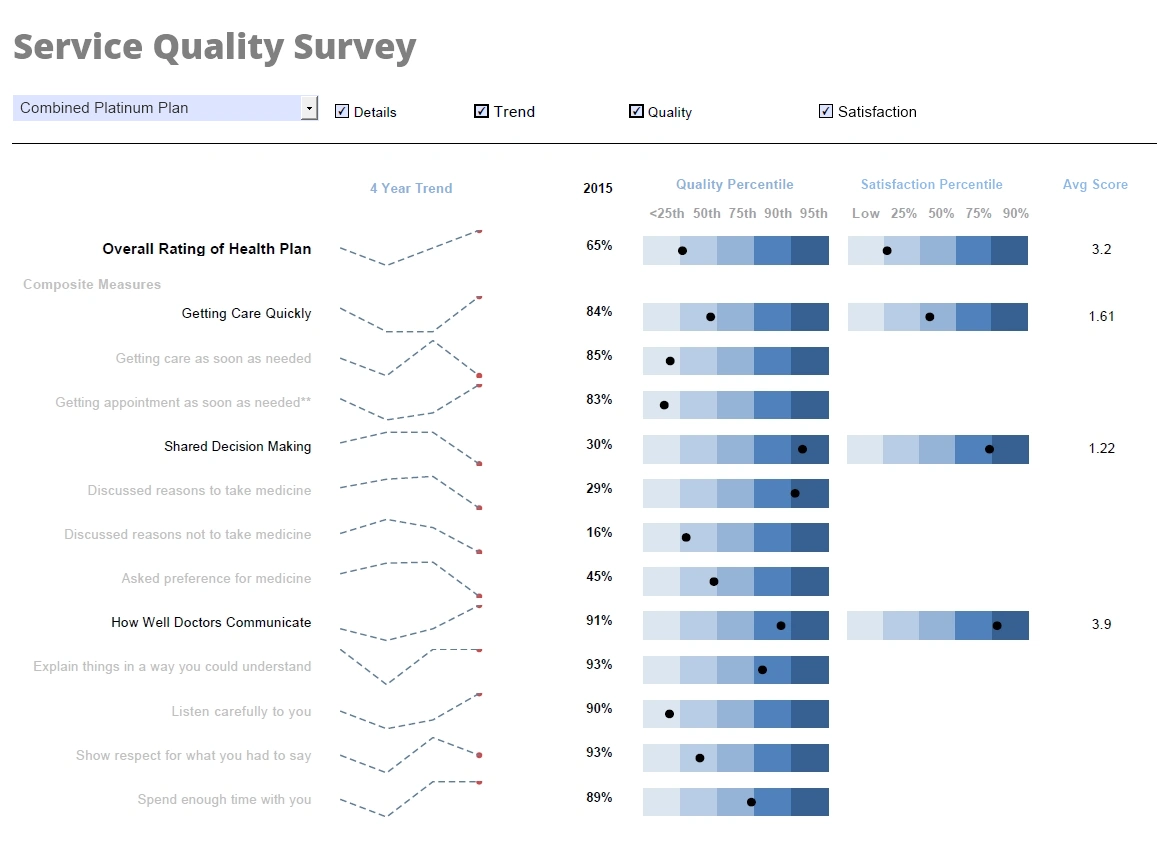
InetSoft provides an interactive live demo portal accessible through their website. This environment features a curated set of dashboards and reports drawn from real use cases across industries such as finance, healthcare, manufacturing, and sales. Users can:
- Explore interactive dashboards with filter controls and drill-down functionality
- View advanced visualizations like KPI tiles, combo charts, and geographic maps
- Assess performance and responsiveness in a hosted cloud environment
The live demo is ideal for getting an instant feel for the end-user experience and the breadth of visualization options available in StyleBI.
2. Free Trial Download
For a deeper and more customizable experience, InetSoft offers a free downloadable trial version of StyleBI. This version allows users to:
- Install the application in their own IT environment or local machine
- Connect to local or cloud-hosted data sources such as SQL databases, Excel files, and web APIs
- Create their own mashups, dashboards, and reports using StyleBI’s visual tools
- Experiment with embedding StyleBI components into web applications
The trial version is particularly useful for IT teams and software architects who want to test security settings, user access controls, performance tuning, and integration options.
3. Cloud-hosted Sandbox Environment
For users who prefer not to handle installation, InetSoft can provision a cloud-hosted sandbox instance of StyleBI. This environment is tailored for prospective customers who want to:
- Evaluate the software’s capabilities in a scalable, SaaS-like setting
- Upload and analyze their own datasets securely
- Share dashboards with other stakeholders for collaborative testing
- Try out scheduling, alerts, and dashboard publishing features
The sandbox is ideal for business analysts or BI champions who need a zero-install solution to test capabilities with actual business data.
4. Guided Product Tours and Webinars
InetSoft frequently offers guided product tours, webinars, and one-on-one walk-throughs. These sessions are led by product specialists who can:
- Demonstrate core features in a live environment
- Answer technical or strategic questions in real-time
- Discuss use cases specific to your industry or team
- Highlight advanced topics like multi-tenant reporting, mobile optimization, or white-labeling
This is an excellent way to gain practical insights into how StyleBI fits into different workflows and how to align it with organizational BI goals.
5. Developer Documentation and API Playground
For development teams, InetSoft offers access to developer resources, REST API documentation, and sample code. Through the StyleBI developer portal, users can:
- Explore how to automate dashboard generation and data updates via API calls
- Learn how to embed visual components within web or mobile apps
- Evaluate customization options for authentication, theming, and branding
- Review code snippets for integrating with popular platforms like .NET, Java, or React
This technical sandbox helps determine the feasibility of integrating StyleBI into existing digital ecosystems or SaaS platforms.
6. Use Case Consultations
For organizations with unique analytics needs or legacy systems, InetSoft offers consultations with solution engineers to help test-drive StyleBI through the lens of a specific project. These collaborative sessions often include:
- Architecture reviews and integration planning
- Data modeling for schema-less mashups
- Custom dashboard design and prototyping
- Pilot project setup and KPI definition
This option is best suited for enterprises exploring strategic rollouts or OEMs evaluating StyleBI for white-label integration.
7. Customer Success Stories and Case Study Downloads
Although not a test-drive in the hands-on sense, reviewing customer case studies provides real-world insight into how others have implemented StyleBI. InetSoft’s website features downloadable PDFs and blog summaries detailing:
- Industry-specific deployment scenarios
- Business impact metrics achieved through StyleBI
- Technical hurdles overcome during adoption
These stories offer benchmarks for what can be accomplished and often inspire new ways to test or model one’s own BI solution.

InetSoft Case Study Articles
-
precision machining shop real‑time dashboards
Brenk Brothers replaced manual SQL-Excel-PowerPoint reporting with dashboards powered by Style Scope. They built 30 interactive dashboards for shop priority tracking, IT ticket status and financial analytics. On-time delivery improved by over 7%, enhancing cross-department communication. -
marketing services firm client portal reporting
A healthcare marketing services company embedded InetSoft reporting into its client portal, replacing a legacy BI tool. They now support over 40 automated report templates, satisfying 95% of client requests automatically. This freed developers to focus on strategic innovation. -
insurance analytics platform builder’s integration
An OEM partner in insurance built an end‑to‑end analytics solution on Style Intelligence with no ETL or SQL. Business users can mash up data, annotate dashboards, and automate alerts across underwriting and claims. The platform delivered 140 configurable industry-standard reports. -
global capital markets bank enterprise BI
A multinational bank deployed InetSoft across continents to meet real-time and regulatory reporting needs without heavy ETL or separate data warehouses. Their operations combine transactional and warehouse data in dashboards for up‑to‑the‑minute trade insights. The solution sped up decision-support and improved user self‑service reporting. -
market research dashboards for global clients
Intellitrends transformed static PowerPoint reporting into near‑real‑time dashboards called Dashview using Style Intelligence. Clients worldwide can interactively explore metrics like NPS, satisfaction and market share by region or segment. This upgrade delivered dynamic insight tailored by role and geography. -
healthcare claims cost‑management reporting automation
NCN streamlined internal reporting using Style Intelligence, cutting BI manager’s SQL query time from hours to minutes. The scheduler automated dashboard generation and delivery in PDF/Excel/HTML, enhancing transparency for business users. Self‑service BI dramatically increased productivity and user autonomy. -
SOA governance system embedding performance reporting
AmberPoint embedded InetSoft’s Style Report Enterprise within their composite applications to provide SLA performance and uptime dashboards. The API integration allowed in-house implementation with minimal consulting. Clients gained actionable performance visibility without building a custom reporting layer. -
K‑12 longitudinal education reporting platform
eScholar integrated web‑based InetSoft reporting into its VISTA system to serve educators and administrators without requiring plug‑ins or client installs. Role‑based security and drag‑and‑drop design empowered users at all levels. The solution met strict reporting mandates and supported both small and large school districts. -
apparel manufacturer boosting margins via dashboards
T‑Formation adopted Style Intelligence to monitor sales, production and customer profitability across its apparel printing lifecycle. Within months they had ten dashboards providing drill‑down analysis that led to optimized pricing and scheduling. The result: improved operational visibility and increased profits. -
HR talent‑management survey analytics integration
Data Solutions Inc. embedded Style Report into its HR performance management suite to deliver branded, real‑time survey and analytics reports. They significantly reduced report generation time from ~2 minutes to ~20 seconds while offering flexible layouts. This integration delivered faster insight and improved user engagement.