Customs Border Control Dashboards: KPIs and How to Influence Them
Customs and border agencies sit at a difficult intersection: they must protect society, collect revenue, and still keep trade flowing. A well-designed customs border control dashboard turns this complexity into a clear, operational picture.
By tracking the right key performance indicators (KPIs), agencies can see where risk is rising, where delays are forming, and where compliance is slipping. The real value comes when those KPIs are not just monitored, but actively managed and improved.
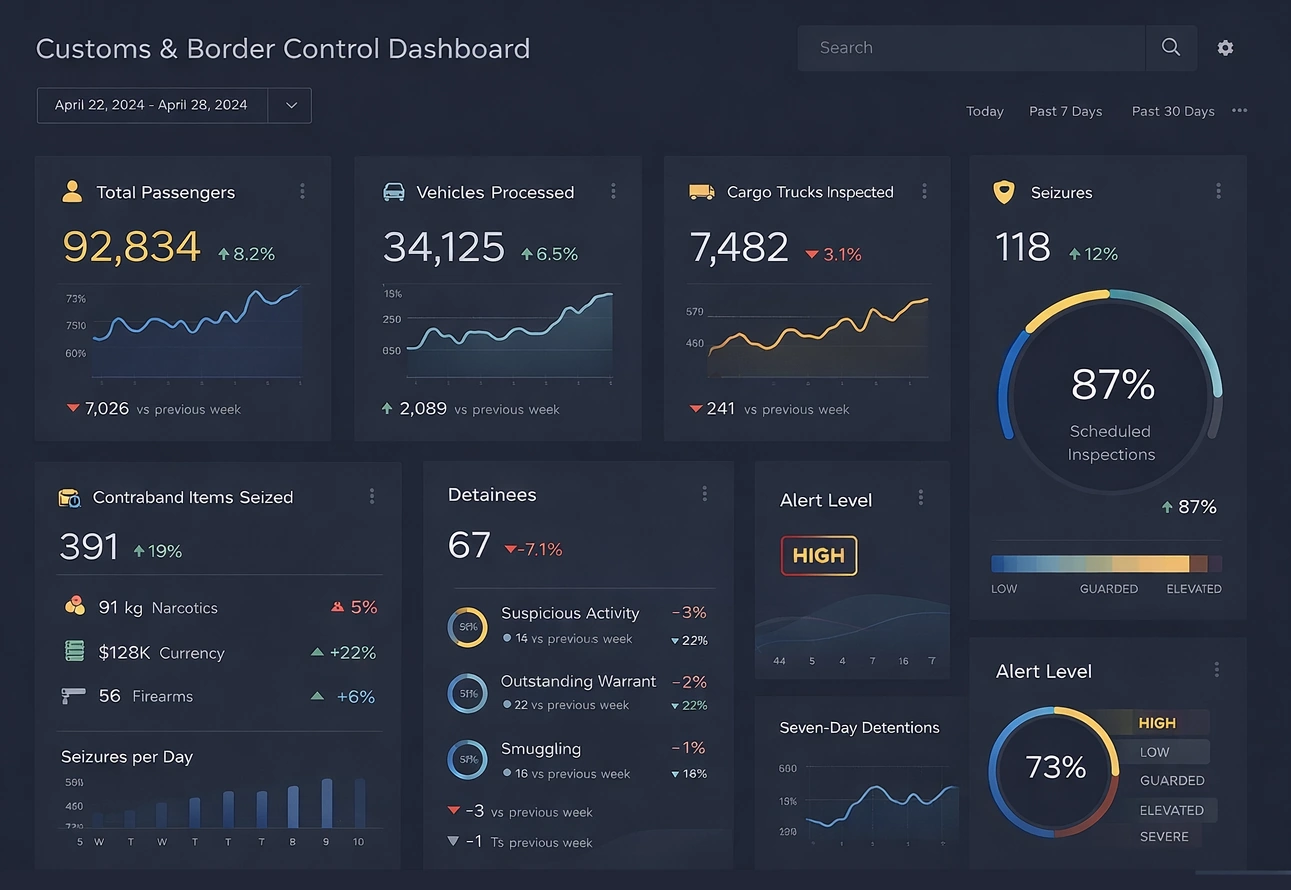

Why customs border control dashboards matter
A modern dashboard gives customs leadership and frontline managers a shared view of performance across ports, airports, and land borders. It consolidates data from declarations, inspections, risk engines, and revenue systems into a single, visual interface. When designed well, it highlights high-risk shipments, bottlenecks, and compliance gaps in near real time.
Dashboards also support strategic decisions. They show whether reforms, new technologies, or staffing changes are actually improving trade facilitation and enforcement outcomes. Over time, they become the backbone of a performance management culture, where decisions are grounded in evidence rather than anecdotes.
Core KPI categories for customs border control
While every administration has its own priorities, most customs border control dashboards revolve around four broad KPI categories: trade facilitation, revenue collection, enforcement and security, and organizational performance.
Trade facilitation and clearance efficiency
These KPIs focus on how quickly and predictably goods move across the border:
- Average clearance time for imports and exports
- Percentage of declarations processed within target time
- Green lane rate (shipments released without intervention)
- Number and duration of border bottlenecks
- Variability of clearance time by port, mode, or commodity
These indicators show whether procedures, IT systems, and staffing are enabling smooth trade or causing unnecessary delays. They are central to international benchmarks and trade facilitation commitments.
Revenue collection and financial performance
Revenue KPIs track how effectively customs collects duties, taxes, and fees:
- Total customs revenue collected by period
- Revenue per declaration or per shipment
- Rate of post-clearance adjustments and recoveries
- Estimated revenue leakage or under-collection
- Accuracy of tariff classification and valuation
A dashboard that combines revenue data with risk and compliance indicators helps identify where misclassification, undervaluation, or fraud may be eroding the tax base.
Enforcement, security, and protection of society
These KPIs focus on risk management and interdiction outcomes:
- Inspection rate by risk category
- Hit rate: percentage of inspections that find irregularities
- Number of seizures (drugs, weapons, counterfeit goods, etc.)
- Detected cases of smuggling, misdeclaration, or sanctions violations
- Trends in high-risk profiles and targeting rules
Effective dashboards balance these enforcement KPIs with facilitation metrics, ensuring that increased controls do not unnecessarily slow legitimate trade.

Organizational and operational performance
Internal performance KPIs help manage resources and capacity:
- Staffing levels and shift coverage by location
- System uptime and incident frequency for core IT platforms
- Training completion rates for officers and analysts
- Backlog of unresolved cases or post-clearance audits
- Cost per declaration or per inspection
These indicators support continuous improvement and help justify investments in technology, training, and infrastructure.
Designing an effective customs dashboard
A customs border control dashboard should not be a dense wall of charts. It should be a carefully structured view that guides the user from high-level status to actionable detail. A common pattern is to start with a top-level overview and then allow drill-down by port, mode, commodity, or risk level.
Key design principles
- Use a clear traffic light status (green, amber, red) for critical KPIs like clearance time, inspection rate, and system availability.
- Group KPIs by theme: facilitation, revenue, enforcement, and internal performance, so users can quickly find what matters to them.
- Provide drill-down paths from national to regional to port-level views, and from aggregate KPIs to individual shipments or cases.
- Highlight exceptions: ports with unusually long clearance times, officers with high or low hit rates, or commodities with rising non-compliance.
- Ensure mobile-friendly layouts for managers who need to monitor performance while traveling or on-site.
The goal is to make it easy for decision-makers to see where attention is needed and to move from summary to detail in just a few clicks.

How to influence and improve customs KPIs
Tracking KPIs is only the first step. A mature customs border control dashboard is tightly linked to operational levers—process changes, staffing, technology, and policy—that can move those indicators in the right direction.
Improving trade facilitation and clearance times
To reduce clearance times and variability, agencies can:
- Expand risk-based selectivity, reducing random inspections and focusing on high-risk shipments.
- Simplify and harmonize procedures, especially for low-risk traders and authorized economic operators.
- Increase pre-arrival processing so that declarations are assessed before the goods reach the border.
- Integrate with other border agencies through a single window, reducing duplicate checks and paperwork.
- Use queue and capacity analysis to adjust staffing and opening hours at busy ports.
As these measures are implemented, the dashboard should show declining average clearance times, higher green lane rates, and fewer extreme delays.

Strengthening revenue collection
To improve revenue KPIs and reduce leakage, customs can:
- Enhance post-clearance audit programs targeting high-risk traders, sectors, or routes.
- Use data analytics to detect patterns of undervaluation, misclassification, or abuse of preferences.
- Improve data quality in declarations, including HS codes, origin, and valuation elements.
- Provide targeted guidance and outreach to traders with recurring errors.
- Align risk rules with revenue risk, not just security risk, to prioritize high-value shipments.
Over time, dashboards should show higher revenue per declaration, fewer large post-clearance adjustments, and a downward trend in identified leakage.
Enhancing enforcement and security outcomes
To increase hit rates and protect society more effectively, agencies can:
- Continuously refine risk targeting rules using feedback from inspections and seizures.
- Integrate intelligence from law enforcement, international partners, and commercial data sources.
- Use advanced analytics and machine learning to identify suspicious patterns in trade flows.
- Focus inspections on high-risk profiles while reducing interventions on compliant traders.
- Monitor officer-level performance to identify training needs or potential integrity issues.
A well-tuned risk engine should lead to higher hit rates, more impactful seizures, and fewer unnecessary inspections of low-risk shipments.

Building organizational capacity and resilience
To improve internal performance KPIs, customs administrations can:
- Invest in officer training on risk management, valuation, and modern procedures.
- Modernize IT systems to reduce downtime and manual workarounds.
- Implement clear service level agreements (SLAs) for clearance times and system availability.
- Use dashboards in regular performance reviews at national, regional, and port levels.
- Encourage a culture of continuous improvement, where staff propose and test process changes.
As capacity grows, dashboards should show fewer system incidents, more consistent performance across locations, and better adherence to SLAs.
From monitoring to strategic transformation
Ultimately, customs border control dashboards are not just operational tools; they are strategic assets. They help align day-to-day activities with national objectives: facilitating legitimate trade, protecting society, and securing revenue. When KPIs are clearly defined, regularly reviewed, and linked to concrete actions, they drive real change.
The most successful administrations treat their dashboards as living systems. They regularly revisit which KPIs matter, retire those that no longer add value, and introduce new indicators as risks and trade patterns evolve. In this way, the dashboard becomes a central part of a modern, data-driven customs organization.

External resources for further reading
- World Customs Organization – Performance Measurement Mechanism (PMM): https://www.wcoomd.org
- OECD – Trade Facilitation Indicators: https://www.oecd.org/trade/topics/trade-facilitation
- World Bank – Doing Business and Trading Across Borders: https://www.worldbank.org
- World Customs Organization – SAFE Framework of Standards: SAFE Framework
- WTO – Trade Facilitation Agreement and implementation guidance: https://www.wto.org
5 Articles on Industry Dashboards from InetSoft
-
Quality of Care Indicators
This article explains how to create a healthcare dashboard using InetSoft's dashboard creation software, featuring charts like donut gauges and crosstab tables. It highlights the importance of analytics and dashboards in healthcare for enhancing financial performance, streamlining operations, and monitoring quality metrics such as patient satisfaction and readmission rates. The donut gauge is used to visually represent patient satisfaction rates, offering immediate feedback and comparative analysis. A crosstab table is employed to track the number of healthcare providers by ward, aiding in resource allocation and compliance. InetSoft's tools simplify the creation process with dedicated components, filters, and aggregation options for dynamic, interactive dashboards. -
Analyze Production Process Efficiency
This training page explains how to create a manufacturing dashboard using InetSoft's dashboard creation software, featuring charts like radar and multidimensional types for visualizing key metrics. Dashboards provide real-time views of performance indicators, enabling manufacturers to monitor operations, identify trends, and make data-driven decisions to optimize production. A radar chart is used to compare multiple product measures, such as labor hours, to analyze costs, efficiency, and resource allocation. Multidimensional charting, including shape charts, visualizes relationships between variables like labor hours and revenue to support cost and efficiency analysis. InetSoft's solution allows easy creation of these charts through drag-and-drop interfaces in Visual Composer, with customization options for measures, dimensions, and aggregations. -
Interactive Range Sliders Dashboard
This article explains how to create a finance dashboard using InetSoft's dashboard creation software, featuring a working example available in the InetSoft Gallery. It begins by detailing the creation of a line chart to display overdue invoice counts and amounts, highlighting divergences in late invoices and their values. Interactive range sliders are added to filter data dynamically by invoice date, due date, and amount, enhancing dashboard flexibility. Additional elements include a donut gauge chart for disputed invoice shares, associative filters in a selection container, a jump line chart for days late by invoice type, and a state map chart for geographical data visualization. Custom tooltips are incorporated to provide contextual information on charts, with a summary noting InetSoft's tools for quick KPI display and advanced finance scripting. -
Optimize Supply Chain Efficiency
Retailers face challenges from big data and online shopping, requiring data analytics and visualization tools to track KPIs and stay competitive. InetSoft's retail dashboard helps managers identify sales patterns, monitor performance metrics like goals versus actuals, and analyze inventory across departments and time periods. It features tables, bar charts, and line charts to compare monthly and annual data, revealing popular departments and seasonal trends. The dashboard enables deeper analysis of underperforming products by breaking down inventory, units per transaction, and shelf delays. By providing actionable insights, it supports better decision-making for resource allocation, promotions, and supply chain optimization to improve profitability. -
Real-Time Data Analysis
This case study details an insurance industry analytics solution developed using InetSoft's dashboard and reporting software to enable access and analysis of real-time data for discovering trends and insights across customer bases. The solution incorporates standard data models like Acord and OMG, supporting consolidated operational reporting for line-of-business details such as worker compensation. It addresses challenges with huge datasets stored in multiple systems by providing a flexible BI tool that joins legacy data with external sources through a single metadata layer for a unified truth in metrics. InetSoft's Style Intelligence was chosen as an OEM component, offering self-service features like dashboard building, data mashups via a proprietary worksheet, and no-need for ETL or SQL processes. The solution enhances data consolidation, allows annotation and alerting on dashboards, and includes 140 pre-built customizable reports for regulatory compliance.