What On‑Demand Reporting Really Means Today: Real‑Time Data, Self‑Service, and AI‑Driven Insights
“On‑demand reports” used to mean clicking a button to refresh a static export.
Today, it means something very different: live data, self‑service exploration, and AI‑assisted insights that are available the moment a question arises.

From Static Reports to On‑Demand Analytics
Traditional reporting workflows were built around scheduled jobs and static outputs. Reports were generated overnight, emailed as attachments, and quickly went out of date. If you needed a new view or a different filter, you had to request a new report from IT or a data team.
Modern organizations can’t operate at that pace. Decisions are made continuously, and stakeholders expect answers in minutes, not days. On‑demand reporting has evolved from “run this report when I click” to “let me explore the data myself, right now, with confidence that it’s accurate and up to date.”
Core Pillars of Modern On‑Demand Reporting
1. Real‑time or near real‑time data access
At the heart of on‑demand reporting is timely data. That doesn’t always mean millisecond‑level streaming, but it does mean that users trust the numbers they see to reflect the current state of the business.
- Live dashboards: Visuals that update automatically as new data arrives, without manual refreshes.
- Direct connections: Reports that query data warehouses, lakehouses, or APIs instead of relying only on exported files.
- Configurable freshness: Different domains (finance, operations, marketing) can define appropriate refresh intervals.
When users say they want “on‑demand reports,” they are often asking for the ability to trust that what they see reflects reality right now, not last week’s snapshot.

2. Self‑service analytics for business users
On‑demand reporting is no longer just about IT fulfilling ad‑hoc requests. It’s about enabling non‑technical users to answer their own questions safely and efficiently.
- Interactive filtering: Users can slice data by region, product, time period, or customer segment without needing a new report.
- Drill‑downs and drill‑throughs: High‑level KPIs can be explored down to transaction or record level when needed.
- Reusable views: Users can save personalized views or bookmarks for their recurring questions.
Self‑service doesn’t mean chaos. It means giving people the freedom to explore within a governed, well‑modeled environment.
3. AI‑driven insights and natural language
AI has become a natural extension of on‑demand reporting. Instead of manually building every chart, users can ask questions in plain language and receive guided insights.
- Natural language queries: “Show me revenue by region for the last 90 days” becomes a chart, not a ticket.
- Automated summaries: Dashboards can include narrative explanations of trends, anomalies, and key drivers.
- Proactive alerts: AI can surface unusual patterns or threshold breaches without waiting for someone to open a report.
AI doesn’t replace dashboards; it amplifies them, helping users move from “What happened?” to “Why did it happen?” and “What might happen next?”
4. Governed data models and a single source of truth
On‑demand reporting only works if everyone is looking at consistent, trusted metrics. Otherwise, self‑service turns into conflicting numbers and endless debates.
- Semantic models: Central definitions for measures like revenue, margin, churn, and active users.
- Role‑based access: Users see only the data they are allowed to see, without needing separate reports.
- Certified content: Key dashboards and datasets are marked as trusted, guiding users toward reliable sources.
Governance is not the opposite of agility; it is what makes fast, decentralized decision‑making sustainable.
5. Automation to reduce reporting bottlenecks
Even in an on‑demand world, some reporting needs are recurring and predictable. Automation ensures that these don’t consume valuable analyst time.
- Scheduled refreshes: Data pipelines and models update automatically on defined schedules.
- Subscriptions and alerts: Stakeholders receive notifications when key metrics change or reports are updated.
- Template‑based reporting: New regions, products, or teams can be onboarded using standardized report templates.
The goal is to free analysts from repetitive tasks so they can focus on higher‑value analysis and strategy.
What Users Really Mean When They Search "On‑Demand Reports"
When someone searches for “on‑demand reports,” they are usually trying to solve a practical problem, such as:
- “I’m tired of waiting for IT to build every report.”
- “Our reports are always out of date by the time we use them.”
- “Different teams have different numbers for the same metric.”
- “We need a way for executives to get answers instantly.”
Modern on‑demand reporting addresses all of these by combining real‑time data, self‑service tools, AI assistance, and strong governance into a single, coherent experience.
Designing an On‑Demand Reporting Experience
Building a true on‑demand reporting environment is not just a tooling decision; it’s a design and process decision. A successful approach typically includes:
-
Clarifying key questions and decisions.
Start with the decisions users need to make and the questions they ask most often. Design reports and dashboards around those, not around raw tables.
-
Defining and modeling core metrics.
Invest in a semantic layer or governed data model that encodes business logic once and reuses it everywhere.
-
Choosing the right level of freshness.
Not every dataset needs real‑time streaming. Align refresh frequency with business impact and cost.
-
Enabling self‑service safely.
Provide curated datasets, intuitive interfaces, and clear guidance so business users can explore without breaking anything.
-
Layering in AI thoughtfully.
Use AI for natural language queries, automated summaries, and anomaly detection, but keep humans in the loop for interpretation and action.

Examples of On‑Demand Reporting in Practice
Executive performance dashboards
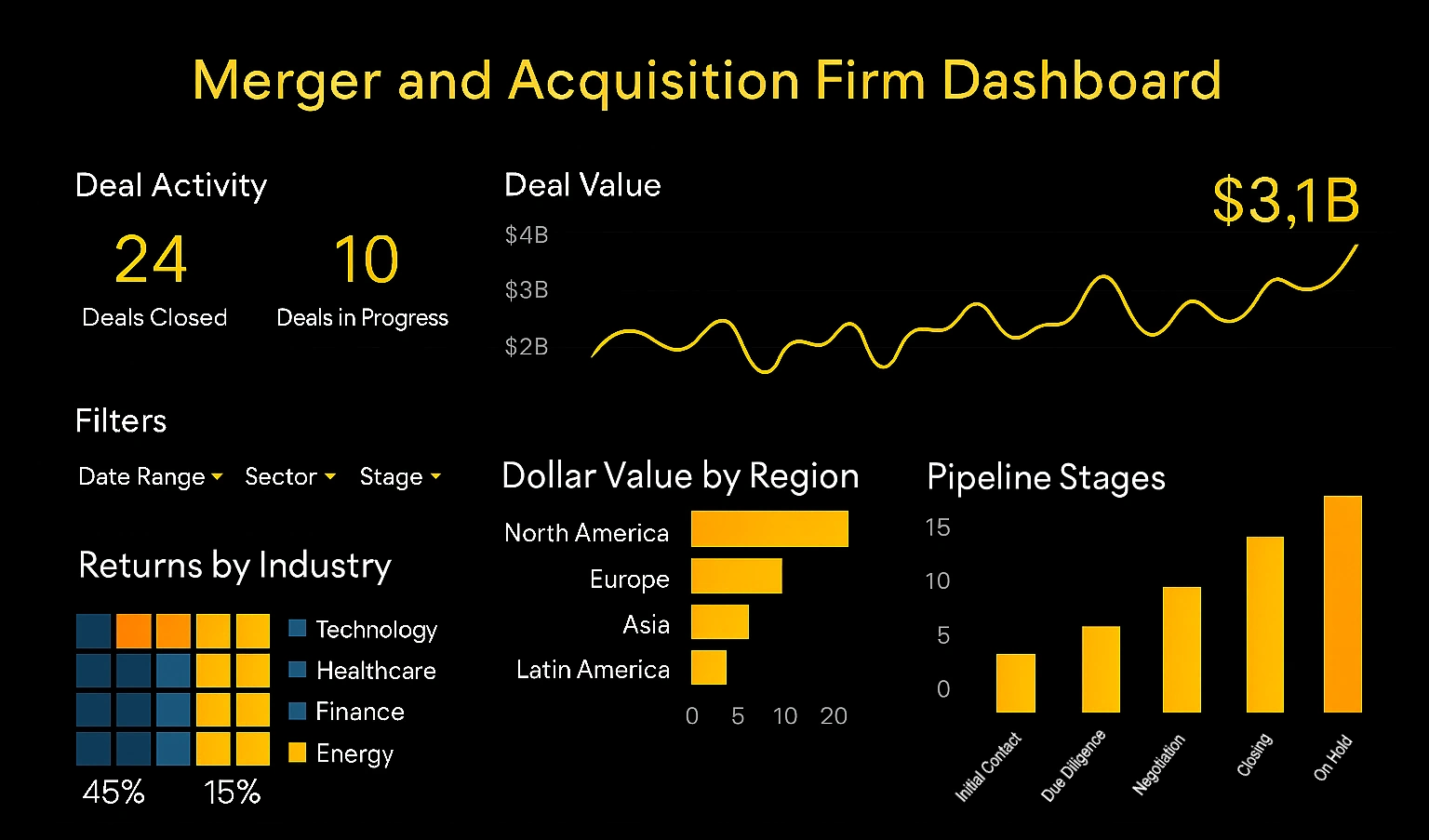
Executives access a single dashboard that shows revenue, pipeline, churn, and operational KPIs in real time. They can filter by region or business unit, drill into problem areas, and receive AI‑generated summaries before key meetings.
Operational monitoring
Operations teams monitor live metrics such as order volume, processing times, or system health. Alerts trigger when thresholds are breached, and on‑demand views allow teams to investigate root causes immediately.
Self‑service analytics for business teams
Marketing, sales, and product teams use governed datasets to build their own views, track campaigns, and analyze customer behavior. They no longer wait in a queue for custom reports; instead, they iterate directly on their own questions.
Key Benefits of Modern On‑Demand Reporting
- Faster decisions: Stakeholders get answers when they need them, not when a report happens to be scheduled.
- Reduced bottlenecks: IT and data teams spend less time on repetitive report generation.
- Greater trust in data: A single source of truth and consistent metrics reduce confusion and debate.
- Higher engagement: Users are more likely to use analytics when the experience is responsive, intuitive, and interactive.
- Better use of AI: AI becomes a partner in analysis, not a separate novelty feature.
On‑Demand Reporting Is an Experience, Not a Button
On‑demand reporting today is about more than running a report on request. It is about creating an environment where anyone can explore trusted data, in real time, with the support of AI and strong governance.
If your current reporting still revolves around static exports and long request queues, the shift to modern on‑demand reporting is not just a technical upgrade—it is a fundamental change in how your organization makes decisions.

Related Articles About On‑Demand Reporting
Comparison with Reporting Systems Like Cognos or Business Objects - There is a question. Here’s one. How does this compare with reporting systems like Cognos or Business Objects? We hear that a lot and we generally find that most of our customers already have obviously reporting tools like Cognos, Business Objects, or Microsoft Reporting Services. These are being used mostly to produce information in a structured formatted way. It can create a lot of indexes so you’ll have some drill down and cross table analysis, but they do not have strong ad hoc visual discovery capabilities such as you saw today. We would say we complement very well those type of products by providing the data discovery and analysis functions. When it comes to reporting and scorecarding we are also strong there, and the advantage of our platform is its agility in dealing with new and disparate data sources. Back to the data discovery ability, being able to do this sort of speed of thought ad hoc analysis which is querying anywhere across all kinds of databases and tables without having to go back to have work on the database to prepare the data is big benefit...
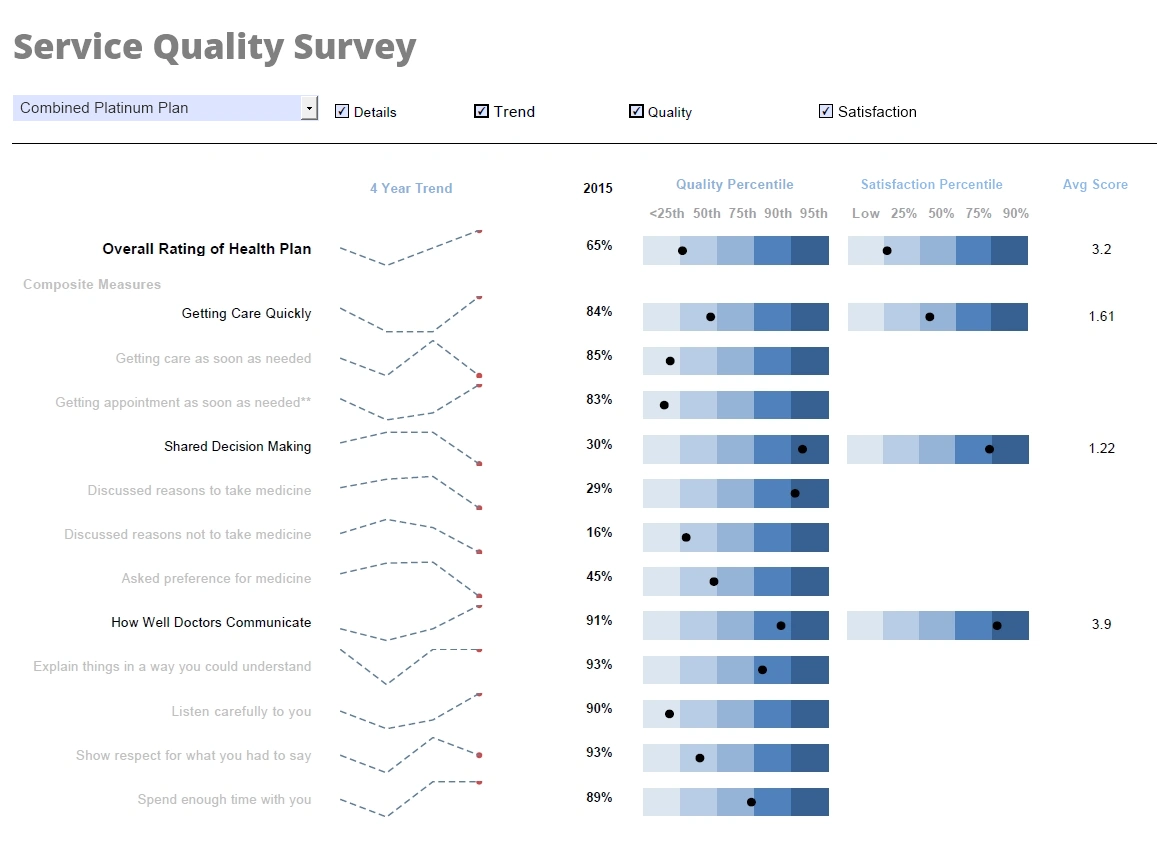
Comprehensive Reporting Software - Does your business need a comprehensive reporting software that covers all of your informational and data needs InetSoft's comprehensive Style Report allows non-technical users to easily create reports that display vital information in the most clear and communicative way possible. Tables, charts, and other tools can all be used in a single display environment and modified for the user's preference with individual data binding, formatting, and display properties, and advanced data mashup and manipulation capabilities unlocks the freedom to explore data in any way desired...
Configuring Materialized Report Views - Users of InetSoft's reporting software can easily configure the materialized report views in order to allocate resources for high level report performance. To configure the server to use distributed materialized views, and to configure the individual nodes, follow the steps below: 1. Shut down the StyleBI server. 2. Add the following properties to the sree.properties file (in the SREE Home directory) on the Style Intelligence server...
Configuring Report Server Clusters - InetSoft's reporting software is based on javascript and allows users to configure report server clusters in order to optimize the speed and performance of the application. Each cluster node will run only the repository servlet (servlet class: inetsoft.sree.web.ServletRepository). One node may additionally run the admin servlet as well, if desired. All cluster nodes must share a common registry directory which is specified as an init parameter in the deployment descriptor file (web.xml). Any change made in the Enterprise Manager (e.g., enabling/disabling security) after the cluster is set up and started will only be reflected when the nodes are restarted. Before deployment of a cluster node, ensure that the node has an installation of the desired InetSoft software, or that the servlet repository is deployed on any appserver on the node...
Configuring Report Server Emails - Configuring the report server emails with InetSoft's reporting software allows for simple report distribution that is unmatched by other reporting applications on the market. Mail configuration controls how the Scheduler will email reports to a user and how an end user can contact an administrator in case an error is generated by the engine. The email is always sent from one fixed email address, specified as part of the mail configuration. For email delivery to work, the mail host must be configured and point to a valid SMTP server. This section describes the basic properties available on the 'Mail Configuration' page...

Configuring the Report Repository - InetSoft's reporting software gives users the ability to configure the report repository in order to meet individual organizational needs. The definitions of all Viewsheets are stored in the registry file named asset.dat. To add a Viewsheet to the Repository, use the Visual Composer to save the Viewsheet into a global scope. See Viewsheet for more details. To modify setting for a particular Viewsheet, click the desired Viewsheet in the Repository tree. This opens the 'Viewsheet Definition' page, which consists of three tabs on the bottom of the page. These are Viewsheet, Materialized View, and Security. The next sections provide additional details about the available settings...
Configuring the Report Scheduler - Configuring the report scheduler is an easy task when using InetSoft's reporting software, a powerful and flexible business intelligence platform that provides real-time visual analysis. The 'Scheduler' is an application which facilitates scheduled batch report generation. An administrator or any end user (with scheduler permissions) can access this tool via the Enterprise Manager and/or the Report Portal. You can create one or more scheduled 'tasks' for which you specify a time condition, reports to be generated, delivery mechanism (email, print, save to disk, archive, etc.), and format (PDF, Excel, etc.) of the generated output...
Consultant Reporting Softwarer - Searching for an easier solution for consultant reporting? Consultants need reporting tools that will communicate business conditions and needs intuitively and effectively. Unlike the large BI vendors who often have a confusing array of components to choose from and configure, InetSoft's Style Intelligence offers a cost effective and easy-to-use performance consultant reporting software. With InetSoft, you'll have the necessary capabilities and flexibility, for the right price...
Consider this Reporting System Tool - Looking for a good reporting system tool? InetSoft's pioneering dashboard reporting application produces great-looking web-based reports with an easy-to-use drag-and-drop designer. View a demo and try interactive examples...

Consolidation of Financials Monthly Report Tool - Are you looking for a good monthly report consolidation tool? InetSoft's pioneering reporting application mashes up financial data from multiple sources to produce pixel-perfect consolidation report pdfs with an easy-to-use drag-and-drop designer. Get cloud-flexibility for your deployment. Minimize costs with a small-footprint solution. Maximize self-service for all types of users. No dedicated BI developer required. View a demo and try interactive examples...
Continuous Online Reporting Program - Looking for a good continuous online reporting program? InetSoft is a pioneer in offering flexible, enterprise-grade reporting software. Use an easy-to-use drag-and-drop designer to create great-looking web-based dashboards and reports. View a demo and try interactive examples...
Context Behind the Business Intelligence Reports - So you have got to understand the context behind the business intelligence reports, the trends, the context behind the numbers so that you can either prepare for success or prevent failure. Identifying trends in quality control, is your marketing working? Are you getting more people to sign up? One problem in marketing is you can generate a lot of interest. A lot of people come, and they sign up, but they're not buying. Generally that tells you that you were targeting the wrong groups. You have got to figure out where and why and understand the context behind the numbers. Defining organization goals, you are monitoring the change within the organization. Your company wants to react to changes, right. If the economy is tanking you might need to start monitoring your customers and monitoring your pricing. We need to look at what our competitors are doing. We also want to cause change by changing buying habits or interrupting people who weren’t looking for this particular product, but now we're going to do some interruptive marketing and make them actually be interested in purchasing this product or maybe new features or new pricing. This isn't about business intelligence, right, but that's what a company wants to do. Business intelligence, though, is getting that information in the right people’s hands in a way that they can understand, that lets them understand the data quickly. So we have to allow management to be able to make the right changes. We have to give them the information that allows them to have confidence in those decisions, and we have to help them understand what changes are having the most ROI at least ROI, what needs to get cut, what needs to survive, that's what business intelligence is all about...

Copper CRM Reporting Tool - Looking for a good solution for Copper CRM dashboard reporting? InetSoft's pioneering BI application produces great-looking cloud-based dashboards with an easy-to-use drag-and-drop designer. View a demo and try interactive examples...
Create a Financial Report - So to create this financial report, let’s start with the invoice header information. Then you can select what fields of information would you like to display. Well, you might want to look at vendor number. You can drag and drop that information. Or you can double click selecting vendor name, and then you might want to also include the invoice amount. And how do you get a count of these invoices? Well, you can take invoice number and drag and drop that over and then tell the system to use one of the built-in functions and select account. The next question is do you want every record that’s in your database or would you rather filter it down to a specific period? So for today, select a particular company by double clicking on the company, and here you can see a list of all the companies that are available. You can select a single company, a range of companies, or you can do a multi-select. For this report, selecting company 100 will serve as the best way to show information. And then without looking at all the information again, how about using the date filter? That way you can be very selective about the period of information that you are viewing. So for today’s purposes, start with January 01, 2022 and go through December 31 of 2022...
Create a Leads Summary Report - This document will explain how to create a Leads Summary Report using report creation software from InetSoft. A working version of this report can be found on the InetSoft Gallery. This report consists primarily of a single chart and a single crosstab, along with a variety of text. Below, we will examine how you can create these different components using the browser-based Ad Hoc Reporting feature. InetSoft provides two different tools for creating reports. The first tool, Style Studio, is a desktop application that provides a full-featured environment for creating pixel-perfect production reports and report components such as scripts, table styles, beans, and templates. This tool is well-suited for professional report developers. The second tool, the Ad Hoc Reporting app, is a browser-based tool intended for end-user report design. It offers the most commonly-used reporting features and is targeted at business users who need to rapidly create custom reports to suit immediate needs...
Create Ad Hoc Reports - Information about using InetSoft's software to create ad hoc reports...
Creating Ad Hoc Reports - InetSoft's intuitive reporting tools allow you to rapidly and easily design your reports yourself. The ad hoc tool allows you to create new reports from scratch by using a step-by-step wizard. This section explains how to use the different wizards. To create a new report, follow these steps: 1. Click on the Design tab in the Portal. 2. Select the ‘Report’ option. This displays a list of the available wizards...
Creating an Interactive Business Report - It's not uncommon for organizations to require several different BI tools: a tool for creating proper formatted paginated business reports, a visual analysis tool, and tools for reformatting and massaging data to prepare the data for reports and dashboards. But what if there was a single platform, available either for embedding or for use as a standalone solution, which provided interactive online business reporting, paginated reporting for printing, and unlimited data mashup and reformatting?