Information for On Demand Reports Using InetSoft's Software
This is a table of contents of useful product information about InetSoft's reporting software. Ease of deployment and ease of use are the cornerstones of our product development strategy. Read articles below for more details.
Comparison with Reporting Systems Like Cognos or Business Objects - There is a question. Here’s one. How does this compare with reporting systems like Cognos or Business Objects? We hear that a lot and we generally find that most of our customers already have obviously reporting tools like Cognos, Business Objects, or Microsoft Reporting Services. These are being used mostly to produce information in a structured formatted way. It can create a lot of indexes so you’ll have some drill down and cross table analysis, but they do not have strong ad hoc visual discovery capabilities such as you saw today. We would say we complement very well those type of products by providing the data discovery and analysis functions. When it comes to reporting and scorecarding we are also strong there, and the advantage of our platform is its agility in dealing with new and disparate data sources. Back to the data discovery ability, being able to do this sort of speed of thought ad hoc analysis which is querying anywhere across all kinds of databases and tables without having to go back to have work on the database to prepare the data is big benefit...
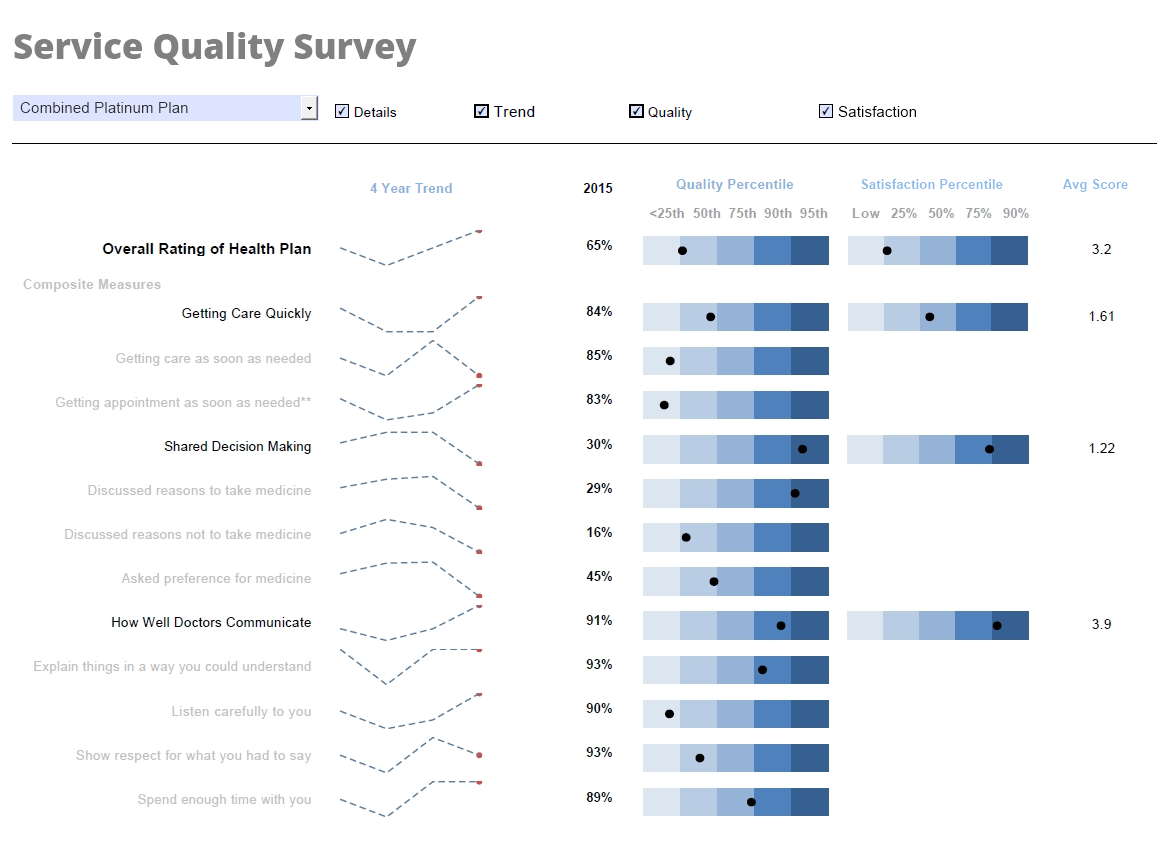 |
Click this screenshot to view a two-minute demo and get an overview of what InetSoft’s BI dashboard reporting software, Style Intelligence, can do and how easy it is to use. |
Comprehensive Reporting Software - Does your business need a comprehensive reporting software that covers all of your informational and data needs InetSoft's comprehensive Style Report allows non-technical users to easily create reports that display vital information in the most clear and communicative way possible. Tables, charts, and other tools can all be used in a single display environment and modified for the user's preference with individual data binding, formatting, and display properties, and advanced data mashup and manipulation capabilities unlocks the freedom to explore data in any way desired...
Configuring Materialized Report Views - Users of InetSoft's reporting software can easily configure the materialized report views in order to allocate resources for high level report performance. To configure the server to use distributed materialized views, and to configure the individual nodes, follow the steps below: 1. Shut down the Style Intelligence server. 2. Add the following properties to the sree.properties file (in the SREE Home directory) on the Style Intelligence server...
Configuring Report Server Clusters - InetSoft's reporting software is based on javascript and allows users to configure report server clusters in order to optimize the speed and performance of the application. Each cluster node will run only the repository servlet (servlet class: inetsoft.sree.web.ServletRepository). One node may additionally run the admin servlet as well, if desired. All cluster nodes must share a common registry directory which is specified as an init parameter in the deployment descriptor file (web.xml). Any change made in the Enterprise Manager (e.g., enabling/disabling security) after the cluster is set up and started will only be reflected when the nodes are restarted. Before deployment of a cluster node, ensure that the node has an installation of the desired InetSoft software, or that the servlet repository is deployed on any appserver on the node...
Configuring Report Server Emails - Configuring the report server emails with InetSoft's reporting software allows for simple report distribution that is unmatched by other reporting applications on the market. Mail configuration controls how the Scheduler will email reports to a user and how an end user can contact an administrator in case an error is generated by the engine. The email is always sent from one fixed email address, specified as part of the mail configuration. For email delivery to work, the mail host must be configured and point to a valid SMTP server. This section describes the basic properties available on the 'Mail Configuration' page...
 |
View a 2-minute demonstration of InetSoft's easy, agile, and robust BI software. |
Configuring the Report Repository - InetSoft's reporting software gives users the ability to configure the report repository in order to meet individual organizational needs. The definitions of all Viewsheets are stored in the registry file named asset.dat. To add a Viewsheet to the Repository, use the Visual Composer to save the Viewsheet into a global scope. See Viewsheet for more details. To modify setting for a particular Viewsheet, click the desired Viewsheet in the Repository tree. This opens the 'Viewsheet Definition' page, which consists of three tabs on the bottom of the page. These are Viewsheet, Materialized View, and Security. The next sections provide additional details about the available settings...
Configuring the Report Scheduler - Configuring the report scheduler is an easy task when using InetSoft's reporting software, a powerful and flexible business intelligence platform that provides real-time visual analysis. The 'Scheduler' is an application which facilitates scheduled batch report generation. An administrator or any end user (with scheduler permissions) can access this tool via the Enterprise Manager and/or the Report Portal. You can create one or more scheduled 'tasks' for which you specify a time condition, reports to be generated, delivery mechanism (email, print, save to disk, archive, etc.), and format (PDF, Excel, etc.) of the generated output...
Consultant Reporting Softwarer - Searching for an easier solution for consultant reporting? Consultants need reporting tools that will communicate business conditions and needs intuitively and effectively. Unlike the large BI vendors who often have a confusing array of components to choose from and configure, InetSoft's Style Intelligence offers a cost effective and easy-to-use performance consultant reporting software. With InetSoft, you'll have the necessary capabilities and flexibility, for the right price...
Consider this Reporting System Tool - Looking for a good reporting system tool? InetSoft's pioneering dashboard reporting application produces great-looking web-based reports with an easy-to-use drag-and-drop designer. View a demo and try interactive examples...
Consolidation of Financials Monthly Report Tool - Are you looking for a good monthly report consolidation tool? InetSoft's pioneering reporting application mashes up financial data from multiple sources to produce pixel-perfect consolidation report pdfs with an easy-to-use drag-and-drop designer. Get cloud-flexibility for your deployment. Minimize costs with a small-footprint solution. Maximize self-service for all types of users. No dedicated BI developer required. View a demo and try interactive examples...
Continuous Online Reporting Program - Looking for a good continuous online reporting program? InetSoft is a pioneer in offering flexible, enterprise-grade reporting software. Use an easy-to-use drag-and-drop designer to create great-looking web-based dashboards and reports. View a demo and try interactive examples...
Context Behind the Business Intelligence Reports - So you have got to understand the context behind the business intelligence reports, the trends, the context behind the numbers so that you can either prepare for success or prevent failure. Identifying trends in quality control, is your marketing working? Are you getting more people to sign up? One problem in marketing is you can generate a lot of interest. A lot of people come, and they sign up, but they're not buying. Generally that tells you that you were targeting the wrong groups. You have got to figure out where and why and understand the context behind the numbers. Defining organization goals, you are monitoring the change within the organization. Your company wants to react to changes, right. If the economy is tanking you might need to start monitoring your customers and monitoring your pricing. We need to look at what our competitors are doing. We also want to cause change by changing buying habits or interrupting people who weren’t looking for this particular product, but now we're going to do some interruptive marketing and make them actually be interested in purchasing this product or maybe new features or new pricing. This isn't about business intelligence, right, but that's what a company wants to do. Business intelligence, though, is getting that information in the right people’s hands in a way that they can understand, that lets them understand the data quickly. So we have to allow management to be able to make the right changes. We have to give them the information that allows them to have confidence in those decisions, and we have to help them understand what changes are having the most ROI at least ROI, what needs to get cut, what needs to survive, that's what business intelligence is all about...
Copper CRM Reporting Tool - Looking for a good solution for Copper CRM dashboard reporting? InetSoft's pioneering BI application produces great-looking cloud-based dashboards with an easy-to-use drag-and-drop designer. View a demo and try interactive examples...
Create a Financial Report - So to create this financial report, let’s start with the invoice header information. Then you can select what fields of information would you like to display. Well, you might want to look at vendor number. You can drag and drop that information. Or you can double click selecting vendor name, and then you might want to also include the invoice amount. And how do you get a count of these invoices? Well, you can take invoice number and drag and drop that over and then tell the system to use one of the built-in functions and select account. The next question is do you want every record that’s in your database or would you rather filter it down to a specific period? So for today, select a particular company by double clicking on the company, and here you can see a list of all the companies that are available. You can select a single company, a range of companies, or you can do a multi-select. For this report, selecting company 100 will serve as the best way to show information. And then without looking at all the information again, how about using the date filter? That way you can be very selective about the period of information that you are viewing. So for today’s purposes, start with January 01, 2022 and go through December 31 of 2022...
Create a Leads Summary Report - This document will explain how to create a Leads Summary Report using report creation software from InetSoft. A working version of this report can be found on the InetSoft Gallery. This report consists primarily of a single chart and a single crosstab, along with a variety of text. Below, we will examine how you can create these different components using the browser-based Ad Hoc Reporting feature. InetSoft provides two different tools for creating reports. The first tool, Style Studio, is a desktop application that provides a full-featured environment for creating pixel-perfect production reports and report components such as scripts, table styles, beans, and templates. This tool is well-suited for professional report developers. The second tool, the Ad Hoc Reporting app, is a browser-based tool intended for end-user report design. It offers the most commonly-used reporting features and is targeted at business users who need to rapidly create custom reports to suit immediate needs...
Create Ad Hoc Reports - Information about using InetSoft's software to create ad hoc reports...
Creating Ad Hoc Reports - InetSoft's intuitive reporting tools allow you to rapidly and easily design your reports yourself. The ad hoc tool allows you to create new reports from scratch by using a step-by-step wizard. This section explains how to use the different wizards. To create a new report, follow these steps: 1. Click on the Design tab in the Portal. 2. Select the ‘Report’ option. This displays a list of the available wizards...
Creating an Interactive Business Report - It's not uncommon for organizations to require several different BI tools: a tool for creating proper formatted paginated business reports, a visual analysis tool, and tools for reformatting and massaging data to prepare the data for reports and dashboards. But what if there was a single platform, available either for embedding or for use as a standalone solution, which provided interactive online business reporting, paginated reporting for printing, and unlimited data mashup and reformatting?