Charting Product Information
This is a table of contents of useful product information about, and benefits of, InetSoft's charting and graphing capabilities that are part of Style Intelligence, the company's business intelligence software for dashboards, reporting, and analytics, or Style Scope, the stand-alone dashboard software product:
3D Chart Tools - Looking for 3D chart tools? InetSoft provides both free and commercial 3D chart tools. View a demo and try them out for free...
A Good Solution for Automating Excel Dashboards - Style Intelligence helps transport your data from lengthy, hard-to-read spreadsheets to fast, user-friendly dashboards. Our dashboards help cut back on time spent deciphering data to allow for a more product-oriented business to thrive. Unlike Excel, Style Intelligence provides interactive user capability and is 100% Web-based.
The dashboard, in its uniqueness, can accommodate needs and mash-ups much faster than the traditional model of Excel spreadsheets allowing for decision making time to be shortened and for the user to retain a greater amount of information offhand...
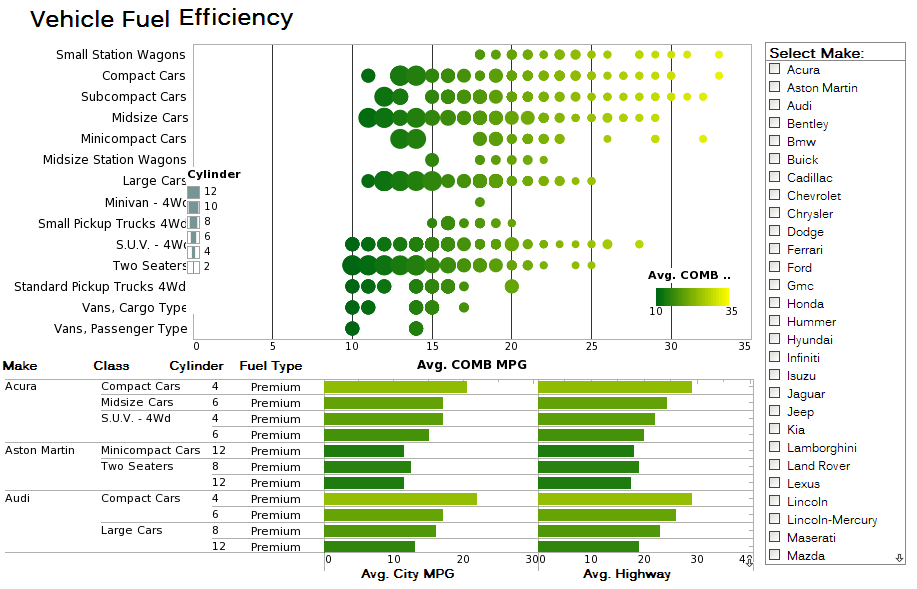 |
Click this screenshot to view a two-minute demo and get an overview of what InetSoft’s BI dashboard reporting software, Style Intelligence, can do and how easy it is to use. |


Adding Interactive Charts to Your Web Application - Learn about adding interactive charts to your Web application using InetSoft. Since 1996, InetSoft has been providing developers reporting and visualization tools. Some of the documentation for the charting API follows below. CategoricalTextureFrame.setTexture(val,texture) Assigns a texture to the specified value. Bind a point-type chart to the sample 'All Sales' query, with 'Company' (top 5) on the X-axis, and Sum(Total) on the Y-axis. Add the following script in the onLoad Handler. A ShapeFrame object contains the shape style for visual chart objects. You can use a ShapeFrame object to represent data dimensions with shape (shape coding), or to apply a fixed (static) shape style. Bind a point-type chart to the sample 'All Sales' query, with 'Company' (top 5) on the X-axis, and Sum(Total) on the Y-axis. Add the following script in the onLoad Handler. The OvalShapeFrame object contains the shape styles for oval elements of varying aspect ratio. To create a OvalShapeFrame object, call the OvalShapeFrame constructor. You can pass the name of a field (e.g., 'Total') to the constructor, or specify this later using the inherited VisualFrame.setField(field) property...
Adding Tooltips to a Table or Chart - To specify tooltips for individual table cells or chart data, use the following syntax: replet.addStatus("ElementID", item, "Tooltip"); The 'item' parameter specifies the particular table cell or chart data that should display the tooltip. The 'item' parameter specifies the particular table cell or chart data that should display the tooltip. The 'item' parameter is an EventPoint object, [column, row]. For example, consider the following element-level script for a chart with ID 'Chart1'. Note the index order in the 'item' parameter. The loop iterates through every value in the first chart dataset (index '1'), given by “getData(1,i),” and assigns each value to the tooltip of the corresponding chart graphical element. Use “getData(0,i)” to obtain the X-labels. To perform a similar assignment of tooltips to individual cells in a table (ID 'Table1'), you can use the following script. Again, note the index order. To specify a data format for the tooltip text, format the 'message' parameter input using the 'formatNumber()' function. In the example below, the tooltips on 'Chart1' are given a particular numeric format...
| #1 Ranking: Read how InetSoft was rated #1 for user adoption in G2's user survey-based index |
|
Read More |
Advanced Web Charts - Use InetSoft's software for making advanced Web charts. Since 1996, InetSoft has been providing developers free and commercial reporting and charting tools. MultiShapeFrame.setScales(arr) specifies the scales to be used for each shape field. MultiShapeFrame.setScales(arr) Specifies the scales to be used for each shape field. Bind a point-type chart to the sample 'All Sales' query, with 'Company' (top 5) on the X-axis, and Sum(Total) on the Y-axis. Add the following script in the onLoad Handler. The VineShapeFrame object contains the shape styles for three-dimensional “vine” elements. To create a VineShapeFrame object, call the VineShapeFrame constructor. You can pass a set of field names (e.g., 'm1', 'm2', 'm3') to the constructor, or specify this later using the inherited MultiShapeFrame.setFields(arr) property. The dimensions are specified in the following order: [angle, magnitude, radius]. • Angle: The angle of the stem line • Magnitude: The length of the stem line • Radius: The radius of the circle VineShapeFrame.setEndAngle(value) The angle to which the maximum angle in the data is mapped. (Note that the max property of any applied scale also affects the displayed angle...
An Example of a Trellis Chart - This Trellis pie chart, taken from InetSoft's Mortality Causes Dashboard illustrates how having many small multiple charts can help the user notice broader patterns than looking at larger individual charts. The dashboard is built on a dataset of mortality causes by, age, sex, and racial demographics....
Appropriately Visualizing Big Data - You know what, mistakes not so much as just poor behavior as they constantly use the same type of visualization for data that would bode well in a different one. Again, this whole concept of a guided analysis or being able to understand what best practices, or being able to hand best practices. Do I need a cross tab for this as opposed to having a bar chart or having a pie chart or having some other visualization, which is more appropriate to the data in hand. So it won't be quite as eye catching, and it won't be as impactful if I use even the wrong data element in the wrong visualization. I won't be able to get to the underlying information that I need as quickly, nor will I be able to blend it as quickly. If I am really going to use a scatter plot, that enables me to use and to look at a huge array of information, across product lines or across timeframes whereas if I am just using a map or if I am using a bar chart, I don’t have that same interaction in contextual fields with the data that I need. So I think that that’s actually a big issue, and that’s for people who already have embraced visualization...
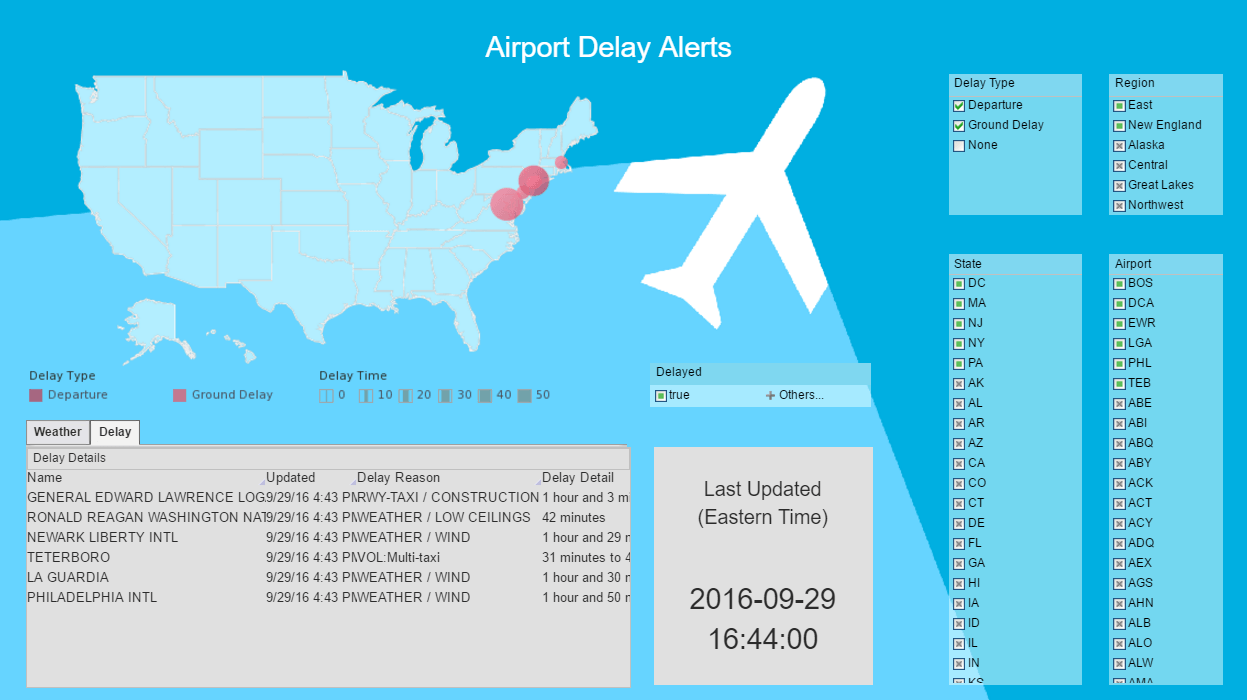 |
Click this screenshot to view a two-minute demo and get an overview of what InetSoft’s BI dashboard reporting software, Style Intelligence, can do and how easy it is to use. |
Amazon QuickSight Alternative - Looking for a good alternative to Amazon QuickSight? InetSoft's pioneering BI application produces great-looking cloud-based dashboards with an easy-to-use drag-and-drop designer. Mashup Amazon-hosted data with other enterprise or cloud-based sources. Maximize self-service for business and technical staff. View a demo and try interactive examples...
An Example of a Step Line Chart - This dual axis chart from the Power Management Dashboard illustrates how a Step Line Chart is, in many cases, more "honest" than a regular Line Chart. This Step Line Chart contains two stepped lines, one representing solar panel installations and the other total output from solar panels. Both of these are non-continuous, in that they may change drastically from one quarter to another without going through an smooth transition from one amount to the other...
Automating Decisions and Actions - We see a lot of organizations looking at automating decisions and actions. Thinking back to the idea of embedding business intelligence in systems, organizations are certainly very much looking at how they can take decisions that are routine or repeated decisions and figure out how they can automate them using software. Lot of these things are tending in the direction of improving the idea of embedding BI. Looking again just a little closer to the user experience, self-service BI and analytics has been the dominant trend and certainly is still something that we see organizations trying to pursue. Some hit a wall though because, again, the inability to bring in those non technical users. Many knowledge workers who are using line of business applications, more point applications, and don't have the time or the skills or even some of the interest to dive in and really learn about BI and analytics to be able to access more data and work interactively with the data. They want their dashboards in an easier environment that fits with their subject matter expertise and their level of experience in working with data which is often not high. Along with this, of course, the user IT relationship is changing. Self-service is great for empowering users because users know better what they need. They often know the data. They can ask the right questions. It's often difficult for IT or BI developers to understand what the users are looking for, so self-service BI is for the good...
Axis Grid - See how to specify the style of axis grid lines using the API provided with InetSoft's BI tools. View a demo and download a free eval copy. AxisSpec.setGridStyle(value) Specifies the style of the axis grid lines. AxisSpec.setLabelVisible(boolean) Specifies whether the axis labels are visible or hidden. AxisSpec.setLineColor(value) Specifies the color of the axis lines. AxisSpec.setLineVisible(boolean) Specifies whether the axis lines are visible or hidden...
BI Chart Gallery - Peruse dozens of advanced chart types rendered by InetSoft's visualization engine and charting API...
 |
Read how InetSoft saves money and resources with deployment flexibility. |
BI Charting Tool - A BI charting tool can help you map your data, making it easier to understand and act on. Implemented correctly, a BI charting tool can help you make better decisions. Making good decisions about your business is not a skill that comes naturally. You need help; help in the form of evidence that empirically proves that the choice you're about to make is the right one. By visualizing the facts, you can clearly interpret trends in the data to make your decision much easier. Last quarter you served pizza in the cafeteria for the first time and profits were up 32%. This quarter, you stopped serving pizza and profits are back to normal. Pizza doesn't equal profits... or does it? Not if you think about it in a vacuum. However, with this data directly in front of you, it's a no-brainer to bring back the pizza next quarter...
Binary Dot Plot Charts - Definition, Example, How To Create - This page discusses the uses of binary ("yes/no") dot plot charts, and explains how you can create them in both Google Sheets and InetSoft. This page also provides access to a free online tool for creating dot plot charts and complete functioning business intelligence dashboards. A dot plot is a type of data visualization that represents individual values of a set of numerical data by plotting dots or markers on a number line or an x-axis. Each dot represents a single data point and is placed along the axis based on its value. This type of plot does not aggregate a measure, but merely displays the raw data points. In some respects, therefore, the basic dot plot is similar to a histogram. Some benefits of a dot plot include: Easy to understand: Dot plots are easy to read and interpret, making them a good choice for presenting data to a wide audience. Clear representation of distribution: Dot plots clearly show the distribution of the data, making it easier to see the distribution of values and identify any outliers or patterns. Space-saving: Dot plots can often be made very compact, making them a good choice for reports or presentations where space is limited...
Box and Whiskers Charts - This document will discuss the uses of Box and Whiskers Charts, and will show how you can create them in Google Sheets and InetSoft. It will also provide access to a free online tool for creating Box and Whiskers Charts and complete functioning business intelligence dashboards. A Box and Whiskers Chart, also known as a Box Plot, is a graphical representation of statistical data that displays the distribution of a dataset. It is created by dividing the data into four quartiles, with the top and bottom quartiles representing the upper and lower "boxes" of the plot. The middle line represents the median of the data, and the "whiskers" extending from the box represent the range of the data, excluding any outliers. Outliers, which are data points that are significantly different from the rest of the data, are typically represented by small circles or crosses outside the range of the whiskers...
Budgeting KPI Charts - Budgeting can be difficult for owners of small businesses. Unknown values complicate financial planning, and corporate budgeting might appear to be a time-consuming, complicated, and constraining procedure. In fact, half of small businesses avoided creating a budget in 2020, deeming it unnecessary. Despite this, firms who do not have a budget miss out on important opportunities to make economic choices that will have the greatest influence on their long-term profitability. A budget shows you if your company is headed in the right direction and whether you're on pace to meet your yearly financial goals. It does not have to be an entirely rigid construction. Instead, it might enable you to distribute resources to the greatest benefit of your company while preserving cash flow. A budget, at its core, will inform you how much cash you have and how to spend it wisely...
Bullet Charts - Definition, When To Use, and Types - This page discusses the uses of bullet charts, and explains how you can create them in both Google Data Studio and InetSoft. This page also provides access to a free online tool for creating bullet charts and complete functioning business intelligence dashboards. A bullet chart is a graphical display that is used to compare the performance of a measure to a target value, and is also sometimes referred to as a bullet graph or a performance bar chart. It consists of a horizontal bar that represents the range of possible values for the measure, with a smaller bar representing the actual value of the measure and a symbol, typically a small circle, triangle, or bar, representing the target value. For example, a bullet chart might be used to show the sales performance of a company compared to its sales target for a particular month. The chart would show the range of possible sales values, the actual sales for the month, and the target sales value. By looking at the chart, it would be easy to see how close the company came to meeting the target...
Chargebee Reporting Tool - Looking for a good solution for Chargebee subscription billing dashboard reporting? InetSoft's pioneering BI application produces great-looking cloud-based dashboards with an easy-to-use drag-and-drop designer. View a demo and try interactive examples...
Chart Annotation and Decoration - Learn how to add chart annotation and decoration using InetSoft charting software. The GraphForm object contains information for form (i.e., shape) elements manually drawn on the chart. GraphForm.setFill(boolean) Specifies whether the form should be filled or unfilled. GraphForm.setInPlot(boolean) For forms that use relative positioning (values or tuples), specifies whether the chart should be resized so that forms remain fully visible in the chart area. GraphForm.setLine(value) Specifies the line style used to draw the form. GraphForm.setMeasure(col) Specifies the measure for which the form should be displayed. If the chart contains a measure of this name, the form object is displayed. Otherwise it is not displayed. This is useful for FacetCoord charts, when the form should be displayed only for the chart that represents a particular measure. You can pass a field name (e.g., 'Quantity') to the constructor, or specify this later using the inherited VisualFrame.setField(field) property. To stylize or reposition text created using a DefaultTextFrame, use the GraphElement.setTextSpec(spec) and GraphElement.setLabelPlacement(value) options...