Why a Subway System Switched from Grafana to InetSoft for Monitoring Dashboards
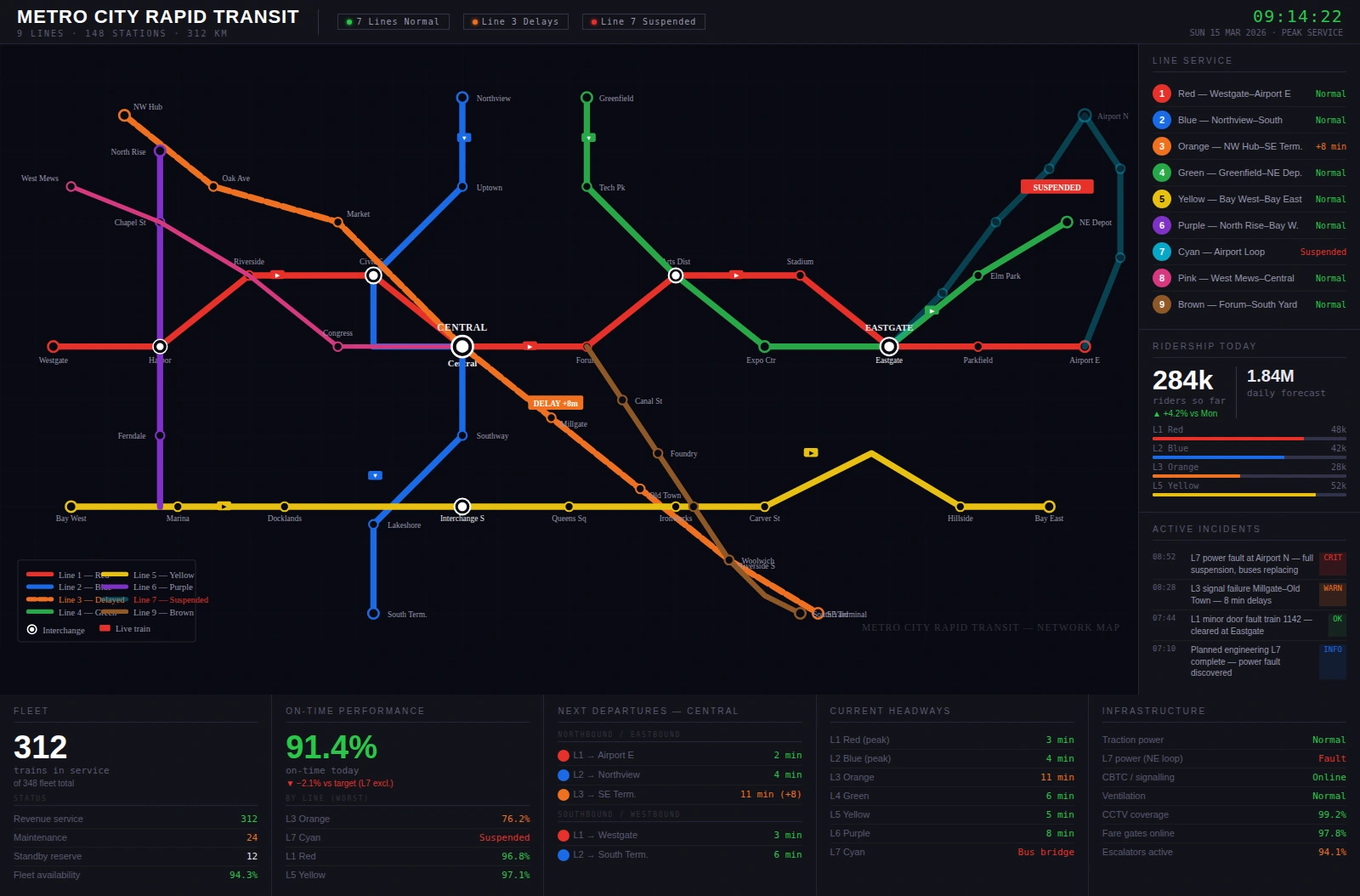
Modern subway systems depend on real-time visibility into everything from train locations and headways to power usage, station occupancy, and equipment health.
For years, one metropolitan subway authority relied on Grafana as its primary monitoring dashboard software.
Grafana provided a flexible, open-source way to visualize time-series data from sensors, SCADA systems, and operational databases.
But as the network expanded, the operations team discovered that what worked well for engineers and power users was not always ideal for dispatchers, station managers, and executives.
This realization ultimately led them to migrate their monitoring dashboards from Grafana to InetSoft.

Growing Beyond Engineering-Centric Dashboards
Grafana excelled at giving engineers and technical staff a powerful way to explore metrics. They could quickly connect to time-series databases, build panels, and create custom queries. For troubleshooting and deep technical analysis, it was a strong fit. However, the subway authority’s needs evolved in three important ways.
First, the audience for dashboards expanded. Dispatchers needed at-a-glance operational views, station managers needed localized performance summaries, and executives wanted high-level KPIs and trend analysis. Many of these users were not comfortable with complex filters, dense panels, or dashboards that required prior knowledge of the underlying data structures.
Second, the data landscape became more complex. The subway system integrated new sources such as passenger counting systems, predictive maintenance data, and real-time incident logs. Combining these with traditional telemetry and SCADA data required more advanced data modeling and blending than the team found convenient to manage within Grafana’s typical workflows.
Third, the organization wanted more control over layout, branding, and standardized design patterns. They needed dashboards that looked and behaved consistently across control rooms, mobile devices, and executive briefings. While Grafana offered theming and layout options, it was not designed as a full enterprise BI and layout platform.
Why InetSoft Was Selected
After evaluating several commercial and open-source options, the subway authority chose InetSoft as the next generation of its monitoring dashboard software. The decision was driven by a combination of data integration capabilities, layout control, and support for multiple user personas.
InetSoft’s data integration layer allowed the team to connect not only to time-series databases but also to relational systems, message queues, and external APIs. This made it easier to build unified views that combined train telemetry, passenger loads, incident tickets, and maintenance schedules into a single dashboard. Instead of maintaining separate dashboards for each system, they could create composite views tailored to specific roles.
The platform’s dashboard layout designer gave them precise control over how information was arranged. They could define consistent grid structures, align components, and create reusable templates for control room wallboards, station-level dashboards, and executive summaries. This helped reduce visual clutter and ensured that critical alerts, KPIs, and maps always appeared in predictable locations.
InetSoft also provided a more guided experience for non-technical users. Filters, drill-downs, and interactions could be configured in a way that felt intuitive to dispatchers and managers who were focused on operations rather than data exploration. Role-based access allowed each group to see the level of detail appropriate to their responsibilities without overwhelming them with raw metrics.

Key Differences Between Grafana and InetSoft in This Context
The subway authority did not view Grafana as a failure; rather, they recognized that it was optimized for a different primary use case. Grafana remained valuable for engineering teams that needed to debug performance issues, analyze time-series anomalies, or experiment with new metrics. However, for system-wide monitoring and decision-making, InetSoft offered several advantages.
One major difference was the way each platform handled multi-source data modeling. In Grafana, combining data from different systems often required complex queries or external data preparation. InetSoft’s semantic layer and modeling tools made it easier to define reusable data sets that joined operational, maintenance, and passenger data. This reduced duplication of effort and made it simpler to maintain consistent definitions of KPIs such as on-time performance, mean time between failures, or station congestion.
Another difference was layout and presentation. Grafana’s panel-based approach worked well for technical dashboards but could become visually dense when many metrics were displayed. InetSoft’s layout designer allowed the team to create dashboards with clear visual hierarchy: maps and critical alerts at the top, key KPIs in the center, and detailed tables or charts in lower sections. This structure helped dispatchers quickly identify problems such as delayed trains, power issues, or overcrowded platforms.
Finally, InetSoft’s support for pixel-perfect reporting and exportable views made it easier to share snapshots with external stakeholders, regulatory bodies, and city leadership. While Grafana could export panels and dashboards, the subway authority wanted more control over formatting and branding for formal reports and presentations.
Implementation and Transition
The transition from Grafana to InetSoft was carried out in phases to avoid disrupting daily operations. The team began by identifying the most critical monitoring dashboards used in the central control room. These included real-time train tracking, power system status, and incident monitoring dashboards. They recreated these in InetSoft, taking the opportunity to refine layouts and consolidate related metrics.
During the pilot phase, both Grafana and InetSoft dashboards ran in parallel. Dispatchers and engineers were encouraged to compare the two and provide feedback. This approach helped build trust in the new system and surfaced usability improvements early. For example, dispatchers requested larger alert indicators, clearer color coding for severity levels, and simplified filters for selecting lines or time windows.
Training sessions were held for different user groups. Engineers learned how to use InetSoft’s more advanced analytics features, while dispatchers and station managers focused on navigation, interpreting KPIs, and using drill-downs to investigate issues. The BI team also created a library of standardized dashboard templates to ensure new dashboards followed the same design principles.

Operational Benefits After the Switch
After fully migrating the monitoring dashboards to InetSoft, the subway authority reported several tangible benefits. Control room staff found it easier to spot emerging issues because dashboards were less cluttered and more focused on critical information. The combination of maps, alerts, and KPIs in a single, well-structured view reduced the time needed to diagnose delays or service disruptions.
Station managers gained access to localized dashboards that showed passenger flows, escalator and elevator status, and recent incidents. This helped them allocate staff more effectively and respond faster to crowding or equipment problems. Because these dashboards were built on the same data models as the central dashboards, there was less confusion about which numbers were “official.”
Executives benefited from high-level performance dashboards that summarized on-time performance, ridership trends, and maintenance KPIs. They could drill into specific lines or time periods when needed, but the default views were designed for quick comprehension rather than detailed analysis. This improved the quality of discussions in leadership meetings and made it easier to align operational priorities with strategic goals.
Shift in Organizational Approach
The subway system’s move from Grafana to InetSoft for monitoring dashboard software was not simply a technology swap; it was a shift in how the organization thought about visibility, usability, and decision-making. Grafana remained a valuable tool for engineering analysis, but InetSoft became the backbone of operational monitoring, executive reporting, and cross-functional collaboration. By adopting a platform that combined strong data integration, a powerful layout designer, and role-aware experiences, the subway authority created dashboards that served everyone from dispatchers to executives—and ultimately delivered a more reliable, responsive transit experience for riders.
More Information About Monitoring Dashboard Software
Salesforce Dashboard Examples - InetSoft delivers unique software that is compatible with any Customer Relationship Management Software out there, especially salesforce.com. InetSoft's unique dashboard design allows integration of any CRM system that you may be using. The StyleBI for Salesforce is a SaaS application for salesforce.com users can install into their own environment to gain advanced dashboard and reporting capabilities. Using the SaaS delivery model, InetSoft uses the unique capabilities of cloud computing to bring data visualization to a whole new level. By implementing the StyleBI SaaS application, as well as allowing for full implementation of key performance indicators and metrics, InetSoft's salesforce dashboards give businesses full reporting capabilities...
Salesforce Dashboards - InetSoft Offers Sophisticated BI Dashboards for Salesforce.com Users InetSoft's StyleBI for Salesforce is a SaaS application salesforce.com users can install into their environment to gain advanced dashboard and reporting capabilities for their sales, marketing, and now customer service operations data. StyleBI for Salesforce automatically saves daily snapshots of your Salesforce data and records all of the changes. Now you can: * Measure sales success rates of campaigns from start to finish. * Compare the current performance of your marketing campaigns...
Scenarios of Using the API to Create Dashboards from XML Data Sources - Using InetSoft's API to create dashboards from XML data sources opens up a range of possibilities. Here are some scenarios illustrating how this can be beneficial: Dynamic Data Integration: Scenario: Your organization receives XML data from various sources, and you want to dynamically integrate this data into dashboards. Use Case: Utilize the API to programmatically fetch XML data, transform it as needed, and populate dashboards in real-time, ensuring that the information is always up-to-date. Automated Dashboard Generation: Scenario: You have a system that generates XML reports regularly, and you want to automate the creation of dashboards based on these reports. Use Case: Develop a script using the API to automatically generate dashboards from incoming XML reports, saving time and ensuring consistency in dashboard creation. Custom XML Schema Support: Scenario: Your XML data follows a specific schema, and you want to create dashboards that adhere to this custom schema. Use Case: Leverage the API to map the XML data to the dashboard components, ensuring that the visualizations and analytics reflect the structure of your custom XML schema...
Scheduling Custom Reports - InetSoft's interactive reporting software gives users the power to schedule custom reports for mass or segmented audiences, providing a powerful distribution tool. A schedule task defines a batch operation to be performed. It specifies when it should run and what to do when it does run. Tasks can be defined explicitly or on the fly by adding reports to the queue. When you run a large report, you will see a loading screen. If you click on 'Add to Queue', the report will run in the background. Go to the Schedule tab to check the status of queued reports. When the queued report has completed, a copy will be delivered to you based on your preferences. That is, the report will be emailed to you, or saved into your 'My Reports' directory using your preferred file format with an optional email notification. The following steps are involved in creating a scheduled task. 1. Click the Schedule tab, and click the 'Schedule Report' link to the right of the schedule. This creates a new task with the name 'Task1'...
Scripting Dashboard Charts - InetSoft's dashboard software allows users to script charts that represent complex data so the most subtle changes to be easily recognized. Charts offer the same expression property scripting as other Viewsheet components. In addition, a comprehensive charting API gives scripting access to all aspects of a chart, including data binding, chart type, dimensions, measures, and aesthetics. The following sections explain how to edit chart API scripts, and review the different aspects of charts that can be modified. To modify a chart using script, follow the steps below. Do not select 'Plot Properties', 'Axis Properties', etc. 1. Right-click on the chart you wish to modify, and select 'Properties' from the context menu. This opens the 'Chart Properties' dialog box. 2. Click the Script tab. Below the 'Script' panel, click the 'Edit' button. This opens the Formula Editor. 3. In the Formula Editor, enter the desired script. For example, the following script creates a bar chart based on a Data Block called 'LimitedProducts'. 4. Click 'OK' to close the Formula Editor, and click 'OK' to close the 'Chart Properties'. The chart scripting API allows you to create a new chart from the ground-up. This requires several general steps, described below...
Search Engine Rankings Dashboard for SEOmonitor - Looking for a good solution for SEOmonitor dashboard analytics? InetSoft's pioneering BI application produces great-looking dashboards that mashup SEO performance data with other marketing campaign data in your organization. View a demo and try interactive examples...
Self-Service Asana Dashboards - Visualization dashboards are the most intuitive ways to understand project information. However, not all dashboards are created equal. InetSoft's web app can easily connect to Asana data to create self-service dashboards with rich built-in interactivity and customization. For successfully delivery of projects, project managers must utilize all project related data, for example, supply chain and issue tracking system data. These systems are normally scattered. Some third party data may even be in Excel files. InetSoft's data mashup makes data processing a light-weight, business user self-serviceable process with great efficiency...
Self-Service Dashboard Creation Tool - Looking for great dashboard creation tools? InetSoft's pioneering dashboard reporting application produces visually appealing web-based dashboards with an easy-to-use drag-and-drop designer. Maximize self-service for all types of users. View a demo and try interactive examples...
Sendible Dashboard Solution - Looking for a better dashboard analytics solution tool for your social media marketing performance measurement than what Sendible provides. Gain greater self-service from personalized dashboards to easier design of new analytics. Create data mashups with other organizational data outside of Sendible for a wider picture of performance. View a demo and try interactive examples...
SEO Campaign Monitoring Dashboards - An SEO dashboard is a tool that helps your company track and monitor your website's performance in search engines. It allows you to see critical data such as traffic and rankings, which can help you improve your SEO efforts and better target your audience. In short, it helps you make better decisions for your SEO campaigns. If you are unable to do all of the hard work, hiring professional SEO consultants can help improve your website's search engine rankings, save you time and effort, and provide expert advice and strategies. They can also stay updated with the latest trends and updates in the SEO landscape and ultimately lead to more traffic and conversions for your business. Below you will find out everything you need to know to make your SEO campaigns successful and track their success...
SEO Reporting Dashboard Solution - Are you looking for a good solution for SEO reporting dashboards? InetSoft's pioneering dashboard reporting application produces great-looking web-based dashboards with an easy-to-use drag-and-drop designer. Connect to Google Analytics and create dashboards that are not possible with Google Studio. Maximize self-service for all types of users. No dedicated BI developer required. Request a Demo. This dashboard mashes up SERP data with Google Search Console search volume extracted via the open API. The rankings are displayed in raw format and transformed into index values that weight the ranking by search volume to reflect impact on site visitors...
SEOmonitor Dashboard Application - Looking for a good solution for SEOmonitor dashboard analytics? InetSoft's pioneering BI application produces great-looking dashboards that mashup SEO performance data with other marketing campaign data in your organization. View a demo and try interactive examples...

Serverless Dashboard - A serverless dashboard is a cloud-native solution for visualizing and analyzing data that doesn't require you to manage any infrastructure. Unlike traditional BI tools that demand costly server provisioning and maintenance, serverless dashboards run entirely on a scalable backend managed by the cloud provider or BI vendor. You only pay for usage—no fixed costs, no hardware, and no DevOps headaches. Serverless analytics platforms are revolutionizing how teams deploy dashboards, especially for real-time metrics, customer-facing analytics, and embedded data visualizations. Here’s what makes a serverless dashboard solution stand out: Instant Deployment: Launch dashboards without provisioning servers or databases. Auto-Scaling: Handle thousands of users or queries without performance degradation. Zero Maintenance: No patching, server tuning, or manual scaling needed. Usage-Based Pricing: Pay only for what you use—ideal for startups and SaaS providers...
ServiceNow Dashboard Application - Looking for a good solution for ServiceNow dashboard reporting? InetSoft's pioneering BI application produces great-looking cloud-based dashboards with an easy-to-use drag-and-drop designer. View a demo and try interactive examples...
Service Level Monitoring Dashboard KPIs - In order to guarantee ideal service levels and client happiness, it is essential to monitor the functioning of these services. An efficient way for organizations to manage and assess service performance is via the use of a service level monitoring dashboard, which offers a thorough overview of key performance indicators (KPIs) and analytics. The key KPIs and analytics used on a service level monitoring dashboard are examined in this article. Service Uptime: The proportion of time a service is operational is measured by this KPI. It offers information on the service's dependability and accessibility. Downtime Duration: The length of service outages is measured by this statistic. Analysis of downtime patterns reveals recurrent problems and areas for development. Mean Time Between Failures (MTBF): The average interval between servicing failures is calculated using MTBF. It helps in the identification of patterns and possible regions for improving service stability...
Service Management Dashboard for IT - Are you looking for a good ITSM dashboard application? InetSoft's pioneering dashboard reporting application produces great-looking web-based dashboards with an easy-to-use drag-and-drop designer. Get cloud-flexibility for your deployment. Minimize costs with a small-footprint solution. Maximize self-service for all types of users. No dedicated BI developer required. View a demo and try interactive examples...
Setting Roles for Dashboards - Are you looking for a good role based dashboard application? InetSoft's pioneering dashboard reporting software permits very granular permission control, by role or group, by individual user, by dashboard, and by database security preferences. InetSoft's pioneering dashboard reporting application produces great-looking web-based dashboards with an easy-to-use drag-and-drop designer. Maximize self-service for all types of users. No dedicated BI developer required. View a demo and try interactive examples...
SharePoint Dashboards with Interactivity - Are you looking for a good solution for interactive SharePoint dashboards? InetSoft's pioneering dashboard reporting application produces great-looking web-based dashboards with an easy-to-use drag-and-drop designer. Get cloud-flexibility for your deployment. Minimize costs with a small-footprint solution. Maximize self-service for all types of users. No dedicated BI developer required. View a demo and try interactive examples...
Show More Dashboards - Let me show you some more dashboards. These are our services, and this is what they are right now. They are all running perfectly. Let’s look at our downloads for our software packages. What we are looking at here. This is product page hits, basically people shopping. What are they looking at? This is actual downloads. It is important for us to know how many pages people go through before the decide to download something. Here’s our top 20. But we can go here and say “ok, here are the packages that were downloaded.” You know this was shocking to me. I had this service running for 5 years before I realized that on most days we have over 2,000 downloads of some software package on that system. Now we have lots and lots of software that we distribute, but if we were distributing it by CD through book stores, that would be a lot of work. It would cost us a lot. We can also see how this looked last year. You can see even the software downloads have dropped. Our enrollment is up. But I really think it is because we have better control over what is going on in our systems. So we have saved a lot of people from having to download something...
Showing the Executive Dashboard Reporting Solution - Next, let’s walk you through showing the executive dashboard reporting solution. This is part of the overall query and analysis toolset. This will allow you to create analysis type reports and again, it does come with the total solution. You will have the ability to start to be interactive with your financial data. For this example, we could build this financial report from scratch but in the interest of giving you some time to talk to us, we are going to use an existing report, formatted already. And one of the things that we want to make sure we share with you is in this report definition you will notice this looks the same as what we went through before, but here we are going to take advantage of few other things. For example, this filter, we are going to say that we want a wild card. So everything that includes the letters ‘fix’ in the starting position is what’s going to be included in this report. Let’s preview this report with data, and there is the report. It has the GL account, the description, actual information, budget and a calculated variance. Now what you didn’t see in the background is this report is run over a specific company that includes all locations and all cost centers or departments...
Significance of Local Government Management Dashboards - The building of a local government dashboard is currently becoming one of the civic management priorities. Many students are now also interested in this topic and began to use it as topics in academic papers, but some lack knowledge in this area, so as an option they can turn to InetSoft for help...

Simple Dashboard Software - Nervous that not having IT or programming experience will stop you from building your own dashboards? For those who lack know-how experience, the idea of self-service dashboard building can seem overwhelming. With InetSoft’s software, creating dashboards is a quick and simple process, so you can start analyzing business data right away. InetSoft’s simple dashboard software is designed with simplicity in mind for both the dashboard designer and the user of the interactive reports. InetSoft’s dashboard software uses a visual approach to building reports and visualizations, allowing complex views to be built with a simple drag and drop user interface. Once IT has completed the initial steps of defining data sources, business users can create their own worksheets, which contain combined fields from multiple data sources. InetSoft’s unique data mashup feature makes it possible to combine any type of data into one visualization. Users create data mashups through InetSoft’s data block, enabling fields from different data sources to be joined together in a Lego-like block fashion, with a few clicks of a mouse...
Simple Management Dashboards - Below are some good examples of simple management Dashboards. A simple management dashboard can be looked at as an executive tool whose sole purpose it to make information easier to read. These dashboards can include a variety of different types of data, which can all be integrated into an easy to read dashboard. Simple management dashboards allow users to seamlessly transition from one graph to another, without losing any important data...
Small Business Dashboard - For small businesses owners working to improve productivity and increase profit, interactive dashboards can be a huge aid in gaining a visual perspective of the health of an organization. Unfortunately, many BI vendors have high entry points for their software, pricing themselves out of the market for small businesses. StyleBI Agile Edition is InetSoft’s first free business intelligence program that’s designed for organizations without a technical staff, and comes with two user licenses at no charge. It’s a risk-free way for small businesses to get started...
Small Business Owners Use Dashboards - Monitoring is a must for every small business owner. However, it is also a time-consuming task due to the volumes of information that the proprietor needs to keep his eyes on. What these entrepreneurs need is a tool that collates, condenses, and presents information from various sources within the business. This tool must generate the needed information with just a few keystrokes and a click of the mouse. Thankfully, the digital age has made possible tools like the business dashboard. The dashboard is a one-stop venue in which a proprietor could get a snapshot of information that concerns their business. One could, for instance, generate a concise report that gives them a working idea of their working capital cycle at any given time...
Smartsheet Dashboard Application - Looking for a good solution for Smartsheet dashboard reporting? Create more interactive views of your product development projects and issue tracking. Maximize self-service. InetSoft's pioneering BI application produces great-looking cloud-based dashboards with an easy-to-use drag-and-drop designer. View a demo and try interactive examples...
Snowflake Dashboard Solution - Looking for a good Snowflake dashboard solution? InetSoft is a pioneer in self-service dashboards and can mashup data in Snowflake with almost any other data source. View a demo and try interactive examples...
Social Media Dashboard Example - Great, thank you, and it's great to be here with today to talk about executive dashboards and how to measure marketing's performance and impact. One of the great things that I get to do as Chief Marketing Officer is do a lot of marketing, which is fun, and look at a lot of data. So, it's really a pleasure to talk to you about marketing dashboards and why should we have marketing dashboards. Basically it really comes down to organization's needing to understand how they are progressing on their business goals, and so a good marketing executive dashboard will demonstrate that progress, or lack thereof, sometimes, and it will do it in a way that's factual, not necessarily based on opinion. Without data and without dashboards sometimes you get a lot of opinions floating around the office or your organization, and I'm sure many of you marketers would nod your heads in agreement. So, what is it that makes a good marketing dashboard? Well, there are a lot of qualities to a good dashboard. A few that I've highlighted here that I think are really important include things like it's being understandable. That's probably the most important thing, and it has to be understandable in a way that executives will respond to it. ..

Social Media Marketing Dashboards for Sendible - Looking for a better dashboard analytics solution tool for your social media marketing perormance measurement than what Sendible provides. Gain greater self-service from personalized dashboards to easier design of new analytics. Create data mashups with other organizational data outside of Sendible for a wider picture of performance. View a demo and try interactive examples...
Software as a Service Dashboard Software Dashboard Software - Are you looking for good SaaS dashboard software? InetSoft's pioneering dashboard reporting solution is designed for embeddding into other applications. InetSoft's solution is true Software-as-a-Service for hosted and self-hosting, not a combination of client developer tools and a web-based delivery platform. All new clients and partners get free one-on-one business intelligence expert help to accelerate deployment. Get cloud-flexibility for your deployment. Minimize costs with a small-footprint solution. Maximize self-service for all types of users. No dedicated BI developer required. View a demo and try interactive examples...
Source for Data Visualization Dashboard Software - Looking for good data visualization dashboard software? InetSoft's pioneering dashboard reporting application produces great-looking web-based dashboards with an easy-to-use drag-and-drop designer. View a demo and try interactive examples...
SparkPost Dashboard Application - Looking for a good dashboard application for SparkPost? InetSoft's pioneering BI application produces great-looking cloud-based dashboards with an easy-to-use drag-and-drop design tool. Mash up your email and SMS delivery data with other enterprise sources for a comprehensive view of marketing program performance. View a demo and try interactive examples...
Sprint Burndown Dashboards - A sprint burndown dashboard is one of the most widely used visual tools in Agile and Scrum environments. It provides a clear, at-a-glance view of how much work remains in a sprint and how quickly a team is completing that work. When designed and interpreted correctly, a burndown dashboard becomes more than a reporting artifact—it becomes a decision-making aid that helps teams adapt, forecast, and improve. At its core, the dashboard answers three essential questions: How much work did we plan? How much work have we completed? And are we on track to finish by the end of the sprint? These answers are expressed through visual clarity, time-based progress, and work transparency. A sprint burndown dashboard visualizes remaining work over time, typically measured in story points, hours, or tasks. The x-axis represents time (usually days in the sprint), while the y-axis represents remaining effort. Two key lines are often present: the ideal burndown line and the actual progress line...